


How to Run Basic TikTok Ads: A Beginner’s Guide

TikTok advertising is increasingly chosen by businesses because this way of reaching customers is extremely promising and impactful. If you’re looking to learn how to run TikTok ads, this article is for you.
What Is TikTok Advertising (TikTok Ads)?
TikTok Ads is a form of marketing used on the TikTok platform. Its purpose is to increase brand awareness and introduce products for sale. Campaigns direct interested consumers from the TikTok page to a website outside the platform according to the desired setup.

Why Should You Advertise on TikTok?
TikTok is a social video app that originated in China and has been chosen by millions of marketers as a powerful branding tool. According to Digital Marketing expert Nguyễn Đình Bảo, TikTok Ads has the following outstanding advantages:
- With over 1.601 billion global users, about 1.05 billion of whom are active monthly, TikTok is the most downloaded and most visited app in the world, surpassing even Facebook.
- With just a phone and video editing software like CapCut, a business can already attract a large number of potential customers through TikTok ads.
- In Vietnam, the number of TikTok users has reached 12 million and is growing extremely fast. A business only needs a simple campaign to attract a large amount of traffic when advertising on TikTok.
- Most TikTok users in Vietnam are young Gen Z under 30, with a “no need to think twice” purchasing behavior, making it much easier for businesses to target this audience than on Facebook.
- TikTok is extremely viral in nature — as long as the content is good and funny enough, sometimes even without high production quality, you can still attract a large number of potential customers to your brand by joining this advertising platform.
- TikTok also regularly runs subsidy programs specifically for stores on TikTok Shop, helping businesses or even individual sellers effectively increase their sales.
The opportunity to reach users on TikTok is quite good, but businesses and marketers also need to clearly define their goals, target audience, and the right ad format to use TikTok Ads most effectively.

4 Popular Types of TikTok Ads
Harness the power of TikTok — the booming short-video platform — to reach millions of potential users with these 4 types of ads:
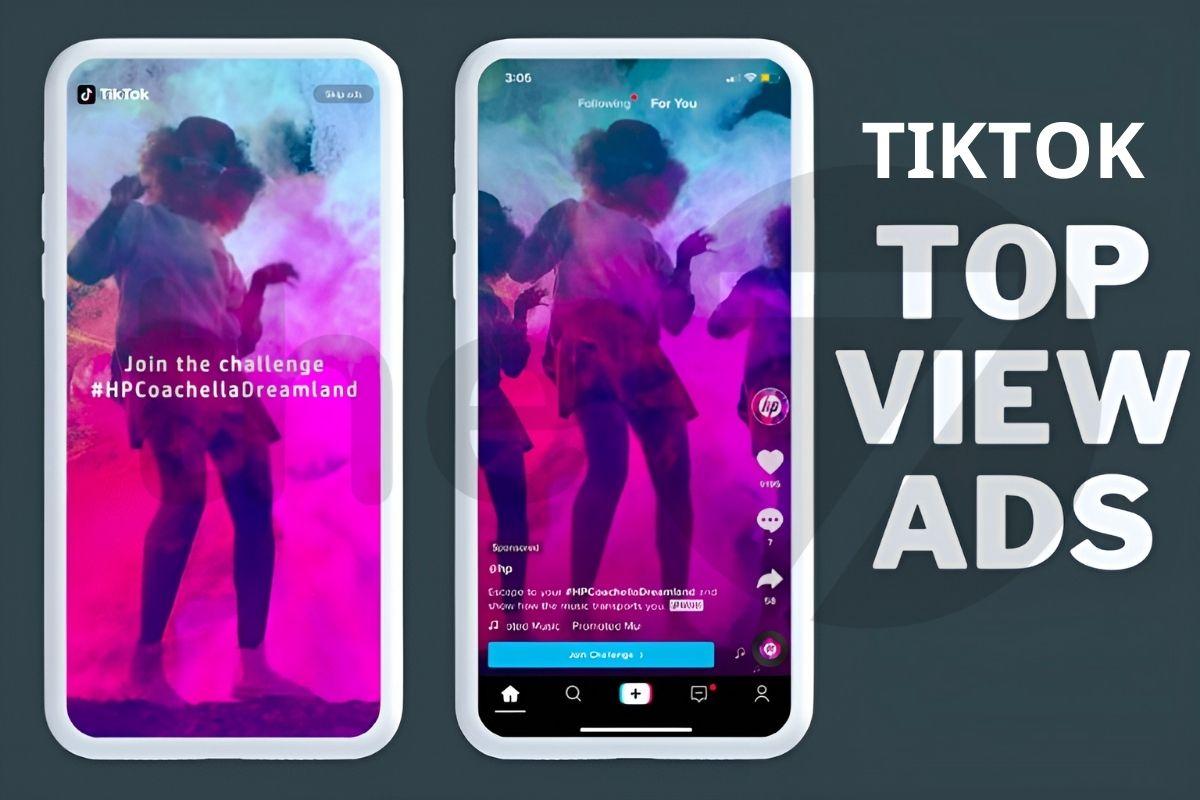
Brand Takeovers:
- Grabs attention the moment the app opens: Your brand image takes over the entire screen for the first few seconds, creating a strong impression and maximum user attention.
- Boosts hashtag challenge views: Encourages users to join in creating videos with your hashtag challenge, spreading your brand and driving massive traffic.
- Creates a FOMO effect: A limited number of advertisers per day creates scarcity and drives user engagement.
Native Video Ads:
- Blends in perfectly: Your video ad appears interspersed among regular videos, feeling authentic and easily catching users’ attention.
- Drives action: Embed a clear CTA (call to action) that encourages users to visit your website, download your app, or make a purchase directly.
- Increases conversion rate: A clear goal and a seamless shopping journey optimize campaign effectiveness.
Video Challenges:
- Sparks creativity: A hashtag challenge encourages users to create videos around your theme and hashtag, spreading your brand naturally and effectively.
- Boosts engagement: Encourages users to share, comment, and discuss videos, creating a community effect and driving user participation.
- Wide reach: Video challenges have strong viral potential, attracting a large number of new users and raising brand awareness.
Branded Lens:
- A unique interactive experience: Creates AR (augmented reality) effects that bring your brand into users’ real world, capturing attention and creating a lasting impression.
- Sparks content creation: Encourages users to use your AR filter to create and share videos, spreading your brand creatively.
- Boosts ad effectiveness: Two-way interaction between brand and user increases brand recall and drives purchase action.
6 Steps to Create a TikTok Ads Account
TikTok currently supports individuals or businesses in creating two types of accounts: Self-Serve (personal TikTok account) and TikTok Ads Agency. We recommend using a personal TikTok account if you’re a beginner. Running TikTok ads through an Agency is more suitable for advertisers who already have experience. Here’s how to create a personal TikTok Ads account:
- Step 1: Click the link: https://ads.tiktok.com/i18n/signup to access the TikTok Ads registration page.
- Step 2: Click Create Now. If your IP is blocked, change your IP address using the WARP app.
- Step 3: Fill in your information to register the account and confirm via Gmail.
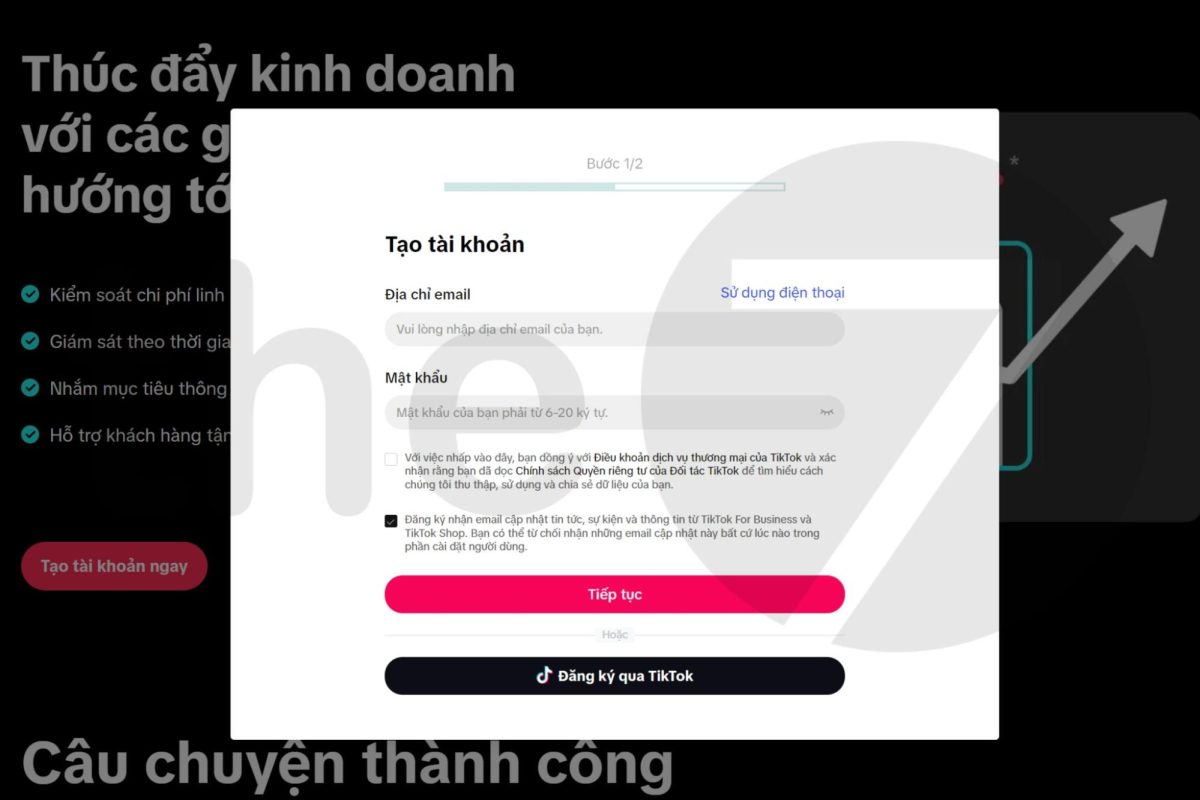
- Step 4: Fill in your business’s basic information. Then click Continue and verify with the OTP code sent to your phone.
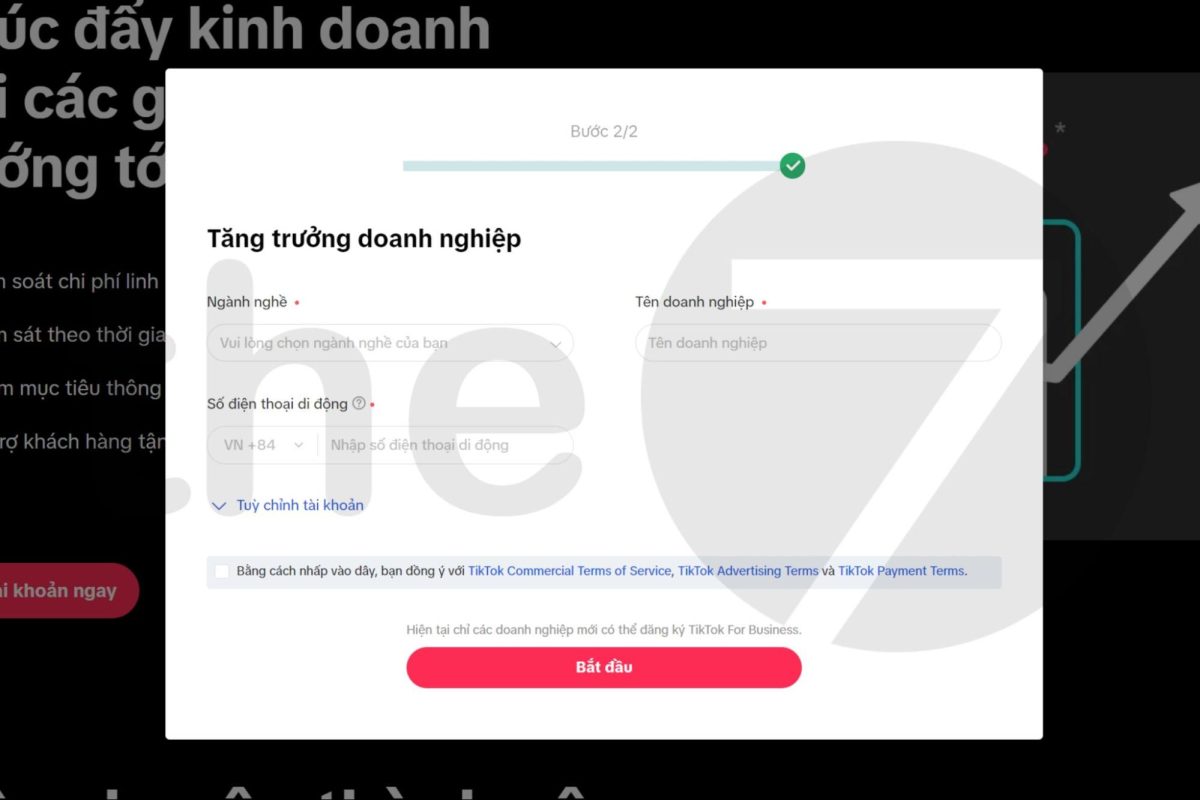
- Step 5: In the Tax Status section, select Non-VAT Registered Business. Then choose Manual Payment and click Go to TikTok Ads Manager.
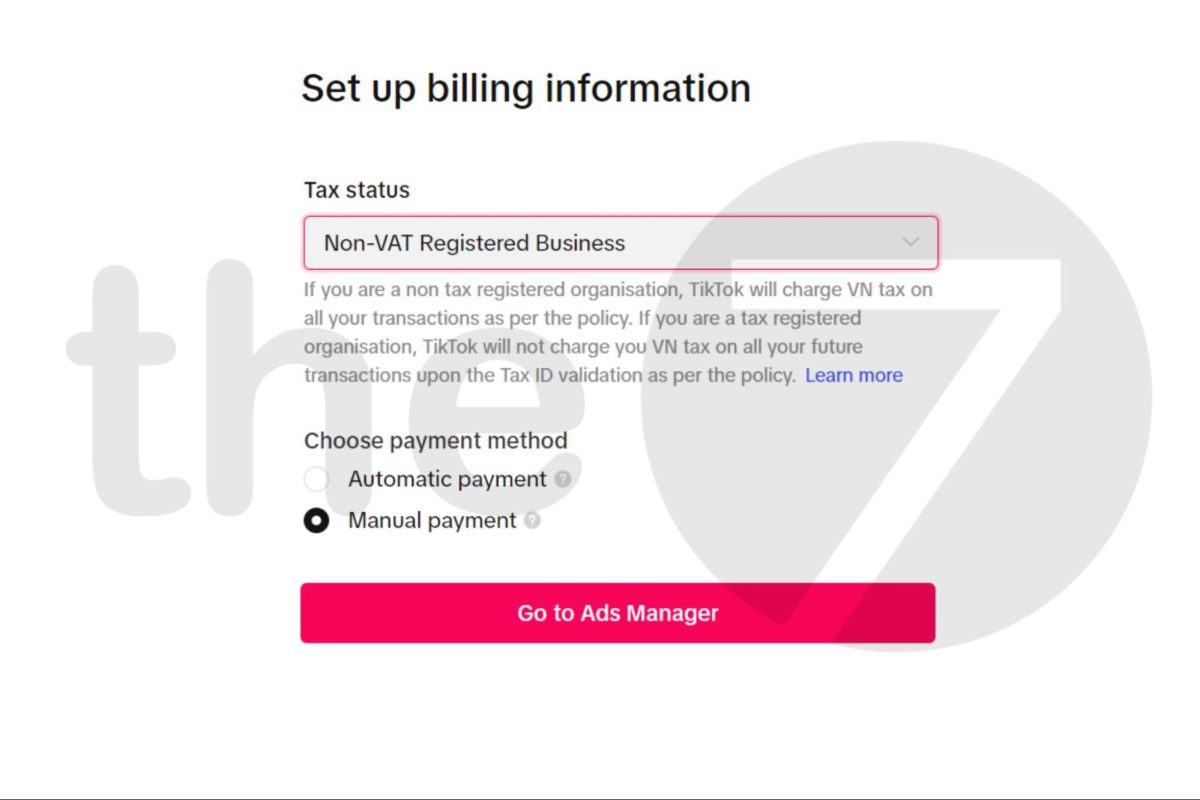
- Step 6: After completing the steps above, you’ll reach the TikTok Ads Manager. Here, you can set up your own ad campaign.
Detailed Guide to Running TikTok Ads in 2024
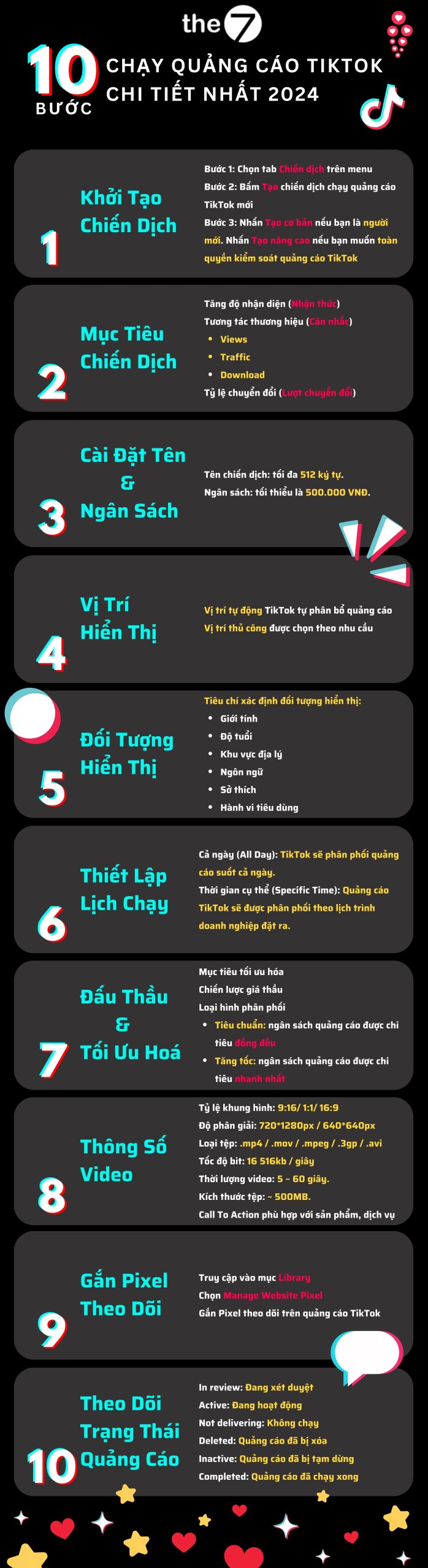
Do you want to advertise on TikTok in a cost-effective and efficient way? Don’t worry — with the detailed guide from The7 below, you can do it entirely yourself!
Step 1: Set up the campaign
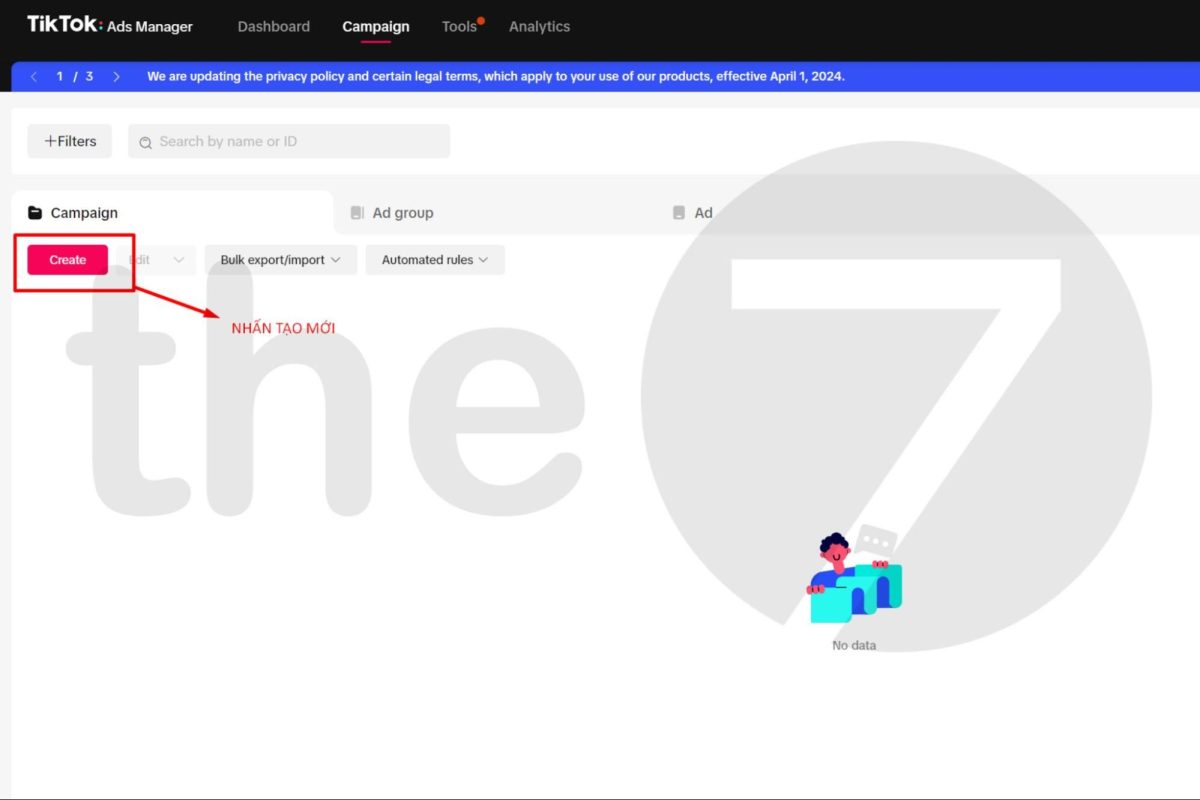
- Step 1: Select the Campaign tab in the menu to access the manager.
- Step 2: Click Create to create a new TikTok ad campaign.
- Step 3: Click Simple Mode if you’re a beginner. Click Custom Mode if you want full control over your TikTok ads.
Step 2: Choose the campaign objective
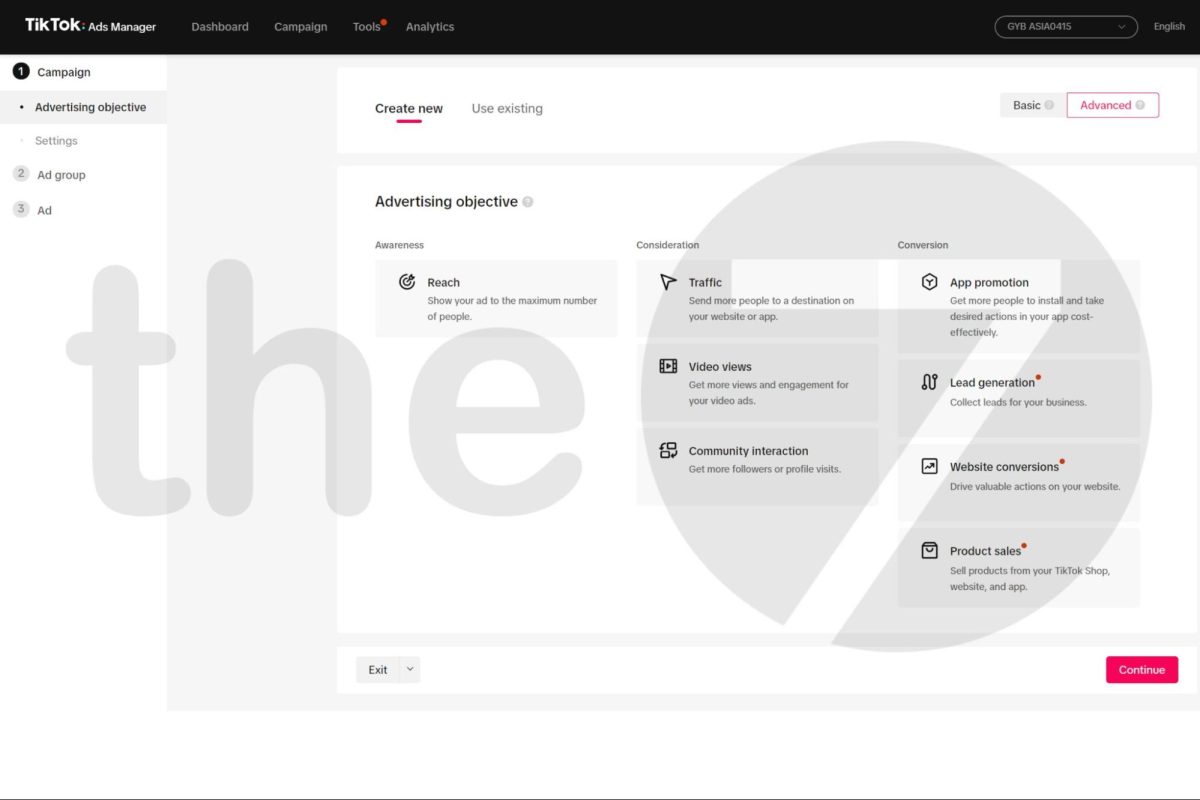
Depending on the customer journey, you’ll choose a different TikTok Ads campaign objective. There are 7 objectives, specifically:
| Campaign | Objective |
| Awareness | Ads reach the maximum number of target users. |
| Consideration | Views: Maximize the number of ad video views.
Traffic: Direct users to visit a specific URL (link). Download: Increase downloads of the business’s app. |
| Conversion | Drive actions on the business’s website (e.g., purchases, sign-ups).
Ad formats use ready-made lead forms to collect potential customers. Ad formats that drive high-value actions on the website. Ads for products in the TikTok Shop catalog. |
Step 3: Set the campaign name and budget
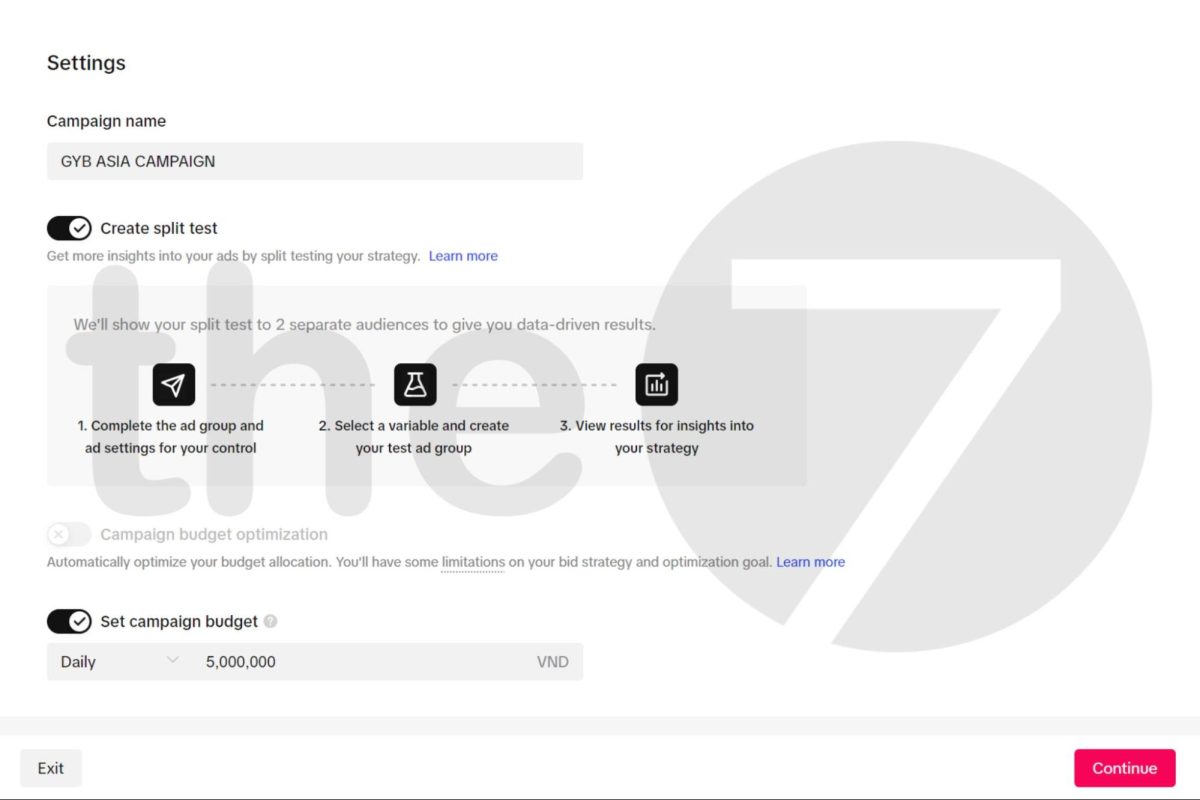
The next step is to decide the name and budget for the entire ad campaign. Choose a name that’s easy to read, easy to remember, and easy to tell apart from other campaigns. Note that the campaign name can be up to 512 characters. As for the budget setting, the minimum campaign budget is typically 500,000 VND or more.
Step 4: Choose the ad placements
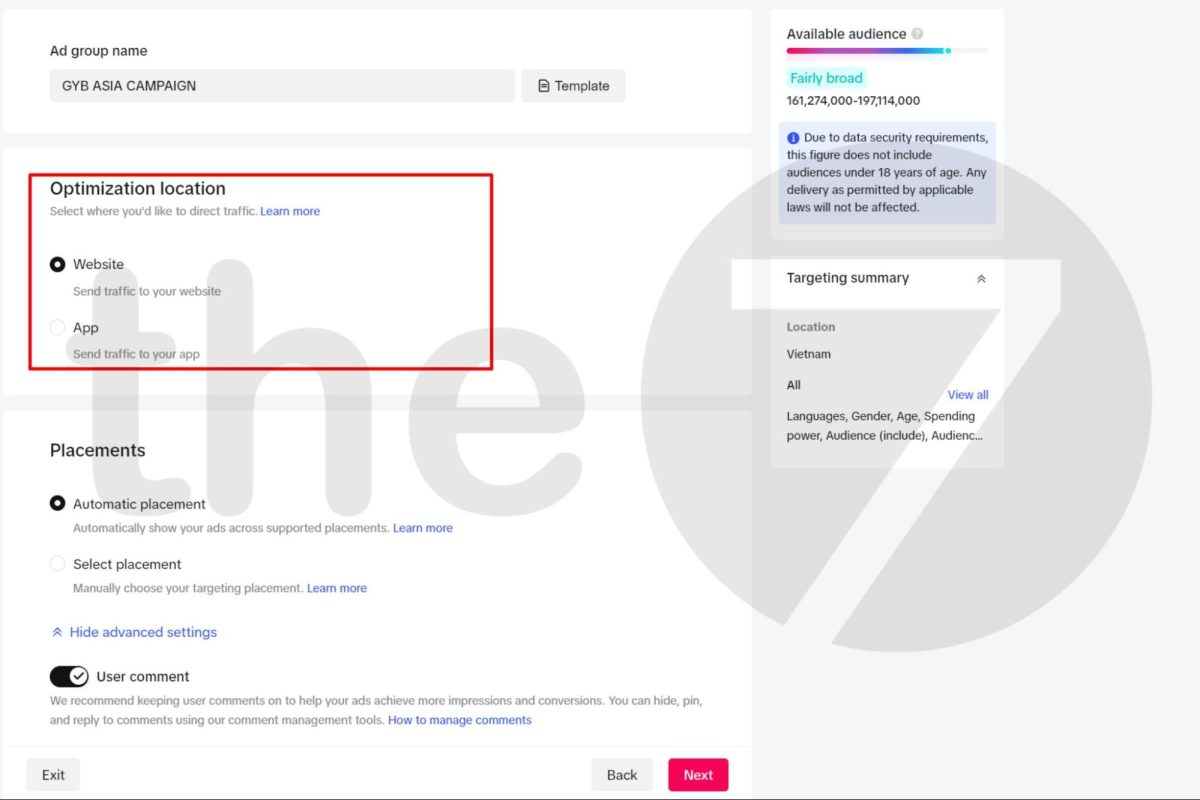
If you want to advertise only on TikTok, simply select this platform alone. In addition, depending on the ad format, you can also advertise on other platforms linked to TikTok, such as BuzzVideo, TopBuzz, NewsRepublic, Babe, Website, and App.
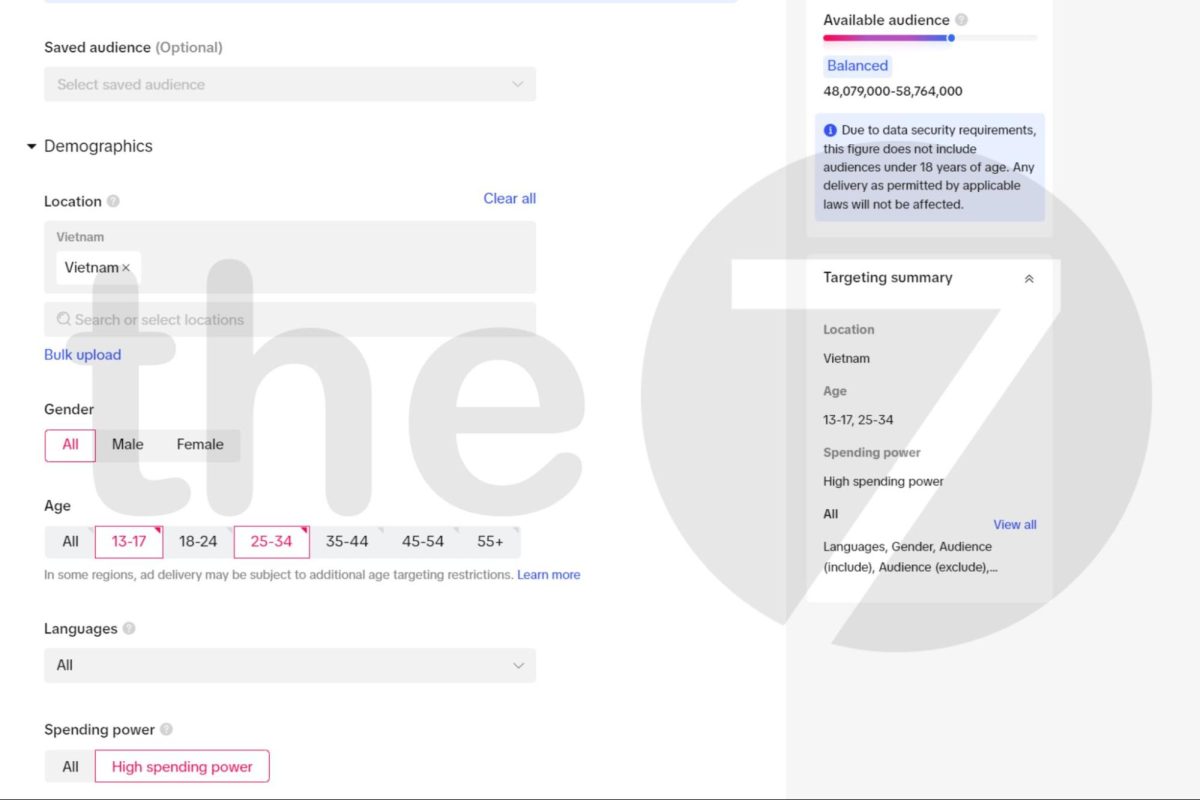
Step 5: Target the audience for TikTok Ads
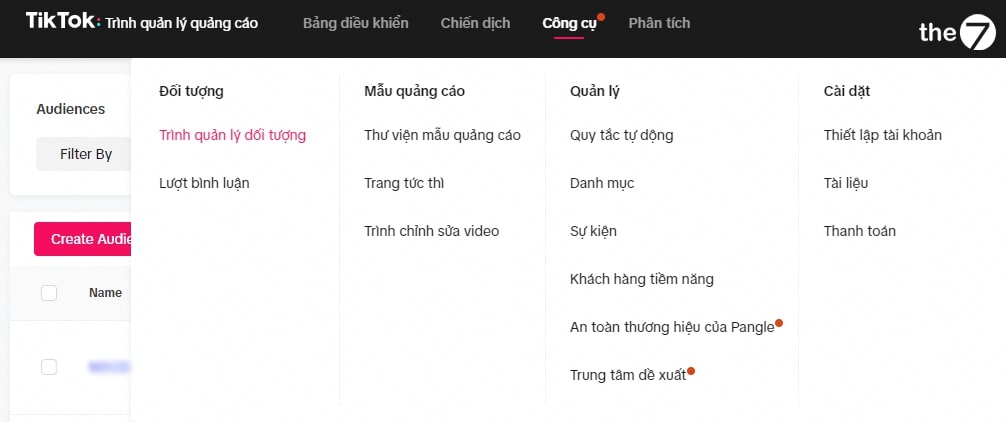
Like other social media platforms, TikTok lets businesses select their target audience based on criteria such as gender, age, geographic location, language, interests, and consumer behavior.
For the best advertising results, you need to clearly define a target audience that fits your product and business goals. This helps ensure your ads reach the people most likely to be interested in and engage with your product/service.
Step 6: Set the schedule and ad group budget
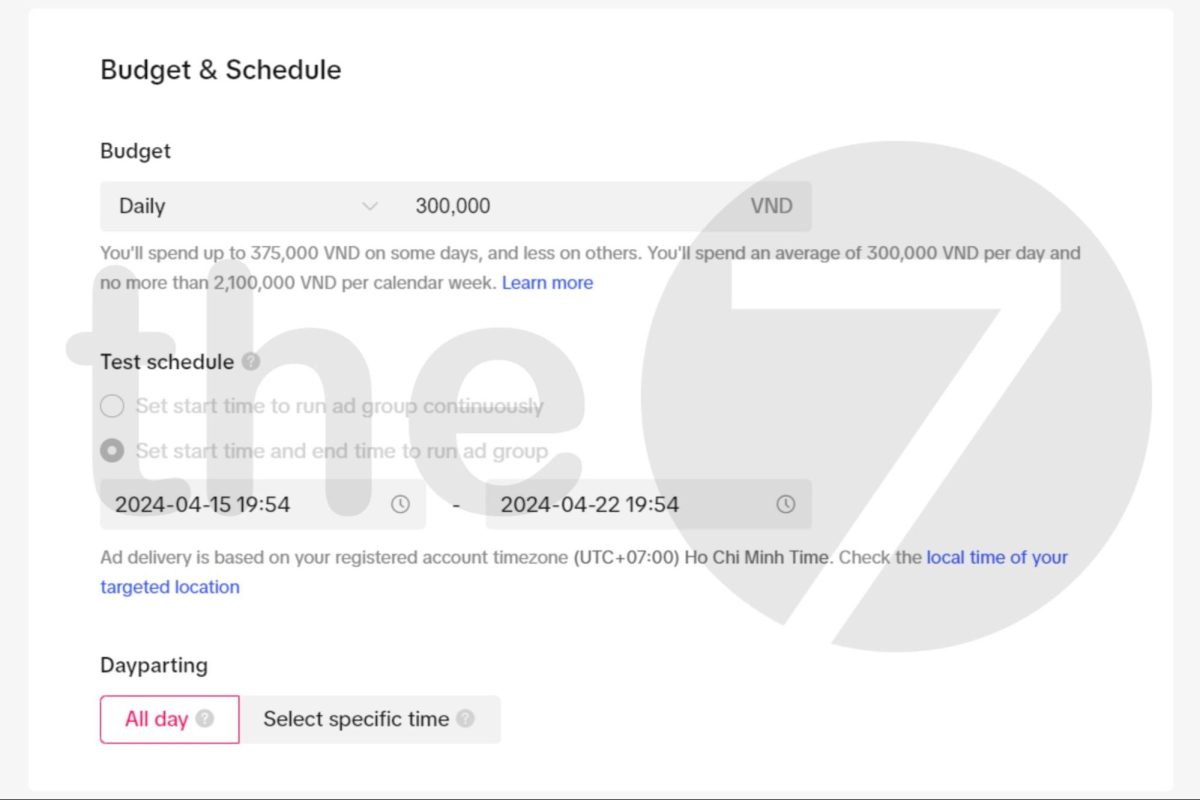
Regarding the ad schedule: You need to choose the start and end times for your TikTok ad campaign.
Regarding the Dayparting feature: This lets businesses choose specific times of day to display ads.
- All Day: TikTok will deliver ads throughout the entire day.
- Specific Time: If you select Specific Time, ads will be delivered according to the schedule you set. For example, you might want your ad to appear only at 7 a.m. and from 8 to 9 p.m. on Sundays.
As for the bid budget for each ad click (Bid Strategy), businesses have three options:
- Daily: For instance, if you set 500,000 VND and choose this type, TikTok may spend up to 100,000 VND in a single day.
- Lifetime: For instance, if you set 500,000 VND and choose this type, TikTok will spread 100,000 VND evenly across each day of the entire ad run.
- No Limit: This option suits businesses with ample budget and no limit on how many days the ad runs.
After completing all the steps above, you’re ready to set up the right TikTok ad group. Now move on to the next step: creating the ad creative.
Step 7: Bidding & optimization
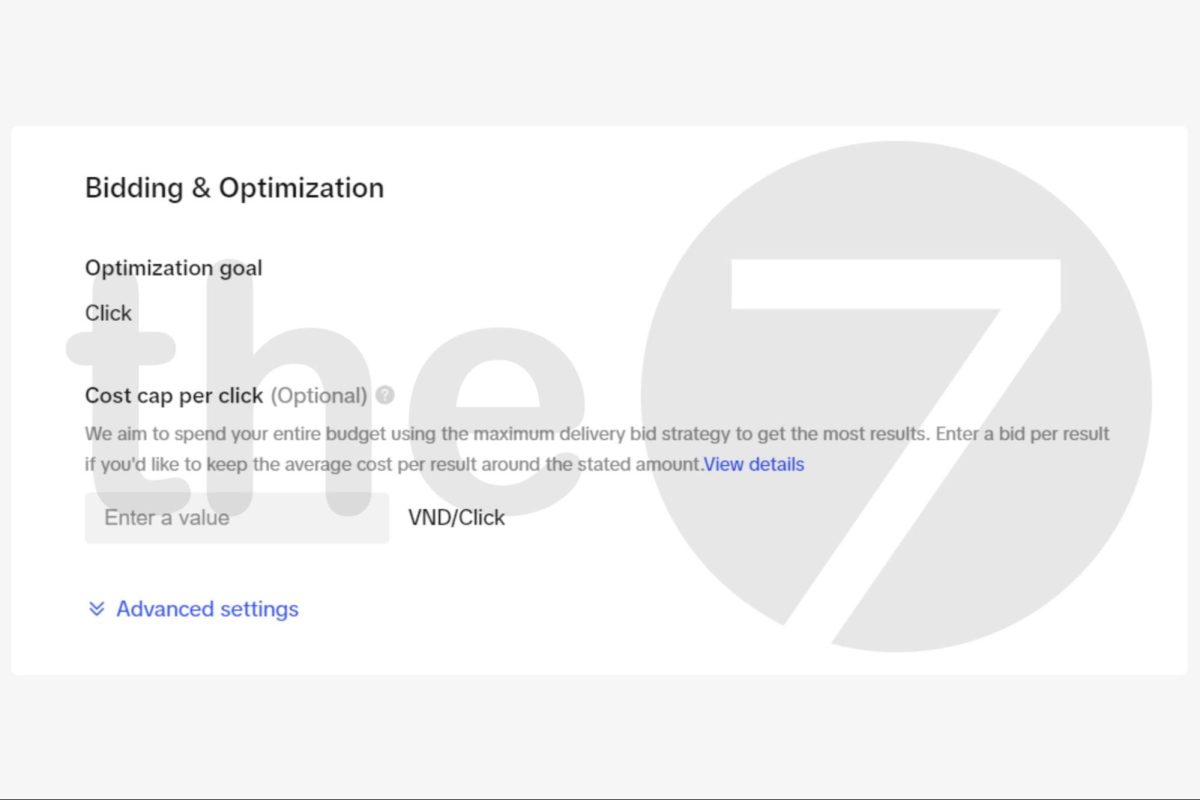
- Optimization Goal: Keep the default selection so TikTok can automatically optimize toward your ad objective. If you want high conversions, choose Conversion.
- Smart Optimization: If you don’t have much experience setting bids manually, choose this feature.
- Bid: You need to decide the price you’re willing to pay per conversion; TikTok will use this price to optimize your ad campaign.
- Delivery Type: You can choose Accelerated if you want TikTok to spend your budget faster and deliver your ads quickly, or choose Standard for normal-speed delivery.
Once you’ve finished the setup, click Next to continue.
Step 8: Set up the ad video display
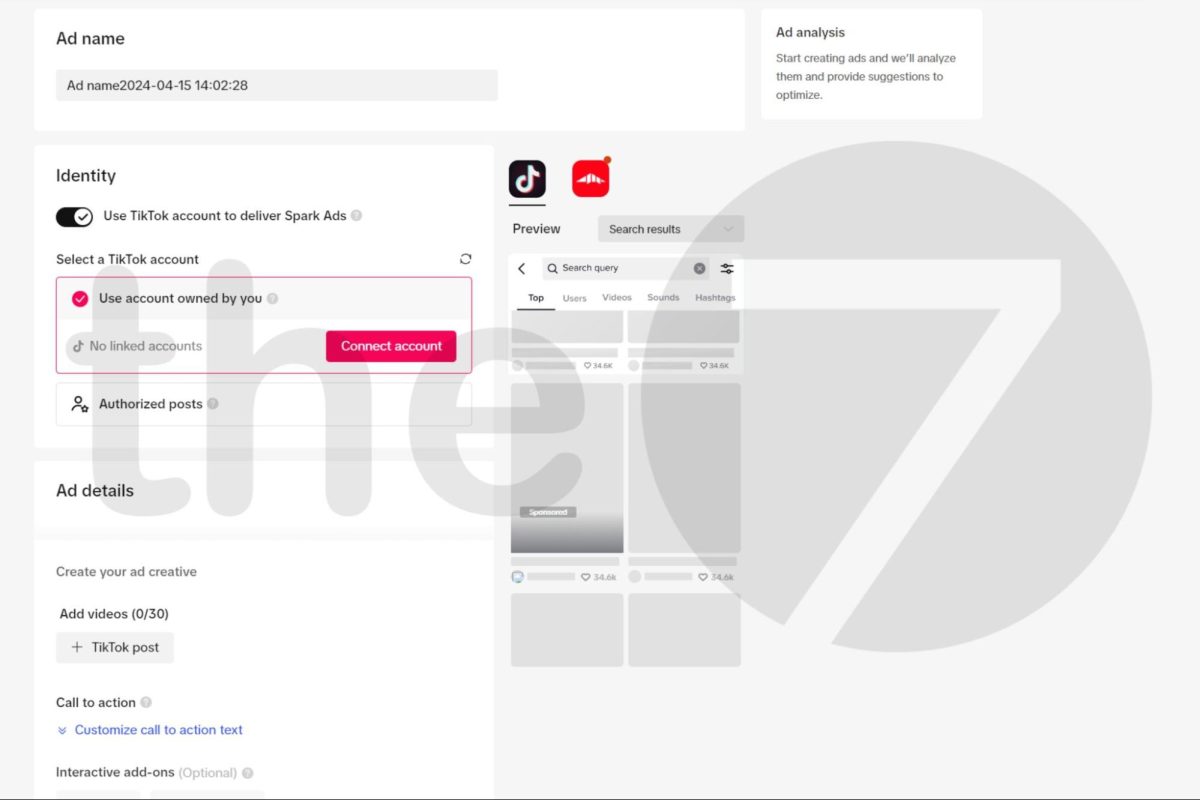
Click “Add From Computer” to upload your ad video, or click “Add From Library” if you want to reuse a video. Choose a video that fits the TikTok ad format — shop owners or businesses with a moderate budget typically find the TikTok In-Feed format suitable.
Besides that, you should invest in a video showcasing your service or product to run your TikTok ads, and add a few CTA buttons linking to a Landing Page to boost conversion rate.
Keep the following specs in mind for running effective TikTok Ads videos:
- Recommended aspect ratio: 9:16 / 1:1 / 16:9.
- Resolution: ≥ 720 * 1280px / ≥ 640 * 640px / 1280 * 720px.
- File type: .mp4 / .mov / .mpeg / .3gp / .avi.
- Bitrate: 16,516kb/second.
- Video length: Short videos of 5 ~ 60 seconds.
- File size: File size of 500MB.
- Call To Action: Choose the call-to-action that fits your product or service.
Once the setup is complete, click Submit for TikTok to review and approve your ad.
Step 9: Install the tracking Pixel on your website
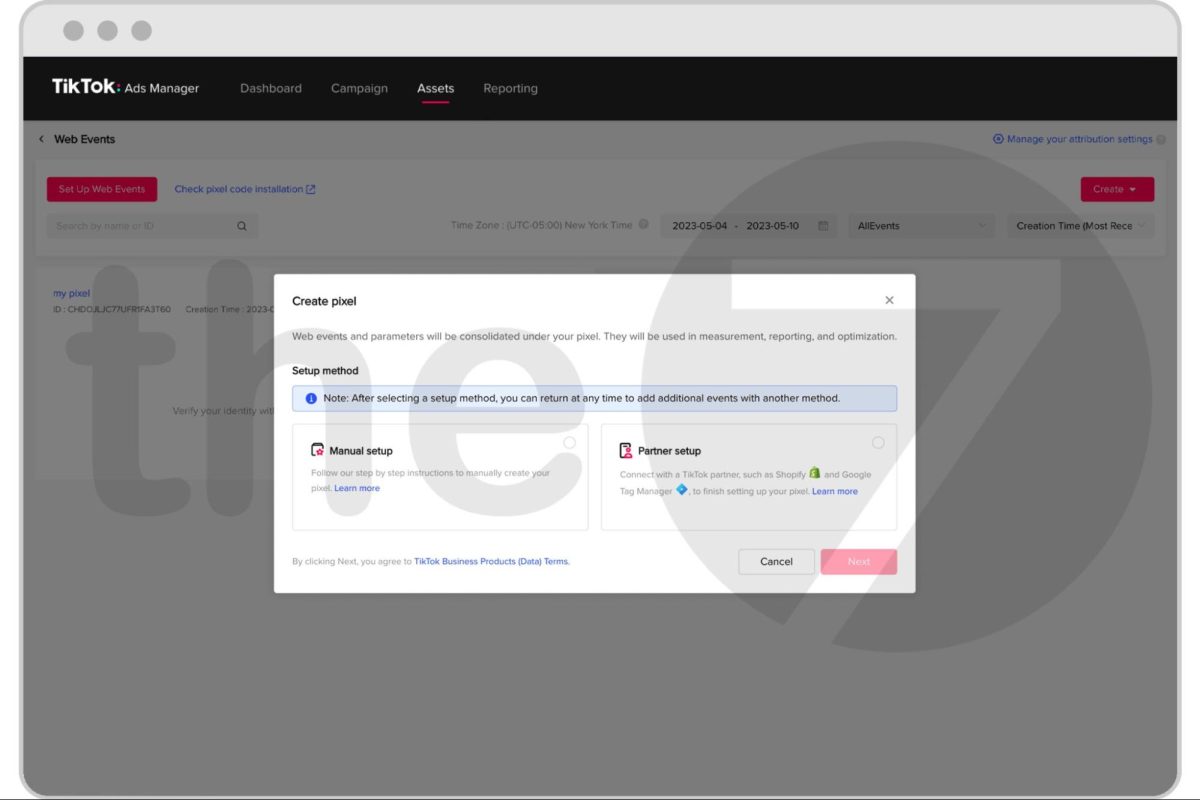
Installing the tracking Pixel on your website makes it more convenient to check website traffic from the TikTok platform. This allows advertisers to make timely, appropriate adjustments to their TikTok Ads campaigns. Go to the Library section, select Manage Website Pixel, and follow TikTok’s available step-by-step instructions.
Step 10: Track your TikTok ad status
You’ll track the status of your TikTok ad campaign through the status column, specifically:
- In review: The ad is under review and hasn’t been delivered yet.
- Active: The ad has been approved and is currently running.
- Not delivering: The ad isn’t running due to a policy violation or insufficient budget.
- Deleted: The ad has been deleted.
- Inactive: The ad has been paused.
- Completed: The ad has run its full duration and stopped delivering.
Tips and Notes for Running TikTok Ads
Below are 13 tips to help you increase the effectiveness of your TikTok Ads:
Don’t use images of celebrities
Advertisers must never use images of celebrities in TikTok ad videos or images (even if your company has partnered with them). To avoid violating TikTok’s ad policy, advertisers need to proactively contact TikTok manually first. You can only run the ad after your ad creative featuring the celebrity’s image has been approved.
Don’t advertise products that violate policy
TikTok’s policy will reject ads for certain product types such as adult products, dietary supplements, and traditional medicine, among others. In addition, TikTok Ads will also be restricted if the content contains phrases like “complete cure,” “guaranteed effective,” or “100% cure.” Be sure to note this carefully to run TikTok ads in the most optimal way.
Prepare resources for running TikTok ads
By making full use of the necessary resources available — including email, phone number, landing page, a Visa card, and at least 15 short videos introducing your brand and products — customers who discover and learn about your product/brand will have more complete information about your industry.

Regularly stay updated on TikTok’s information
TikTok regularly updates its information and the latest advertising regulations through TikTok For Business and the TikTok Help Center. That’s why you should regularly visit these documentation pages and read TikTok’s materials so you can stay on top of the latest information and be more proactive when setting up TikTok ads.
Use the right hashtags
Use hashtags that are directly related to your ad video content and the product/service you offer. At the same time, combine popular hashtags with lower-competition hashtags to attract more viewers.
However, avoid using overly generic hashtags that aren’t related to your video content, and use no more than 30 hashtags per ad video.
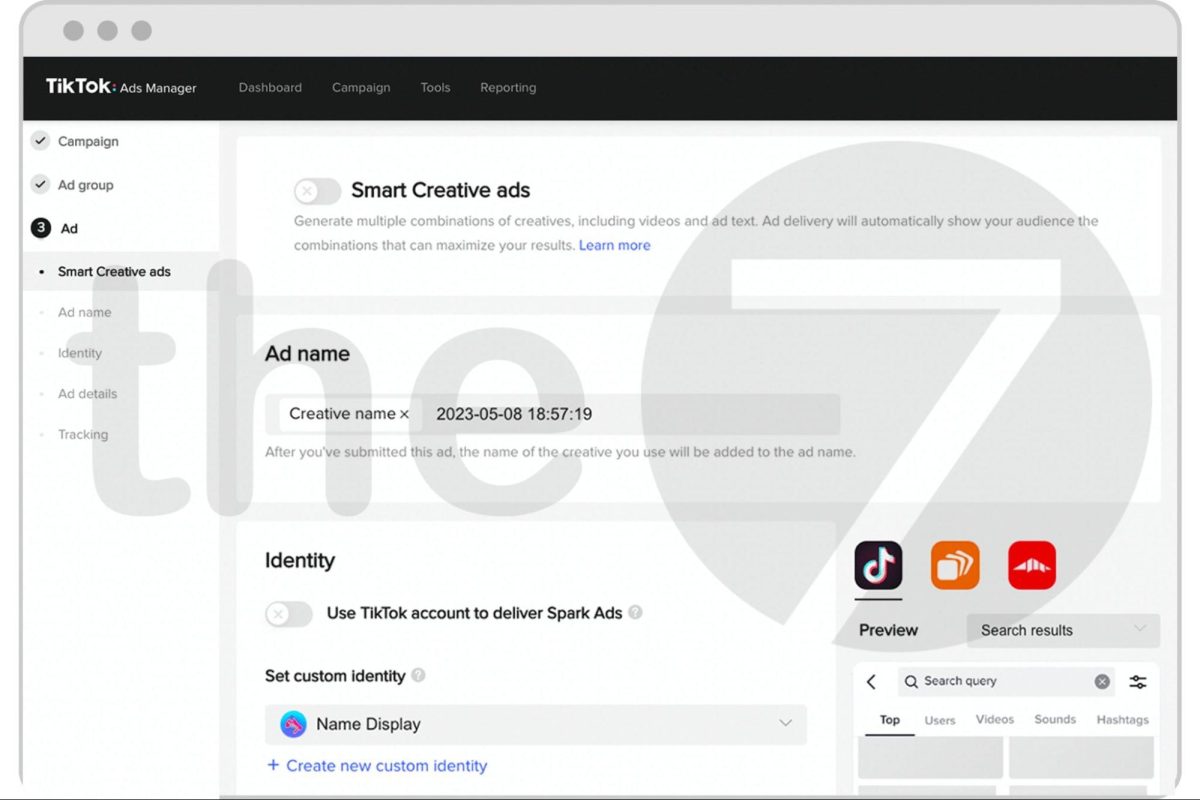
Turn on Smart Creative Ads on TikTok
Smart Creative Ads lets you upload up to 10 ad videos and add 5 ad descriptions. This feature then automatically combines the videos and ad descriptions at random to determine the most effective ad combination.
Make sure your ad videos are high resolution
Videos with too low a resolution will either be rejected by the system for upload or will only display on secondary platforms such as Vigo, Helo, and Buzz Video (websites linked to TikTok).
Regarding TikTok ad descriptions
Because the description space is limited, you need to optimize your ad copy. If you need to explain your product/service in detail, insert the text directly into the ad video content.
Create multiple ad groups and ads
Create multiple ad groups and ads to test and compare effectiveness between each group. In addition, within the same ad group, create 2 videos to test the engagement of each one.
Partner with influential public figures
Partnering with KOLs and KOCs who have significant influence within your target customer base is an effective way for a business to boost its brand awareness in the market — especially for brands that aren’t yet widely known.
TikTok has set up a feature that helps businesses connect with influencers in each field. You can find the best representative for your product from this list.
Post at least 3 videos a day
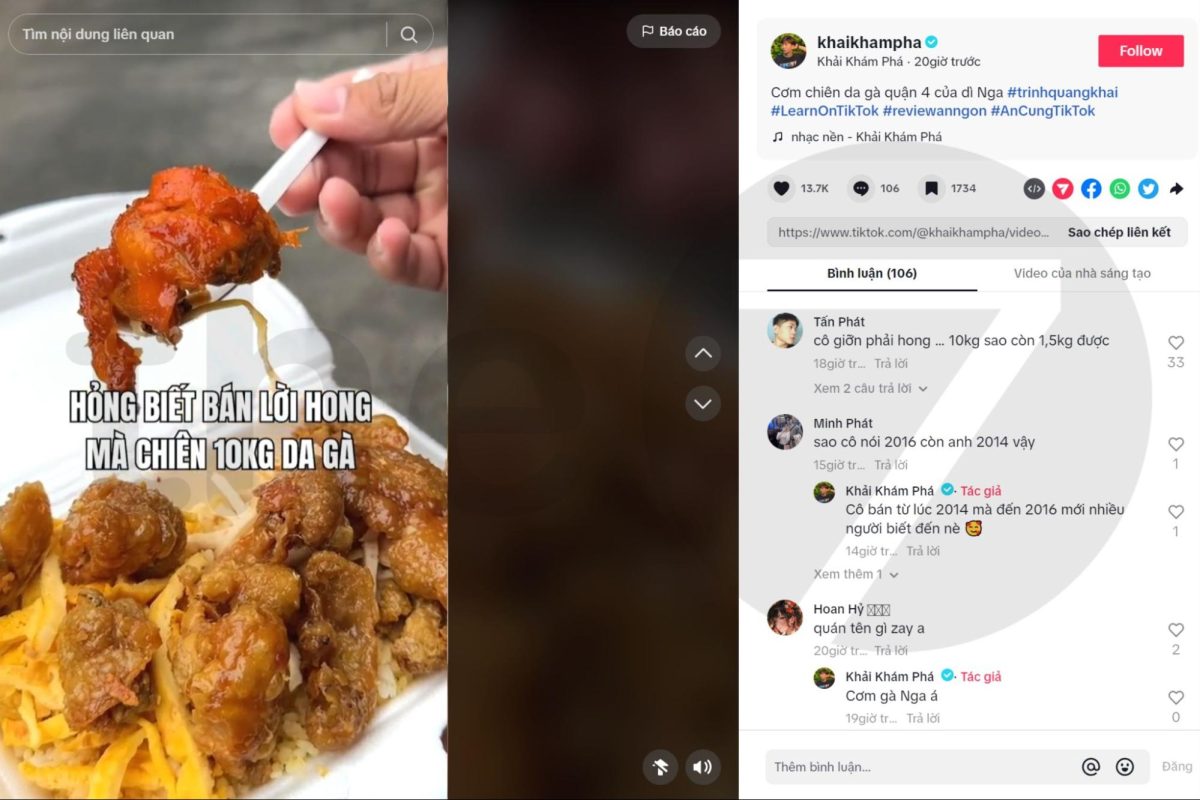
TikTok users tend to open the app looking for enjoyable entertainment content every day, and buying products isn’t the first thing on their mind when they open TikTok. That’s why you need to create a personal-style account like a normal user, then post rich, varied content daily to increase your reach.
Share your content or campaign on other social media platforms
Sharing content on other social platforms will help you expand your reach to your target audience. On TikTok, users tend to be young. Meanwhile, Facebook, Instagram, and others have a broader demographic, from young people to older adults.
Start new trends on TikTok
Creating fresh trends on TikTok will draw the interest of many users and get them to follow your account. As a result, your brand will reach more users. This is also one of the most effective and cost-efficient ways to run TikTok ads.
Above is a detailed guide on how to run effective TikTok ads, helping you generate the highest revenue at the most cost-efficient price. We hope this information helps you no longer feel overwhelmed when planning your TikTok ad campaigns.
With hands-on experience across hundreds of large and small projects, The7 is the leading agency trusted by clients to run TikTok Ads campaigns. Contact 0827386886 if you have any questions that need answering.

Nguyễn Đình
Bảo




As CEO of The7, I am committed to sharing practical, useful knowledge with every reader. Every article on The7 is based on my 7 years of hands-on experience in marketing — Facebook advertising, LinkedIn advertising, Google advertising, and marketing strategy. I hope you take away plenty of insight from these posts and apply it successfully in practice.
Related Articles

What Is TikTok Marketing? Effective TikTok Marketing Strategies
TikTok has been topping the global rankings of the most downloaded and most visited apps. That makes it a gold mine for marketers who love creativity. In this article, The7...

26 Predictions for Social Media Marketing Trends in 2025
It’s that familiar time of year again, when experts and analysts start revealing their predictions for the social media marketing trends worth watching, along with the shifts that promise to...

TikTok Creator Marketplace: The Breakthrough Bridge Between Businesses and Creators
Building a TikTok channel to sell products means finding the right KOLs, KOCs, or influencers to promote them, and that is no easy task. How do you make sure your...
What Are TikTok TopView Ads?
In the competitive world of online advertising, TikTok TopView ads are a key tool for helping businesses stand out and make a powerful impression from the very first moment they...

TikTok Golden Hours: Secrets to Boost Views and Go Trending in 2024
TikTok has become one of the most popular social media platforms in the world, especially in Vietnam, with more than 800 million users globally. If you are a TikToker or...
TikTok Targeting: How to Choose Your TikTok Ad Audience Effectively in 2024
To succeed with TikTok advertising, one of the key factors is the ability to choose your TikTok ad audience accurately, so your message reaches exactly the right people. This article...


