


What Is TikTok Business? How to Create a TikTok Business Account
If you run ads on TikTok or are getting ready to, TikTok Business is a concept you need to understand. How do you create a TikTok Business account, what are the benefits of TikTok Business, and why should you use it? This article from The7 gives you useful information and a TikTok Business guide on how to use it.
What Is TikTok Business?
TikTok Business has become an essential tool for marketers who want to harness the power of TikTok for their advertising campaigns. This all-in-one platform streamlines the entire advertising process, eliminating the need for multiple tools and saving you valuable time.
TikTok Business Account vs. Regular TikTok Account
What they have in common:
- Basic features: Both account types let you pin comments, pin videos, go live on TikTok, reply with videos, and more.
- Tool access: You can easily access and use the creator tools on the platform.
- External links: You can add an outside link to your TikTok profile.
- Advertising: Both account types can run ads. However, ad review usually takes longer for these accounts than for accounts built specifically for advertising, such as a TikTok Agency account or Ads Manager.
How they differ:
| Personal TikTok | TikTok Business | |
|---|---|---|
| Analytics tools | This account type has limited access to detailed analytics tools. Even so, advertisers can still join the TikTok Creator Next program to become content creators on TikTok Creator Marketplace and take part in the TikTok Creator Fund. | A Business account comes with a dedicated analytics toolkit that includes workspace, analytics, activity, and support features. A Business account can also access the Business Creative Hub, which offers customer insights and the latest trends on TikTok. |
| Messaging | This account can only message other personal users when both sides follow each other. | A business account places no limits on messages for the account owner. |
| Account privacy | A personal account can switch from public to private mode. | A business account can only change its visibility from public to private. |
| Link in bio | A personal account can only add a link once it reaches a certain number of followers. | A business account can easily add a link to any website you want. |
| Music usage rights | A personal account has access to both standard sounds and commercial sounds. | A business account can only access commercial sounds, a library of audio for commercial and entertainment purposes. |
Key Benefits of TikTok Business for Your Company
Access to “Exclusive” Features
A business account gives creators “exclusive” features that regular accounts don’t have. Here are the features:
- Ads: A TikTok Business account lets you use advanced advertising tools, helping brands and businesses reach the right potential customers on TikTok effectively.
- Analytics: This tool helps business owners understand how their ad campaigns perform, so they can build a precise, well-optimized marketing strategy.
- Business Creative Hub: This app has a dedicated design that sparks creative ideas for businesses and makes content creation more effective.
- Commercial Music Library: A TikTok Business account can access a library of songs and sound effects for commercial use. Here, creators can easily make content that fits their brand.

Third-Party Tool Integration
A business account supports integration with third-party tools. This lets businesses connect to and make use of analytics, management, and automation tools that link the data in a TikTok Business account with those third-party tools. You can easily integrate the app with your company’s management tools to optimize your TikTok ad campaigns.
Build a Professional Marketing Strategy
TikTok Business helps businesses build a methodical, professional marketing strategy. With this account, you can build ad campaigns aimed at the right audiences and goals. TikTok also lets businesses create engaging content and suggests channels to reach more users, and its analytics tools help you optimize and evaluate the results of your marketing strategy.
Unlimited Information and Content Storage
Unlimited storage for information and content is a perk that TikTok Business offers. You can store and manage images, videos, campaign information, and audience data efficiently on the TikTok platform. This helps you access and organize your information in the most orderly and convenient way.
Become a TikTok Shop Connected to E-Commerce Platforms
A TikTok Business account can easily register for TikTok Shop, a new platform that directly connects products on e-commerce platforms with your account. You can create content, encourage users to place orders, or lead them to your products and services on TikTok. You can also direct customers to a website or a direct shopping channel.
Drive Significant Website Traffic
A business account helps companies drive significant traffic to their websites by running ads. Use content to attract users and guide them to click through to your website, which increases your chances of conversion and boosts sales.
Connect With KOLs Easily
TikTok Creator Marketplace is a way to connect creators with businesses on TikTok, and it is one way to improve a brand’s communication results. Connecting with KOLs makes it simpler and more effective to introduce your products and brand.

The Most Detailed Guide to Creating a TikTok Business Account
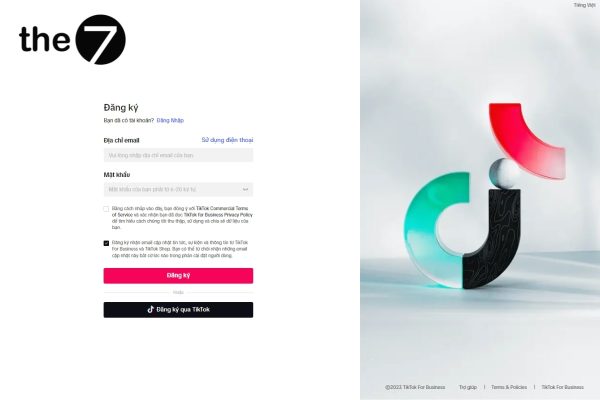
Step 1: Go to https://www.TikTok.com/business/vi and select the “Create Now” button to start the registration process. The sign-up page asks you to provide your registration details by email, and TikTok will send you a confirmation code to register the account.
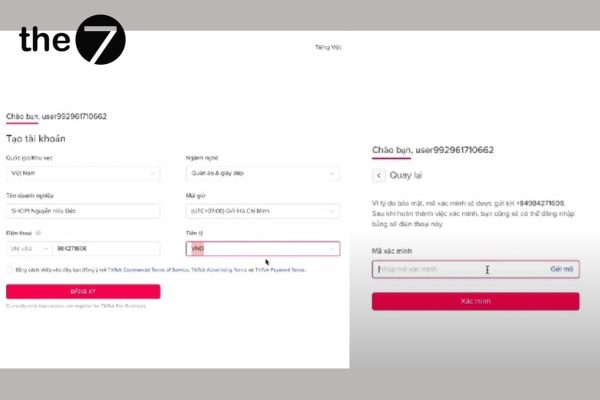
Step 2: Provide the information requested to set up the account, then enter the verification code sent to your registered phone number.
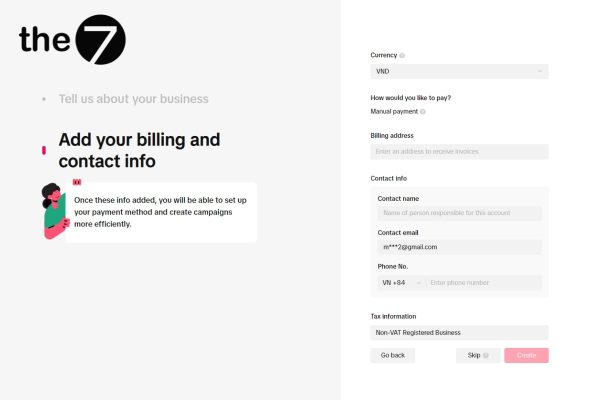
Step 3: The screen switches to a payment page. Under tax status, select “Not-VAT Registered Business,” then click “Go to Ads Manager.” Choose “Custom mode” and uncheck “Show this page.”
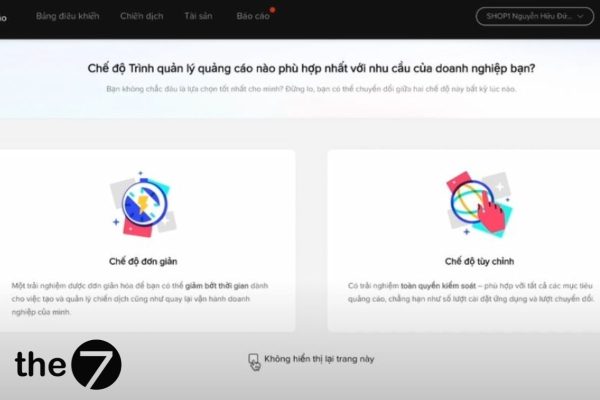
Step 4: Click the briefcase icon (Business Center) at the right corner of the screen. The 3 steps below make up this TikTok Business guide:
- Fill in the account information
- Provide a business description
- Add a payment method
Then select “Create” to finish. You now have a TikTok Business account and can start running ads.
How to Link Your TikTok Account to Your TikTok Business Account
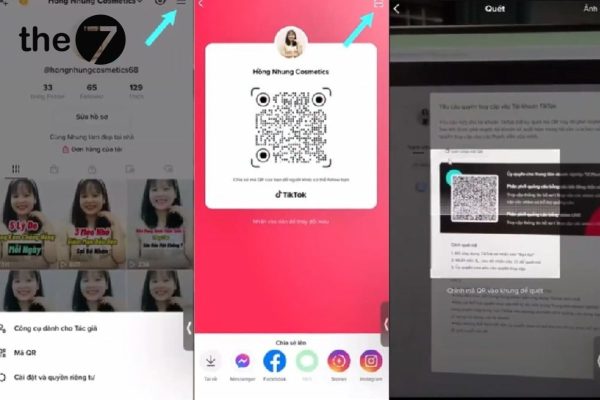
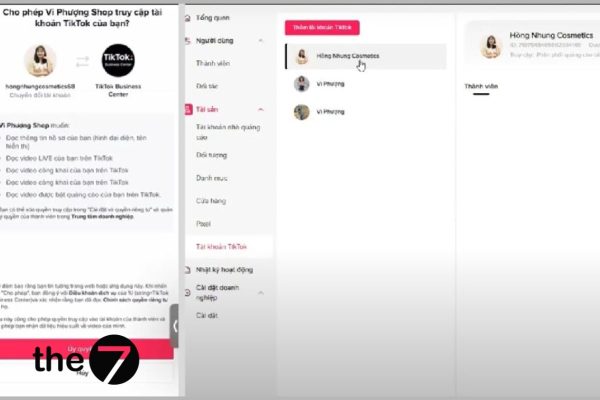
Step 1: Log in to your TikTok Business account. When the Business Center interface appears, select “TikTok Accounts.”
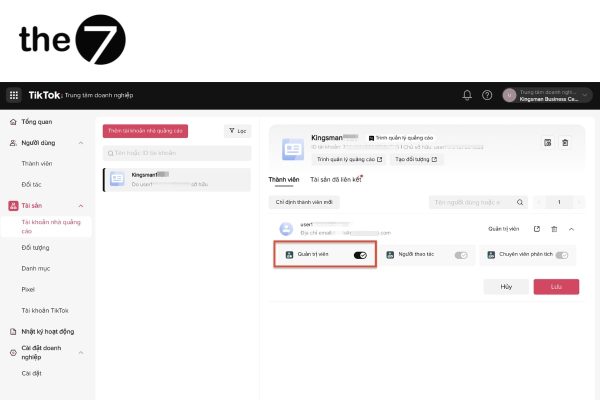
Step 2: Click the red “Add Account” button and turn on “Ad delivery for existing posts” and “Ad delivery for LIVE videos.” Click “Generate QR Code.”
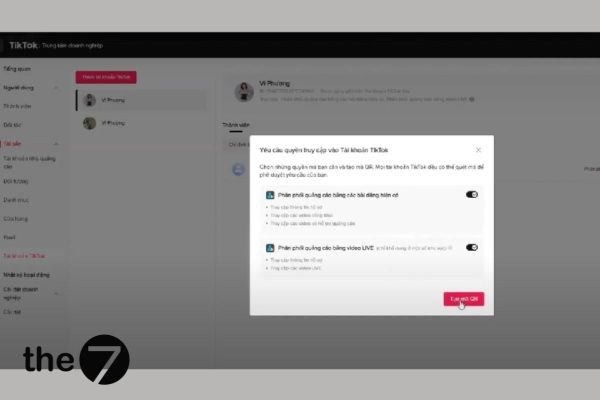
Step 3: Open your business’s TikTok app to link the accounts. Tap the three-line icon at the right corner of the screen, then select “QR code.” The QR code appears at the top right corner of the screen.
Step 4: A new interface appears. Select “Authorize” to link the account with TikTok Business.
We hope this article has given you a better understanding of what TikTok Business is and shown you, step by step, how to create a TikTok Business account as a beginner. The7 also has plenty of other great articles about TikTok, so don’t miss them!
>>>>> See more:
- TikTok Promote: What It Is and How to Use It Effectively
- TikTok Shop: What It Is and How to Register
- What Is TikTok? Everything You Need to Know About TikTok
- The Most Effective Guide to Running TikTok Ads in 2024

Nguyễn Đình
Bảo




As CEO of The7, I am committed to sharing practical, useful knowledge with every reader. Every article on The7 is based on my 7 years of hands-on experience in marketing — Facebook advertising, LinkedIn advertising, Google advertising, and marketing strategy. I hope you take away plenty of insight from these posts and apply it successfully in practice.
Related Articles

What Is TikTok Marketing? Effective TikTok Marketing Strategies
TikTok has been topping the global rankings of the most downloaded and most visited apps. That makes it a gold mine for marketers who love creativity. In this article, The7...

26 Predictions for Social Media Marketing Trends in 2025
It’s that familiar time of year again, when experts and analysts start revealing their predictions for the social media marketing trends worth watching, along with the shifts that promise to...
TikTok Creator Marketplace: The Breakthrough Bridge Between Businesses and Creators
Building a TikTok channel to sell products means finding the right KOLs, KOCs, or influencers to promote them, and that is no easy task. How do you make sure your...
What Are TikTok TopView Ads?
In the competitive world of online advertising, TikTok TopView ads are a key tool for helping businesses stand out and make a powerful impression from the very first moment they...
How to Run Basic TikTok Ads: A Beginner’s Guide
TikTok advertising is increasingly chosen by businesses because this way of reaching customers is extremely promising and impactful. If you’re looking to learn how to run TikTok ads, this article...

TikTok Golden Hours: Secrets to Boost Views and Go Trending in 2024
TikTok has become one of the most popular social media platforms in the world, especially in Vietnam, with more than 800 million users globally. If you are a TikToker or...


