


How to Add Sitelink Extensions in Google Ads (2024 Guide)
Sitelink extensions let your ads give customers more information. They also make each ad stand out more than your competitors’ ads.
This gives your Google Ads extensions a Quality Score boost, raises click-through rates by 10 – 15%, and lowers the cost per click on your ads. Below, The7 walks you through how to add sitelink extensions in 2024, so keep reading!
>>>> See more: A guide to running Google ads that deliver strong results
What Are Sitelink Extensions?
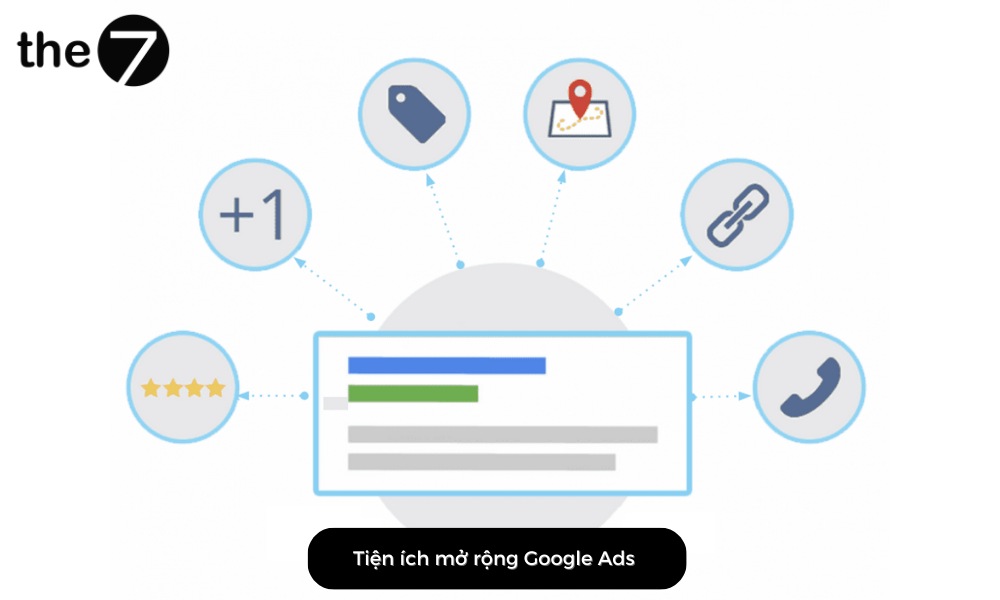
Sitelink extensions are a type of Google Ads extension that displays links to specific pages on your website. They give users more information about your business and make it easy for them to find the content they are looking for. This helps you reach potential customers and bring in a large volume of traffic.
>>>> See more: What Is Google Ads? Google Ads knowledge for beginners
How to Add Sitelink Extensions
As mentioned, Google Ads add-ons are extra pieces of information shown with your ads. That’s why you should set up all of these extensions to make your ads more impressive. Below is a detailed guide on how to add Google Ads sitelink extensions in 2024:
Call Extensions
Ads are not allowed to include a phone number directly in the ad text. So you need to create a call extension as follows:
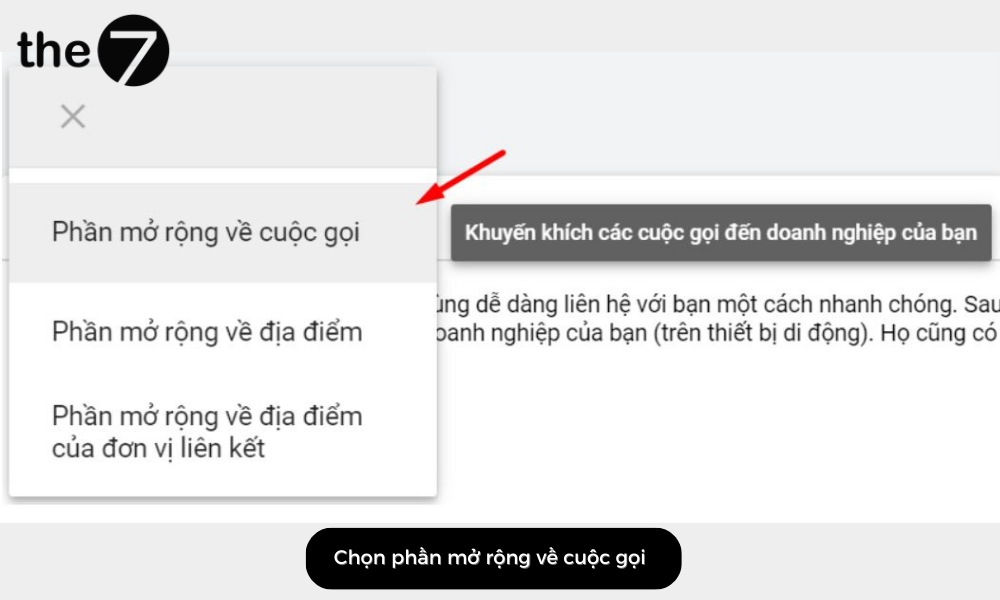
- Step 1: First, select the ad you want to add the sitelink extension to. Then click Extensions -> click “+” -> Call extension.
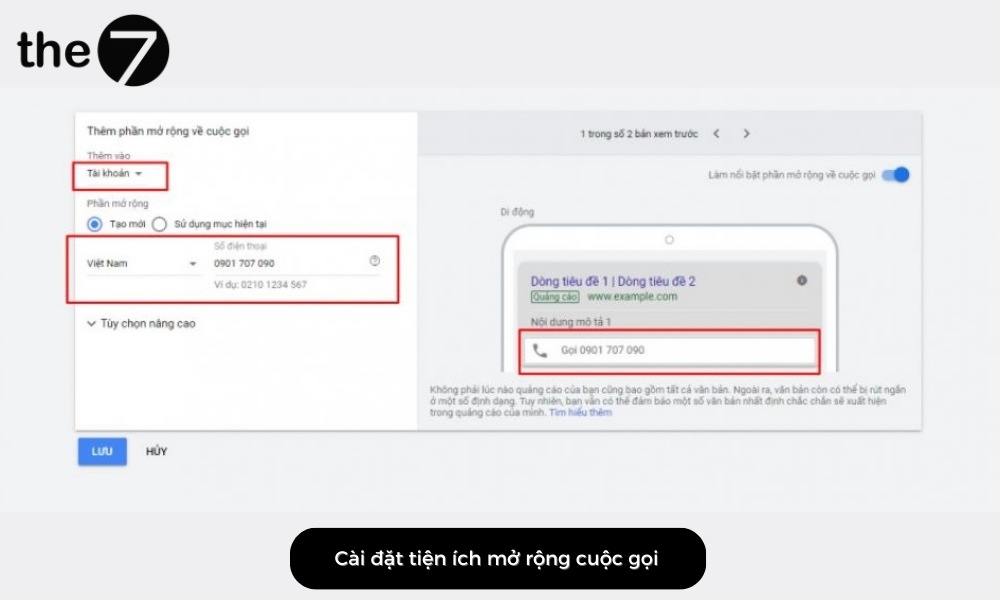
- Step 2: Next, add your phone number. If you want the extension to appear for a specific campaign or ad group, you can change that under “Account”. You can also choose Advanced options to customize the dates, times, and more…
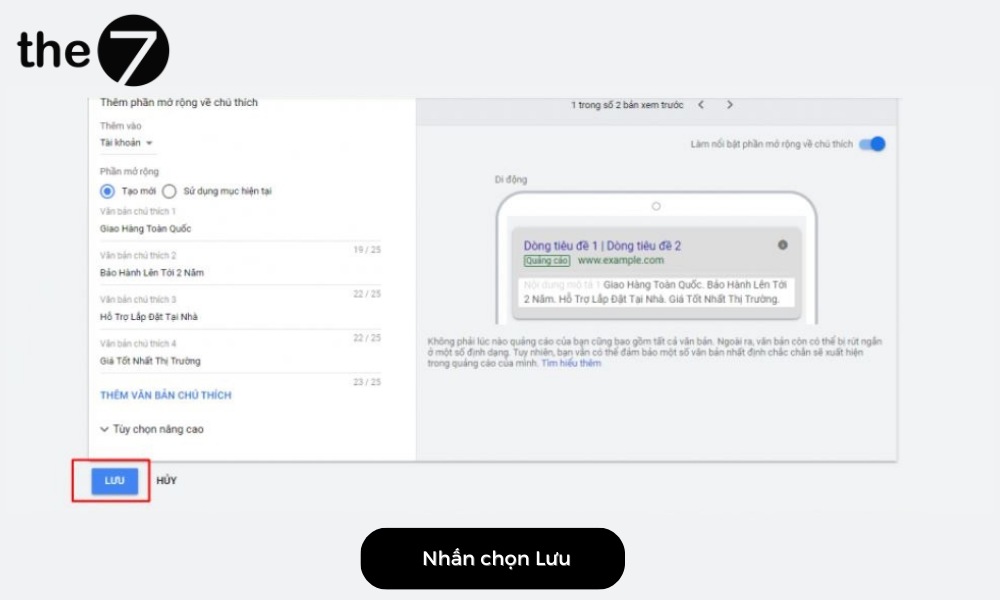
- Step 3: Once you have created the Call Extension, remember to click “Save” to finish.
Location Extensions
If your company or business doesn’t have a Google Maps account (Google My Business) yet, go to https://www.google.com/intl/vi_vn/business/ and create one. Then wait for Google to send you a verification code. Once you are verified, your address will appear on Google Maps.
You can also set it up manually, as follows:
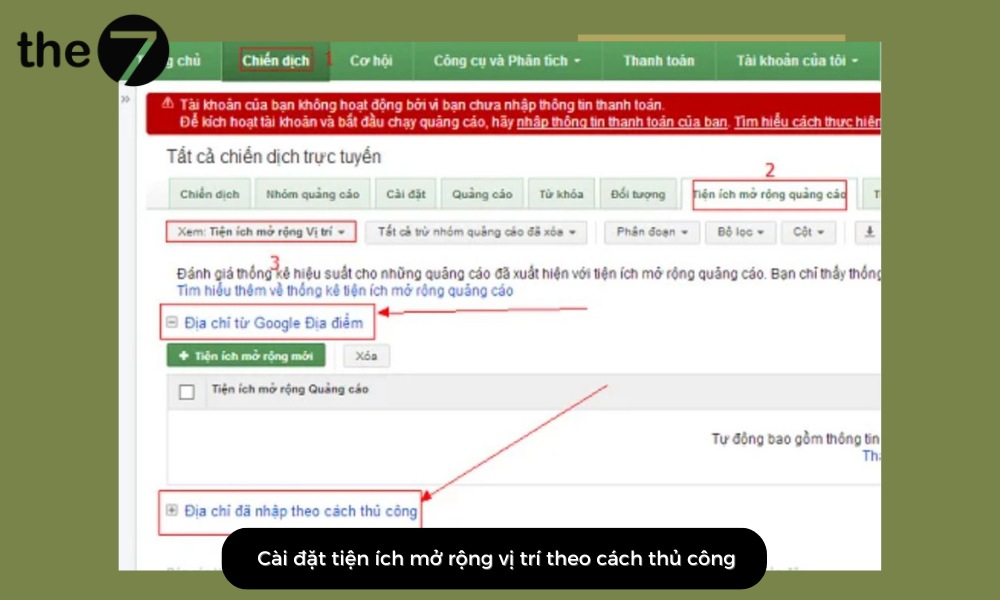
- Step 1: Sign in to Adwords -> select Campaigns -> click Ad extensions -> select Location extension -> click Address from Google Places -> choose Address entered manually.
- Step 2: Fill in all the required details, such as country, company name, phone number, company address… -> Save
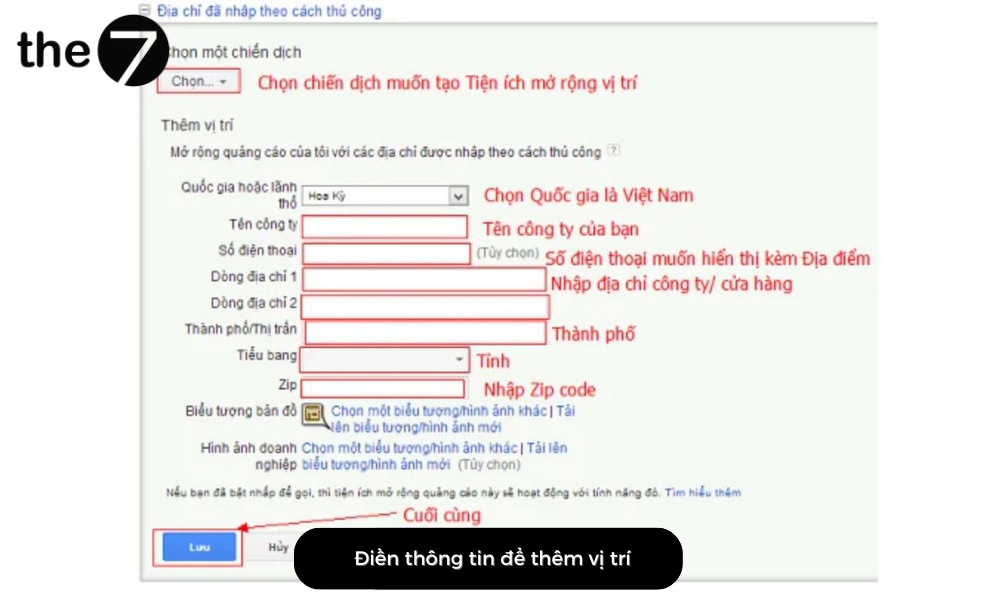
With just these 2 simple steps, you have added a Location Extension to your Google ads. Customers will see your store’s location right in the ad and can find you more easily.
Affiliate Location Extensions
To add an affiliate location extension to your business’s ads, follow these steps:
- Step 1: After clicking the “+” sign, click Affiliate location extension.
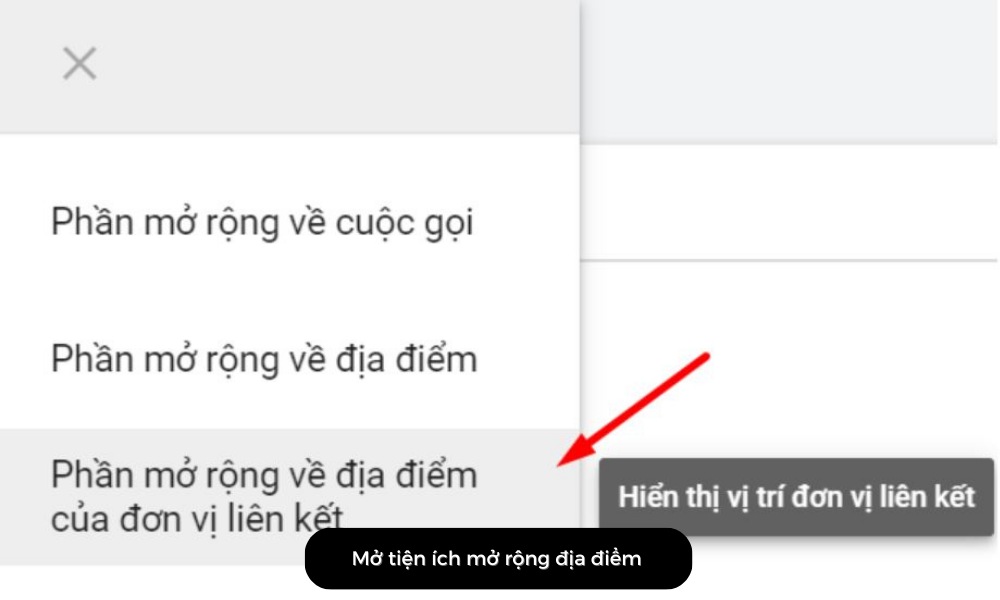
- Step 2: Click General retailers and then Choose general retailers.
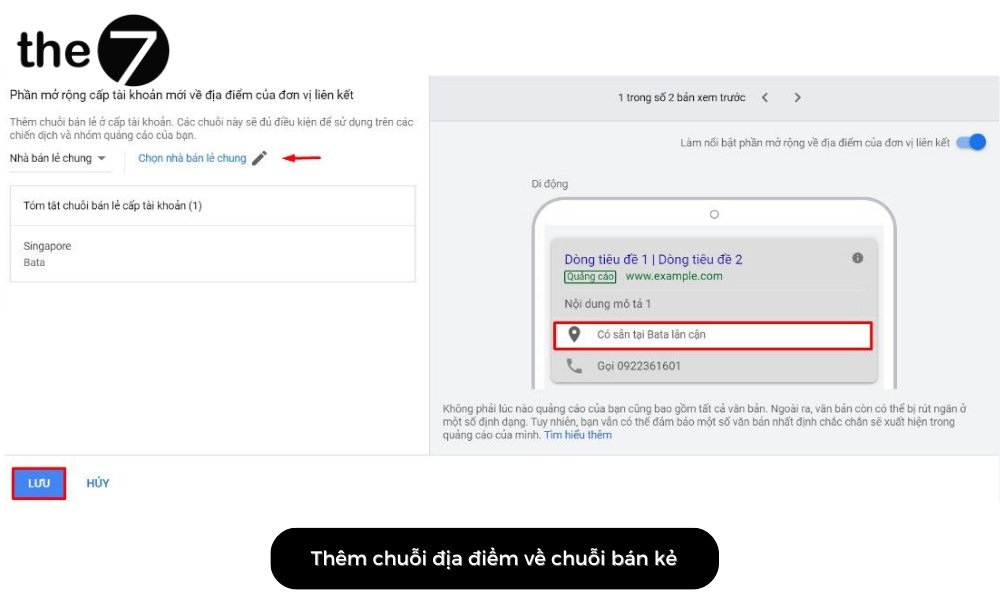
- Step 3: Click “Save” to finish adding the location extension.
Callout Extensions
This extension adds default lines of text to every ad. So it should be compelling content about your business, such as being open every day of the week or offering free shipping,… Here is how to set it up:
- Step 1: Select the campaign you want to add the extension to -> click Extensions -> click the “+” sign -> Callout extension.
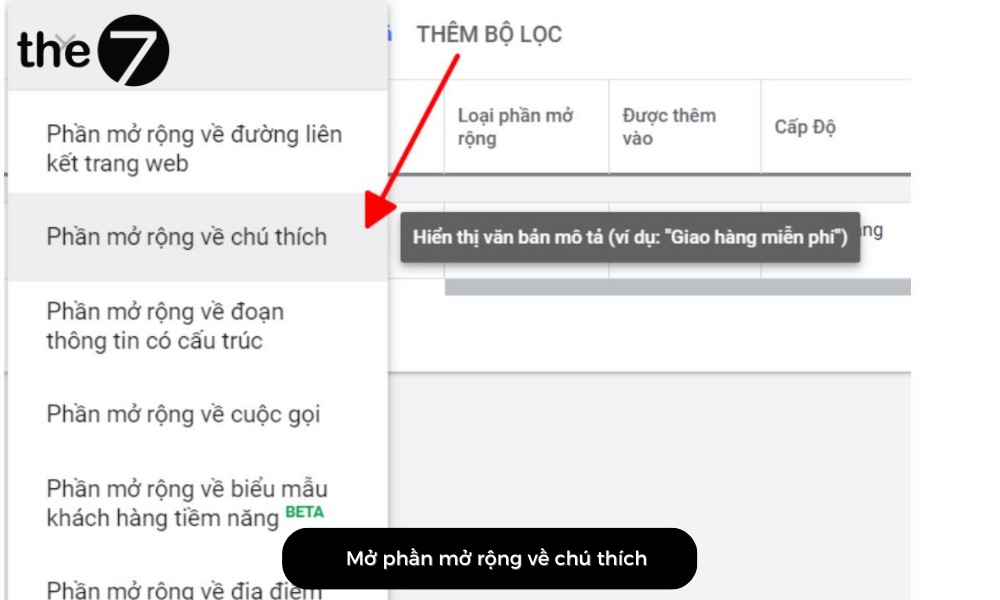
- Step 2: Then add your content to the callout text. To add more callouts, click ADD CALLOUT TEXT.
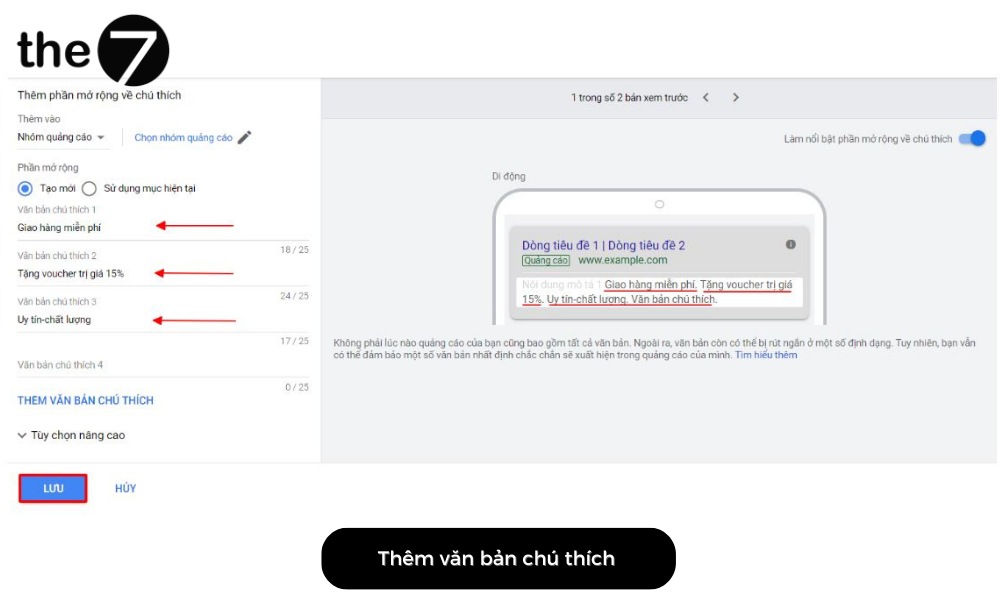
- Step 3: Once you have created the callout extension, click “Save”. And just like that, you have created a callout extension successfully.
Promotion Extensions
Adding a promotion sitelink extension is fairly simple. You just need to follow these 3 steps:
- Step 1: As above, first select the ad you want to add the extension to -> Extensions -> click the “+” sign -> Promotion extension.
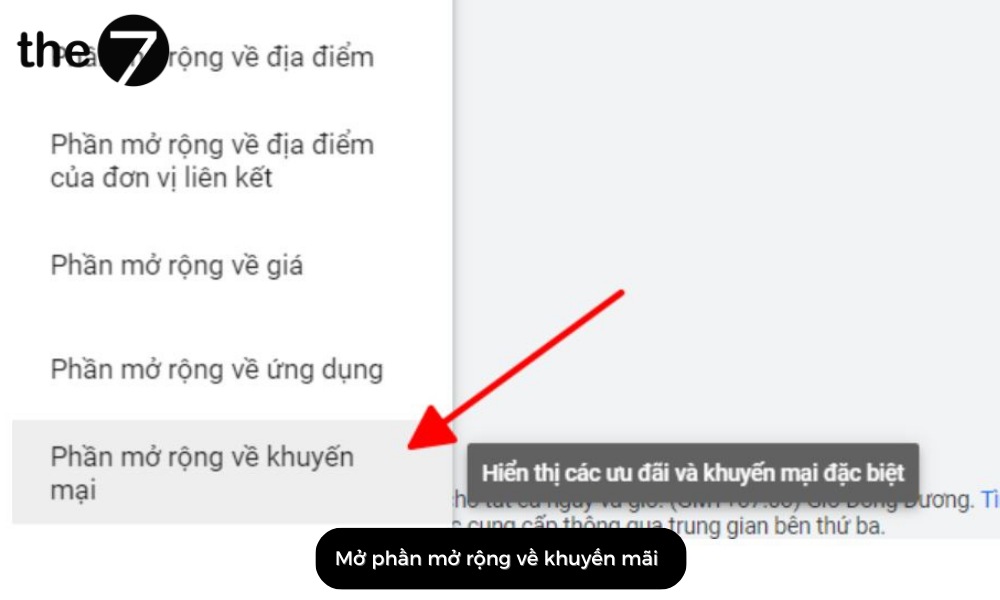
- Step 2: Fill in the language, currency, promotion type, item, final URL, and promotion details. In addition, if the discount runs for a set period, set a start date and an end date for that ad.
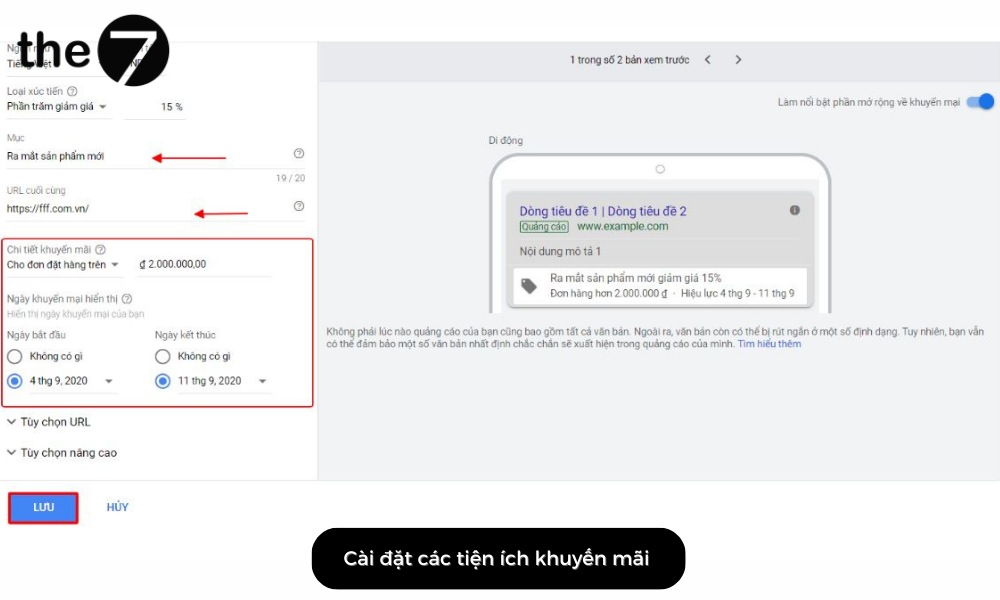
- Step 3: Once you have created this extension, remember to click “Save” to finish.
A Roundup of Google Ads Extensions
Google offers many types of extensions to support businesses’ communication goals. These extensions can work together when shown alongside your ads, making a stronger impression on viewers.
Here are the Google Ads extensions you should know:
Sitelink Extensions
Sitelink extensions help search results show a website’s key service or product categories as horizontal text links beneath the main ad that is running.
Example: When you search “Thế Giới Di Động” on Google, an ad appears at the top of the search results page. Right beneath the main ad are 4 links related to Thế Giới Di Động’s information and services. Those results are sitelink extensions.
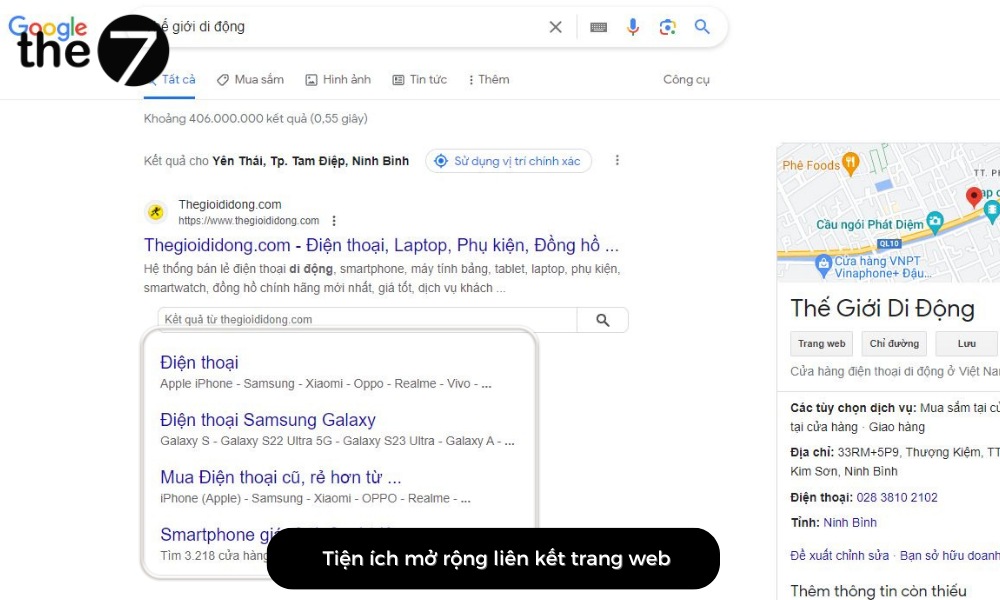
One thing to note: when users click a sitelink, the business still pays the same cost as a click on the main ad. In addition, sitelink extensions have the following characteristics:
- Each sub-link points to a different landing page.
- The links complement the main ad.
- Each link can be a maximum of 25 characters (including spaces).
Call Extensions
With call extensions, you can easily add a phone number to your ad. It’s fair to say this is a popular extension in service industries.
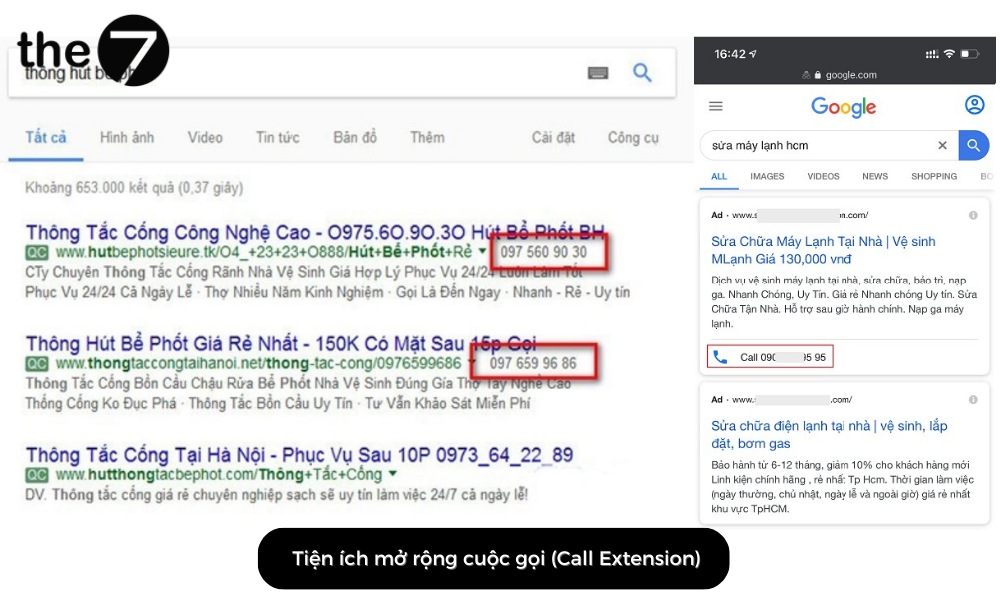
The advantage of this extension is that when customers see your ad and start to consider learning about or buying a product or service, the phone number acts as an immediate call to action.
What’s more, the extension helps shorten customers’ decision time. It also makes it easier for a business to hold on to its potential customers.
Note: With the Call Extension, the phone number is displayed differently depending on the device:
- On smartphones and tablets: The extension appears as a call button icon. Readers can tap the icon to get in touch.
- On PCs and laptops: The extension displays the full phone number as text, on the same line as the URL in the ad.
Callout Extensions
Callout extensions let you expand your ads with promotions, offers, discounts, unique USPs, and the benefits and features of your products and business.
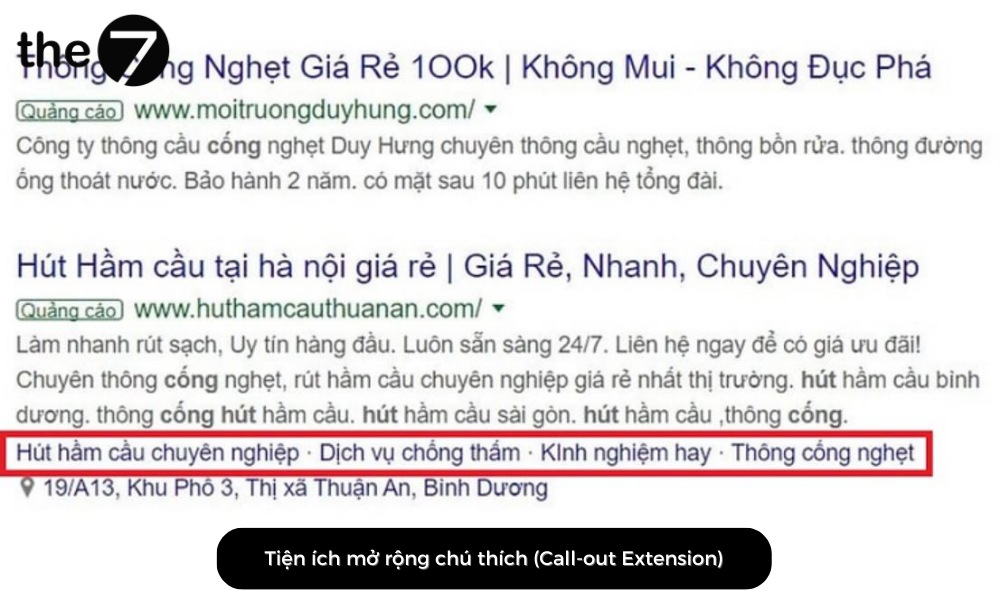
Callout extensions usually don’t stand out much, but you can use them to save space in your extensions or to highlight things that aren’t on your landing page, such as support details or delivery…
However, pay attention to the content and the amount of information shown to customers. Google only allows 2 descriptions to be displayed at the same time. If those 2 descriptions appear together with callouts, information can end up duplicated, making your ad too long and discouraging customers from reading it.
Location Extensions
If your e-commerce store or business has a physical location, take advantage of the Location Extension to drive sales. It lets you tap into the power of location by showing your ad together with your store address, a map to the location, and even the distance to your business.
This extension is different from the others. You pay both for clicks that send potential customers to your website and for clicks that go to your business location.
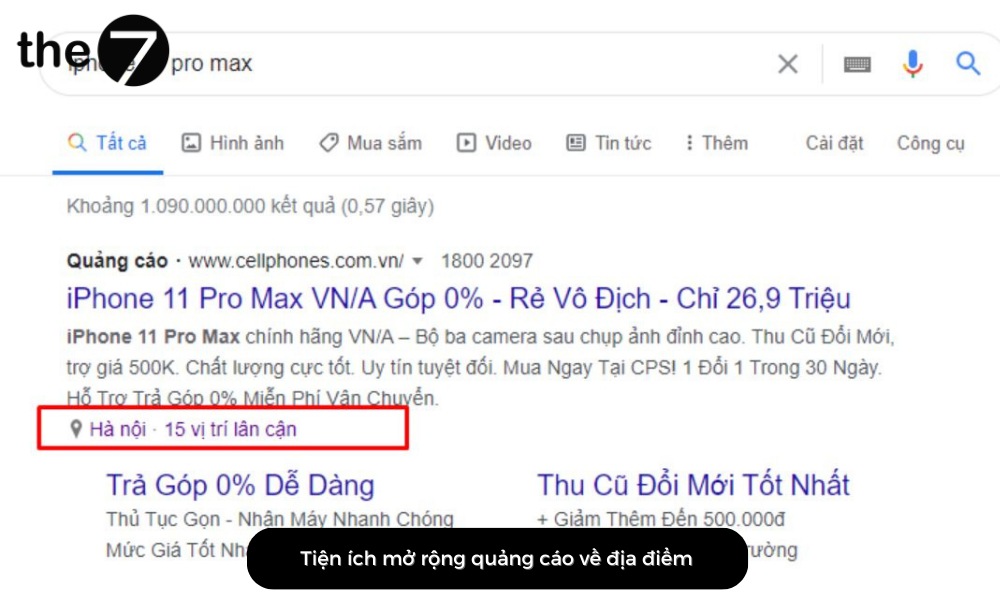
When potential customers click the Location Extension, they are taken to Google Maps, where your store or business location has already been entered. The extension can also show your store’s phone number and location so buyers can easily get in touch.
Review Extensions
With this extension, you can show people the positive reviews from customers who have bought and used your services or products before. When an ad carries a positive review, other customers view it more favorably and trust your products more.
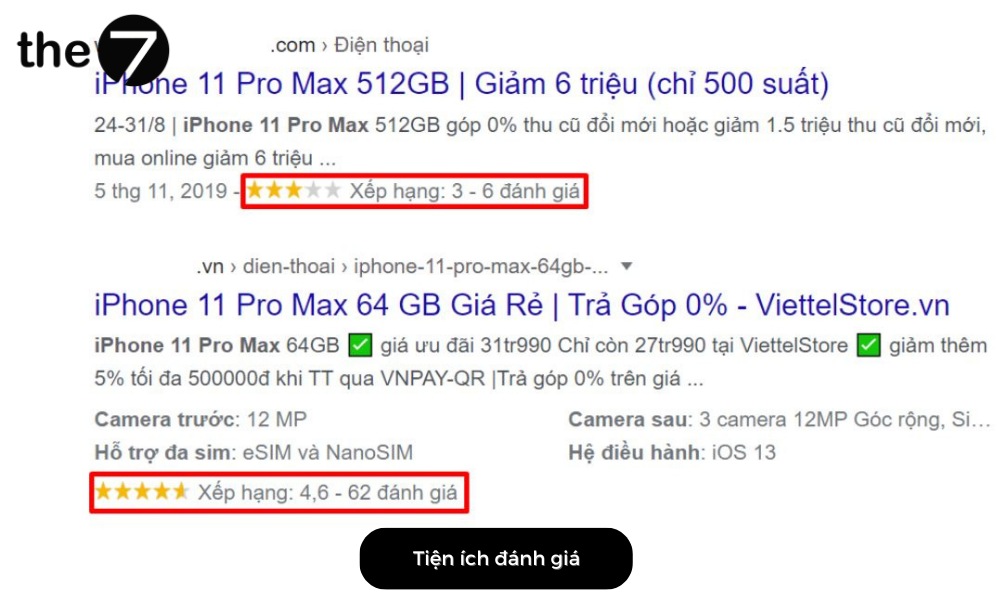
Every review is a vote for the quality and credibility of the services and products you offer. Marketing experts point out that 64% of customers look for reviews before they decide to buy.
With review extensions, a business can put customer testimonials directly into its ads on Google Ads. Naturally, this means the ads will earn more clicks and a higher conversion rate.
App Extensions
App Extensions support businesses and organizations that have developed, or are developing, their own apps. They let you link from Google Ads to your own mobile or tablet app.
Websites are fairly hard to navigate and not very attractive when viewed on phones or tablets. That is also why businesses are willing to spend a large sum to develop mobile apps, because apps are easier to navigate.
Accessing information on a phone is also much faster and easier. On top of that, customers use their phones to look up information more than any other device.
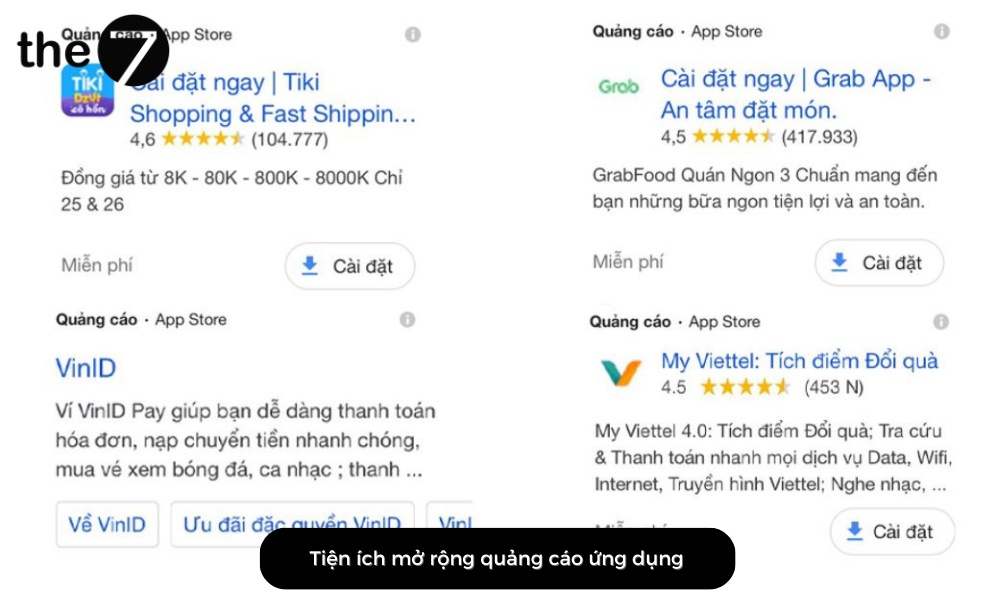
It’s not just e-commerce platforms like Lazada, Shopee, or Tiki. Most businesses across many different fields now use app extensions to bring their own apps for services and products closer to customers.
So if your organization is developing an app, add the App Extension to your ads on Google Ads right away.
Promotion Extensions
This extension gives businesses a chance to increase revenue directly. Promotion extensions make your ads stand out with information about offers and promotions.
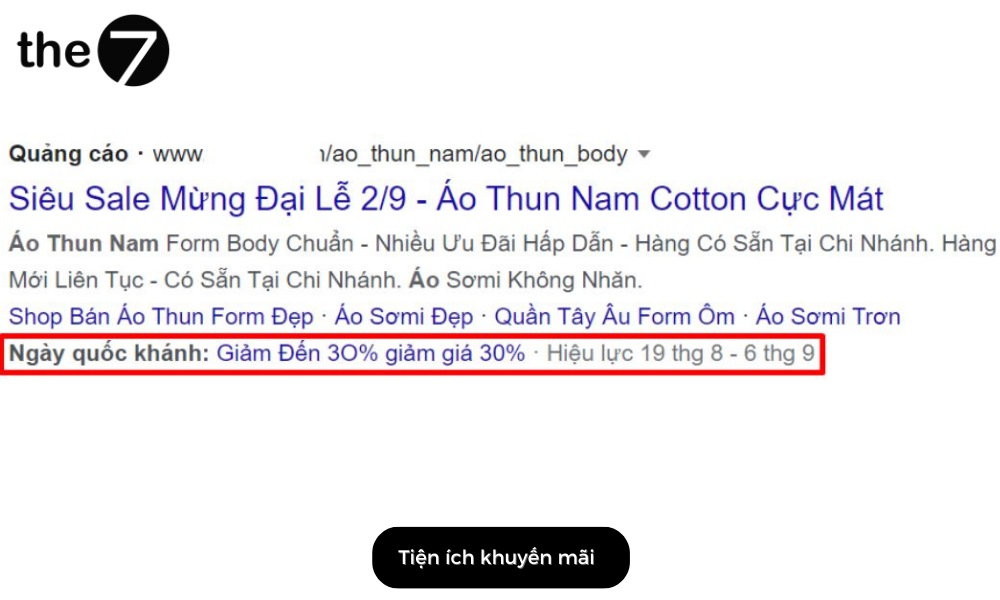
This type of extension appears below your ad as up to 2 lines of text. Businesses often use it on special occasions or to clear out inventory… You can set messages that show a percentage discount or a fixed amount off a product or service.
Best of all, adding this extension is completely free. You only pay when a customer clicks to view the promotion, and the cost per click is the same as a click on the main ad.
Structured Snippet Extensions
Structured snippet extensions let you provide extra information related to the services and products you sell.
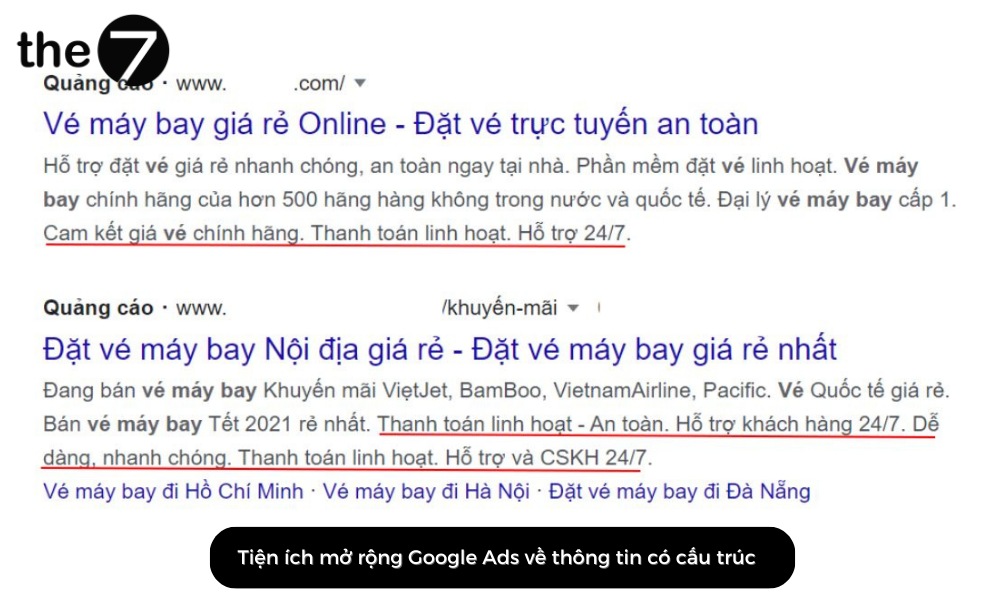
Not every customer who sees an ad knows who you are, what you sell, or what your service does for them. That is why this extension was created: to give customers additional explanation about your products and business.
In addition, the extension can improve relevance and ad click-through rates. That improves your return on investment by focusing on attracting clicks from people who are more likely to be interested in what your organization offers.
Don’t forget to connect with The7 for consultation and support on adding sitelink extensions and optimizing your Google Ads campaigns, helping to increase visibility and conversion rates and improve ad performance for your business!
>>> See more related articles: A guide to linking Google Analytics with Google Ads in 2024

Nguyễn Đình
Bảo




As CEO of The7, I am committed to sharing practical, useful knowledge with every reader. Every article on The7 is based on my 7 years of hands-on experience in marketing — Facebook advertising, LinkedIn advertising, Google advertising, and marketing strategy. I hope you take away plenty of insight from these posts and apply it successfully in practice.
Related Articles
6 Simple Yet Effective Steps to Run Google Ads in 2024
Google Ads (Google AdWords) is Google’s online advertising service that helps businesses reach the right target customers, boost brand awareness, attract customers, and drive sales as customers search for information...
How to Run Effective Gmail Ads for Your Business
One of the advertising formats attracting the attention of many business owners is Gmail advertising. So how do you run effective Gmail ads? Let The7 walk you through this fresh...
What Are Google Smart Campaigns? Tips to Drive High Traffic
Google Smart Campaigns are one of the ways advertisers can access advertising information and digital marketing techniques faster. If you have just started a small business, keeping track of your...
What Card Should You Use to Pay for Google Ads in 2024?
Which card to use to pay for Google Ads is a common question among people who are new to Google Ads campaigns. So which card is best for paying for...
How to Link Google Analytics With Google Ads in 2024
To run Google Ads effectively, you need to do more than just launch campaigns. You also have to analyze and evaluate the performance of each campaign through its metrics. So...
SEO vs. Google AdWords Advertising: Which Campaign Should You Choose?
SEO and Google AdWords are both powerful forms of online marketing. With competition on the digital market growing fiercer by the day, comparing SEO and Google AdWords to decide which...


