


What Is Google Merchant Center? Latest GMC Updates for 2024

Consumers’ tastes and shopping behavior keep changing, and that makes a strong online presence a must. Imagine a platform that not only helps you showcase your products to a wide range of customers across multiple channels, but also brings customer insights together in a single dashboard. That is Google Merchant Center, the gateway to a world where your products break through boundaries and capture the attention of shoppers who are ready to buy.
What Is Google Merchant Center (GMC)?
Google Merchant Center (GMC) is a tool that helps you manage and advertise your online store and products across Google’s many platforms, such as Google Shopping. When you use Google Merchant Center effectively, your products become easier to find online and reach more customers on Google. It makes it simple to upload your products and ensures they show up when potential buyers search for similar items.
Today, with e-commerce now mainstream, businesses are looking for ways to maximize their online presence and reach potential customers effectively. Keep in mind, though, that search engine optimization (SEO) is a long-term effort that cannot deliver results overnight. While you should keep optimizing your website for SEO, it is just as important to run advertising alongside it. In other words, you recognize the long-term value of SEO while also meeting your immediate needs through ads.
This is where Google Merchant Center comes in: you can use it to improve your presence on search results pages and boost your sales.
With Google Merchant Center, you can manage your online business and make sure your products get found more often. Another reason to use it is that you can integrate it with other Google services, such as Google Business Profile (GBP), giving you full control over your online marketing campaigns on Google.
Benefits of Using Google Merchant Center for Your Business

Google Merchant Center is an essential tool for e-commerce businesses. It gives them the chance to reach a huge number of users and showcase their products smartly, right when consumers are searching for similar items. This precise, targeted visibility leads to higher click-through rates, better conversion rates, and increased sales.
Here are the benefits of using Google Merchant Center for your business:
Real-Time Product Description Updates
Did you know that there are around 8.5 billion searches on Google every day? That is the main reason you need to update your product descriptions whenever necessary. With Google Merchant Center, you can quickly update and refine your product descriptions as your products change. This real-time capability keeps your product information accurate, appealing, and relevant to your target audience.
However, the benefits of Google Merchant Center go beyond managing product descriptions. One clear example of its effectiveness is the ability to bring content from the platform into Google Shopping, which helps you run targeted advertising campaigns. This strategic combination reflects the core goal of SEO, which is to increase your website’s visibility on search engines, so your products stand out more. By using Google Merchant Center, you can not only create real-time, engaging product descriptions but also reach potential customers through Google Shopping to expand your product reach, building a trustworthy, interactive environment with your audience.
Performance Tracking
SEO is a journey that calls for constant testing and learning. Regularly evaluating performance is important for judging how effective your digital marketing efforts are. Google Merchant Center is a valuable tool in this process, allowing you to track and adjust your campaigns accurately.
With the volume of data Google has available, it has a deeper view of your customers, one that can surpass your own insights, especially when it comes to understanding what drives their engagement. Tracking these complex patterns in your campaigns yields some of the most valuable information. As you go through this process, Google Merchant Center gives you the tools to measure product performance accurately. These insights not only help you make data-driven decisions but also form the foundation for adjusting your strategy, optimizing it for more favorable results.
Reach a Global Audience
If your products suit customers around the world, joining Google Merchant Center is a smart strategic move. This versatile platform lets you set up multi-country product feeds, extending your product offering to a large pool of potential customers worldwide. By optimizing your website for global SEO, you increase your chances of building brand awareness across many different countries, creating a global presence.
Merchant Center Next vs. Merchant Center
Google has announced the launch of an upgraded version of Google Merchant Center called “Merchant Center Next” and plans to gradually replace the old version before 2024. The original Merchant Center is still running, but Merchant Center Next offers a more intuitive, more streamlined interface with advanced features built in.
The Google Merchant Center Next dashboard:

The Google Merchant Center dashboard:

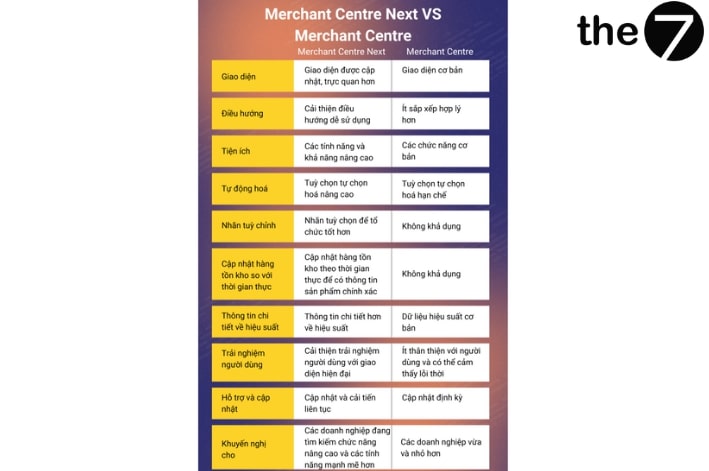
Merchant Center Next has improved navigation, which makes it easier for businesses to manage product data, campaigns, and settings. The new interface offers a cleaner, more user-friendly experience, saving businesses time and effort when managing their product listings.
In addition, Merchant Center Next includes advanced features such as automated data feeds, custom labels, and real-time inventory updates, making it the preferred choice for businesses looking for more advanced features and performance.
Take a look at the table below for a clearer picture of the differences between Google Merchant Center Next and Google Merchant Center:
How Do You Use Google Merchant Center?
Getting started with Google Merchant Center is a simple process that involves a few basic steps. Here is a short guide to help you get going:
Create a Google Merchant Center Account
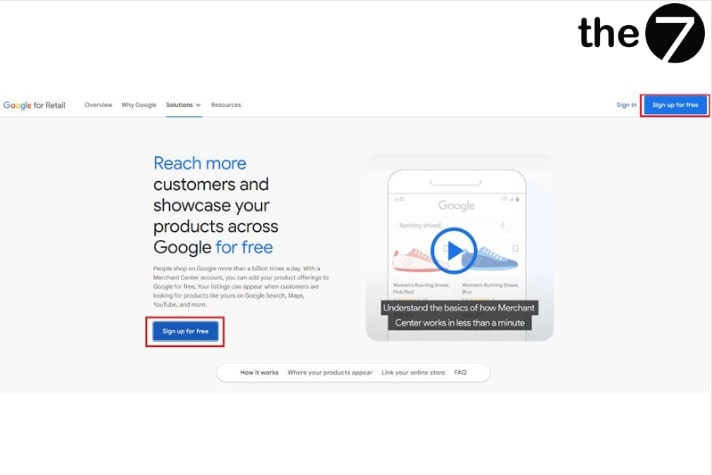
Go to the Google Merchant Center website and sign in with your Google account credentials. If you don’t have a Google account yet, create one by following the instructions provided.
Link to Google Ads
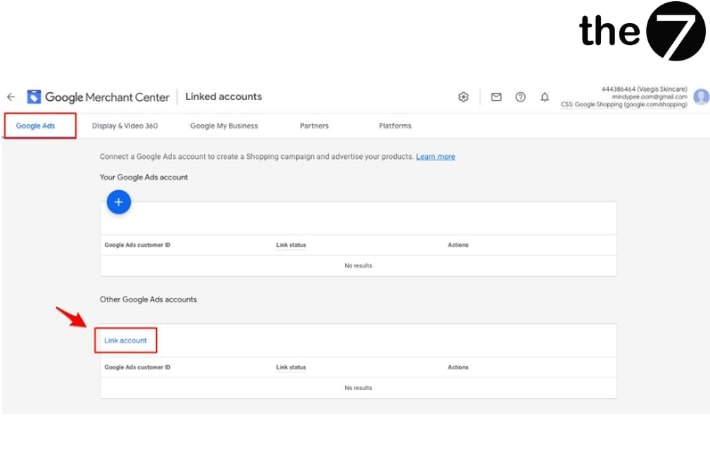
Connect your Google Merchant Center account to Google Ads to maximize the impact of your product listings. This integration lets you run Shopping ad campaigns and promote your products to a wider audience.
Verify and Claim Your Website
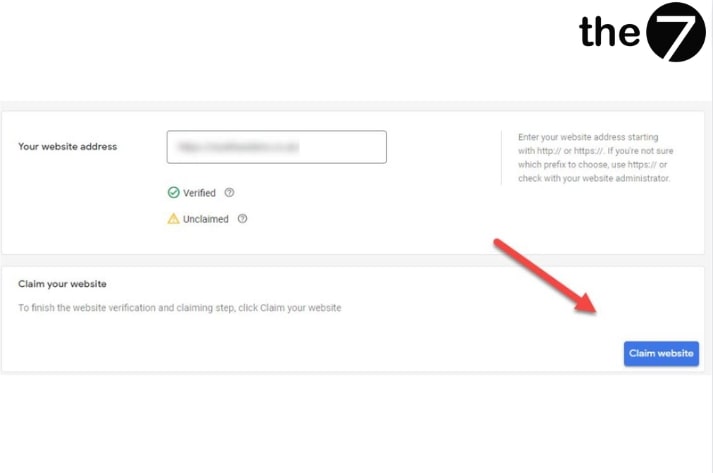
To make sure you have the right to manage and advertise your products, you need to verify and claim ownership of your website in Google Merchant Center. This process involves adding specific code snippets or uploading an HTML file to your website.
Account Settings
Once your account is set up, take the time to configure settings such as currency, language, and shipping information. These settings make sure your product listings are accurate and match your business requirements.
Setting Up Your GMC Account Information
After creating your Google Merchant Center account, you need to enter basic information about your business in the Business information section of Merchant Center. This information is used across many Merchant Center programs, such as Shopping ads. Business information includes:
- Displayed business name: This is the name of the store or business you want to show in your product ads. Use your real, actual name so customers can recognize your brand more easily.
- Website: In this section, enter the domain where your products are hosted. Your website URL must start with “http://” or “https://” and include the full domain name. Note: Your product landing page links must match the domain you previously registered with Google Merchant Center.
- Business address: The location or headquarters of your company. Having a specific address helps customers trust you and the products you offer more.
- Primary user: Responsible for matters related to the Merchant Center account and receives emails about your account activity. This includes standard users, admins, and email contacts.
- Secondary users: These include users who manage orders and customer reviews on Google, as well as billing managers or billing analysts.
- Customer service: In this section, enter the URL, email, and phone number of the business contact who can answer customers’ questions about the services your website provides.
Step-by-Step Guide to Adding Products to Your GMC Feed
Option 1: Add products directly in Merchant Center
You can add products one at a time without creating and uploading a new data feed. After adding each item individually to Merchant Center, you can edit the information for each product separately.
- Step 1: Sign in to your Merchant Center account, select Products from the navigation bar, and click All products.
- Step 2: Click the blue plus button to add a product.
- Step 3: Enter the information in the required product data fields. These fields must be filled in accurately. If you enter them incorrectly, your ads will be flagged with errors and won’t be displayed. If you sell similar items that differ in size, color, gender, or other attributes, click Detailed product description and select I sell apparel or variant products. Then add the appropriate attributes and values to tell the variants apart.
- Step 4: Click Save.
Option 2: Add multiple products through Google Sheets
This is an effective solution when you need to add a large number of products to prepare for an advertising campaign. Follow the steps below:
- Step 1: Click the dropdown under Products in Merchant Center.
- Step 2: To create a new data feed, click the blue plus button.
- Step 3: Follow the instructions and fill in key details, such as the country where you sell your products and the language you use, then click Continue.
- Step 4: Name your data feed, select Google Sheets, and click Continue.
- Step 5: Choose Create a new Google Sheet from a template, then click Create feed and start editing your spreadsheet.
- Step 6: Make sure you have entered all the required attributes. These attributes can vary by country or product category, so refer to the product data specification and enter the information as required.
Recommendations for Using Google Merchant Center
To unlock the full potential of Google Merchant Center, follow these recommendations to optimize your product listings and improve your overall performance:
Recommendations for using Google Merchant Center
- Provide accurate, detailed product information: Make sure to provide accurate and detailed information for each product, including the title, product description, price, and availability. Clear, concise descriptions help customers make informed decisions, while accurate price and availability information builds trust.
- Use high-quality images: Present your products with high-quality images that accurately show how they look. Use professional photography and make sure your images meet Google’s requirements for resolution, aspect ratio, and background.
- Optimize titles and descriptions: Create engaging, relevant titles and descriptions for your products. Work keywords in naturally and highlight the main features and benefits of each product. Avoid keyword stuffing, as it can hurt visibility and the user experience.
- Use the right categorization: Assign accurate, specific product categories to your listings. Use Google’s product taxonomy to choose the most suitable category for each product. This makes your listings more relevant and helps customers find your products more easily.
- Manage and update your inventory: Update your product data regularly to reflect changes in product availability, pricing, or stock. Skipping updates can lead to customer dissatisfaction and wasted advertising spend due to outdated or inaccurate information.
In short, Google Merchant Center is an invaluable resource for both your Google Ads campaigns and your online store, offering a seamless combination of features. With just one tool at your fingertips, you can easily edit product descriptions and track performance, which streamlines the whole management process.
Google Merchant Center is also easy to use, letting you upload your product data simply and making it more convenient to optimize your inventory for Google’s platforms.
To get the most out of Google Merchant Center, though, integrate it with Google Ads to attract more buyers and increase sales. By linking these two resources, your products will have stronger visibility on Google Search, while your ads become more relevant and tailored to your target audience.
>>>> See more related articles:
- What Is Adwords? Reasons to Run Google Ads
- Guide to using Google Data Studio (latest 2024 edition)
- Guide to running effective Google Ads in 2024
- Google Advertising Services
- 7 Google Ads Trends (Latest for 2024)

Nguyễn Đình
Bảo




As CEO of The7, I am committed to sharing practical, useful knowledge with every reader. Every article on The7 is based on my 7 years of hands-on experience in marketing — Facebook advertising, LinkedIn advertising, Google advertising, and marketing strategy. I hope you take away plenty of insight from these posts and apply it successfully in practice.
Related Articles

6 Simple Yet Effective Steps to Run Google Ads in 2024
Google Ads (Google AdWords) is Google’s online advertising service that helps businesses reach the right target customers, boost brand awareness, attract customers, and drive sales as customers search for information...
How to Run Effective Gmail Ads for Your Business
One of the advertising formats attracting the attention of many business owners is Gmail advertising. So how do you run effective Gmail ads? Let The7 walk you through this fresh...
What Are Google Smart Campaigns? Tips to Drive High Traffic
Google Smart Campaigns are one of the ways advertisers can access advertising information and digital marketing techniques faster. If you have just started a small business, keeping track of your...
What Card Should You Use to Pay for Google Ads in 2024?
Which card to use to pay for Google Ads is a common question among people who are new to Google Ads campaigns. So which card is best for paying for...

How to Link Google Analytics With Google Ads in 2024
To run Google Ads effectively, you need to do more than just launch campaigns. You also have to analyze and evaluate the performance of each campaign through its metrics. So...
How to Add Sitelink Extensions in Google Ads (2024 Guide)
Sitelink extensions let your ads give customers more information. They also make each ad stand out more than your competitors’ ads. This gives your Google Ads extensions a Quality Score...


