


What Is Quality Score? How to Improve It in 2024
Quality Score is arguably a handy tool that Google Ads managers use to optimize their accounts and prioritize opportunities. But it is also one of the most misunderstood concepts in Google’s paid search. So what is Quality Score? How do you improve it? Join The7 as we break down the answers for you!
>>>>> Explore The7’s services: Google Ads Management Services
What Is Quality Score?
Quality Score (QS) plays a key role in evaluating how well your ads perform against competitors. It is shown on a scale of 1 to 10 and applies to each individual keyword.
As a useful diagnostic tool, Quality Score gives you detailed insight into the relevance and effectiveness of your ad strategy, keywords, and landing pages.
A high Quality Score shows that your ads and landing pages are relevant and deliver value to people searching for a keyword. As a result, your ads get more visibility and a better chance of converting.
To determine where an ad appears on a search engine, each ad is evaluated based on a combination of its bid and its Quality Score. The ads are then ranked in descending order based on the result of this equation.
Although search engines do not disclose the exact ratio of Quality Score to bid, they all reserve the right to adjust their ranking methods.
Quality Score also plays an important role in determining a keyword’s eligibility during the auction and when ads are shown. Keywords with a low Quality Score are unlikely to be shown.
In late 2008, Google announced that it uses Quality Score to decide which ads appear in the organic, non-paid search results. A high Quality Score helps your ads outrank those with lower scores, thanks to the usefulness of your ad copy, keywords, and landing pages.
In short, Quality Score is an essential tool for diagnosing and improving the factors tied to your ads, keywords, and landing pages so you can achieve optimal results.
>>>> See more:
- The most effective guide to running your own Google ads in 2024
- What is Google AdWords? An overview of Google Ads
Factors That Affect Quality Score
Quality Score is affected by a number of different factors. Specifically:
| Factor | Details |
| Past click-through rate (CTR) for specific keywords | That is, how often a keyword leads to clicks on a particular ad. |
| Past CTR of the display URL | How often a specific display URL receives clicks. |
| Account history | The overall CTR of all the ads and keywords in an account. |
| Landing page quality | How transparent, relevant, and easy to navigate the landing page is. |
| Relevance of the keyword to the ad. | Simply put, how well the keyword matches your ad. |
| Relevance of the keyword to the search | That is, how relevant the keyword is to what customers are searching for. |
| Geographic performance | How likely your account is to succeed in specific regions. |
| Ad performance on a given website | How well ads perform on this website and similar websites in the Display Network. |
| Target devices | How well ads perform on different device types such as tablets, mobile, and PC. |
From the nine factors above, we can see that Quality Score is shaped by two important signals: ad performance history on websites and on devices. In addition, choosing the right keywords also helps show whether your Quality Score is moving with or against current market trends.
Why Should You Improve Quality Score?
Quality Score is an important metric Google uses to determine the ranking position (Ad Rank) of Google Ads. Quality Score ranges from 1 to 10. The higher the score, the more often your ads are shown and clicked.
An ad with a high Quality Score has a better chance of earning a strong Ad Rank and a lower CPC, while also improving your business’s ability to reach potential customers. Beyond improving your Google ranking, Quality Score also lowers your cost per click and boosts the competitiveness of your ad campaigns. Specifically:
Improve Your Google Ranking
In the Ad Rank formula, Quality Score is the factor that decides whether your ads reach a good position in the search results.
When your Quality Score is low, your Ad Rank naturally drops. That means your business’s ads will miss out on a large number of potential customers on Google.
Lower Your CPC
CPC is the amount you pay each time someone clicks on your ad. If an advertiser wants to optimize CPC, raising Quality Score is the best option.
If your Quality Score is high, Google trusts that the ad is likely to deliver good results. As a result, more potential customers will see your ad, and you no longer have to pay so much for each click.

Boost Your Competitive Edge
When your ads have a high Quality Score and also earn plenty of engagement and positive feedback from users, Google rates your business more favorably.
From there, your business’s ads get more chances to compete on Google, reach more of your target audience, and convert into revenue effectively.
In short, improving Quality Score can help us hit the goals of a Google Ads campaign, such as improving Ad Rank, lowering CPC, and boosting your competitive edge.
13 Suggested Ways to Improve Quality Score
Improving your ad score can take a lot of time and effort, but it is absolutely worth it. Here are some ways to improve Quality Score that you can try:
Choose Accurate Keywords
It is not only in SEO: in Google Ads, keywords also play an extremely important role. Quality Score is a good example.
So make it a priority to choose keywords that are well rated and showing positive growth. This helps your Quality Score improve noticeably.
In addition, look for a set of keywords that are closely related to each other. Google will then recognize them and allocate your ads clearly, helping your ads reach more customers.

Make Landing Page Content Match Your Keywords
Landing page content that matches your keywords directly affects the Quality Score of your Google Ads. For example, if the keyword you choose is “bán máy tính” (computers for sale) but, when customers arrive, the landing page content talks about how to repair computers… then it is easy to see why your Quality Score would suffer.
So you need to improve your landing page content so that it fits your ads, matches user needs, and is high quality. Make sure the landing page stays true to the intent of the keyword.
A landing page with clear content, a focus on user needs, useful information, clear images and videos, and a clear call to action will see its bounce rate drop and its time on page rise. As a result, your Quality Score will also go up.
Optimize Your Content
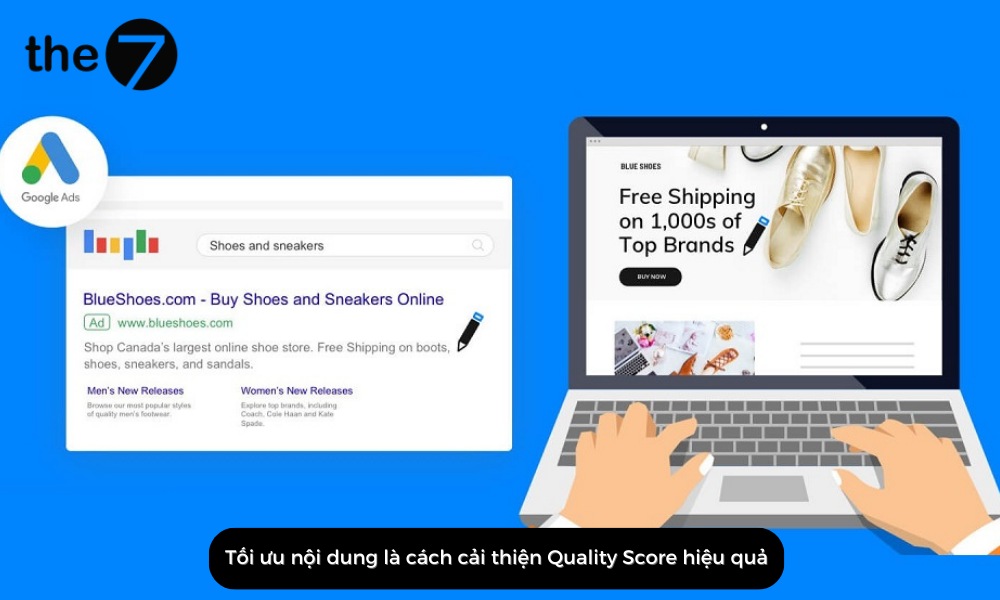
Optimizing your content is an effective way to improve Quality Score. Relevant, high-quality ad content helps Google understand that your ad is related to user needs, which in turn raises your ad ranking on Google.
So present your landing page content as clearly, transparently, and concisely as you can. The more detailed the content, the stronger the customer’s emotional pull each time they click the conversion button.
In addition, businesses should invest in videos and images that show the colors, designs, details, and usage of the product. You should also arrange them in a sensible, logical order. Remember: the more engaging and optimized your landing page content is, the higher your Quality Score will climb.
Use Appropriate Navigation
Navigation buttons are something every advertiser adds to their ads to increase the conversion rate. However, do not rush and place CTAs without a clear purpose.
Make sure that, wherever you place a CTA, viewers have enough time to learn about the service or product before taking action. The more skillfully a CTA is placed, the more your ads’ Quality Score will improve.
Increase Page Load Speed
Page load speed also affects Quality Score to some extent. In fact, page load speed and bounce rate are directly related: the slower a page loads, the higher the bounce rate. Put simply, customers leave your ads before they even find out what is on the landing page because they have had to wait too long. Naturally, your Quality Score will slide as a result.
So make sure users get the best possible experience whether they reach your ads on a PC, mobile, tablet, or any other device. Check your page load speed regularly and control the size of uploaded images and videos, as well as your hosting, so that your Quality Score is not lowered for avoidable reasons.

Target the Right Audience
When you identify your target audience correctly, your business saves a great deal on advertising costs.
In addition, when your ads reach an audience that actually needs what you offer, it also confirms the quality of your ads. Naturally, a higher Quality Score follows.
Research and Refresh Your Ad Campaigns Regularly
Of course, no ad campaign lasts forever. Customer trends change often, so your ads also need to shift to keep your approach fresh. This is also a great way to improve your Quality Score, and many businesses already use it.

Add Sitelinks
Sitelinks are additional links that appear beneath your ad on Google’s search results page. They help users navigate to your landing pages easily and can lead to more clicks and a higher conversion rate.
However, to increase the chances of Sitelinks showing for your ads, you should build a clear site structure, provide quality content, use internal links, create a Sitemap.xml file, and submit it to Google Search Console.
Example: For the keyword “how to play the Shopee farm game”, you can use two Sitelinks that lead to specific landing pages such as “how to access the Shopee farm game” or “how to grow crops in the Shopee farm game”. Delivering exactly what users want right on the search results page makes your ads stand out more, while also raising CTR and producing better, more accurate conversions.
Replace Ineffective Ad Copy
Conversion data is the key data for deciding whether an ad succeeds or fails. If your business’s ad does not lead to conversions, you should replace it.
However, if you have no conversion data, you can use CTR instead. CTR is the percentage of users who click your ad after seeing it. A good CTR is typically 2-4%. If your ad falls below 1.25-1.5%, you should consider replacing it.
In addition, we also need to run tests to gather creative ideas for your business’s headlines, descriptions, calls to action, and display URLs. This takes more time at first, but it helps your ad campaign get off the ground faster.

Set Geographic Targeting for Your Ads (Geotargeting)
Choosing where your ads are shown is important for any business using AdWords. Targeting indiscriminately only makes your ad campaign worse, and you may not even reach your final goals.
So think carefully about where your potential customers are, and consider the area around where they live, so you can picture the work to be done before creating a new Google Ads campaign.
Use Negative Keywords
Negative keywords are mainly used to help you avoid unwanted clicks.
Here is how you can create negative keywords:
- Use Keyword Planner to find every unwanted keyword phrase.
- In the keywords tab, click “Keywords Details” or “All” and see exactly which keyword triggers the negative keyword or set of negative keywords.
- Take out the negative keywords you want and apply them.
Reduce the Number of Keywords
The worst Quality Scores usually show up in ad groups crammed with keywords. Try to limit the number of keywords in each ad group as much as possible (around 3-10 keywords per ad group) so you can create ads that target a more focused, specific keyword. This improves relevance and also raises CTR.
Separate Out Broad Match Keywords
Broad match keywords are a bit like a double-edged sword. They can give you suggestions for new keywords, ad groups, or campaigns. However, they can also generate conversions on those low-cost long-tail keywords.
Left unchecked, these keywords can become a monster that eats up your budget. Worse, they are a CTR killer. That is why separating out broad match keywords helps you control your budget flow better and optimize your ad campaign effectively during critical periods and for exact match keywords.
Separating out broad match keywords is fairly easy. Just duplicate your campaign in Ads Editor, then rename the ad group and exclude the corresponding keyword.
How to Check Your Google Ads Quality Score
Checking your Google Ads Quality Score is not difficult at all. You can add a “Quality Score” column to your report and then look at the related metrics, such as CTR or landing page experience….
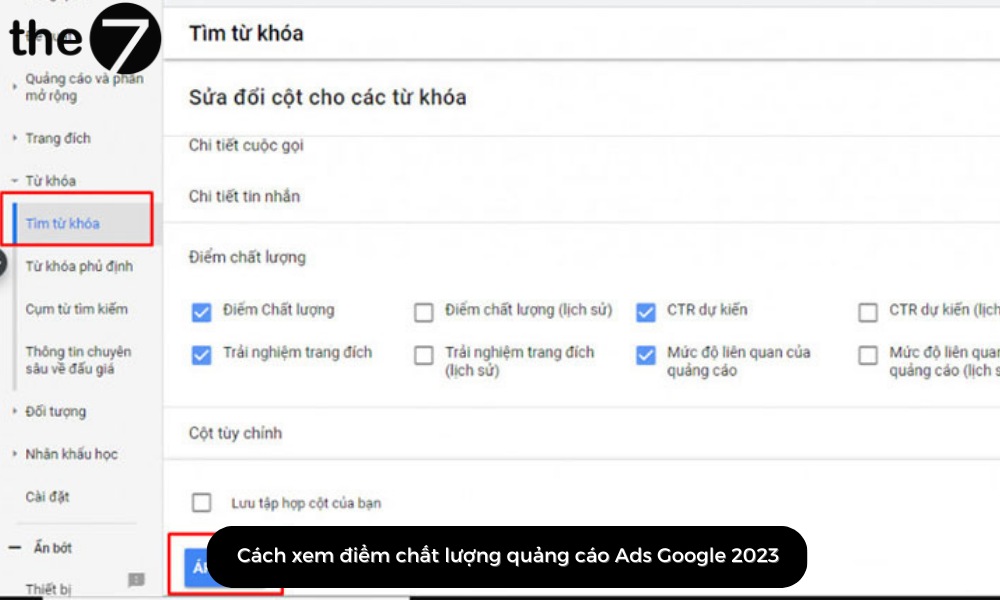
Here are the specific steps to check your Google Ads Quality Score:
- Step 1: Sign in to Google Ads.
- Step 2: Click “Ads”.
- Step 3: Select Keywords -> Edit columns.
- Step 4: Check Quality Score and the related metrics you want to track.
- Step 5: Click Apply to see the details.
In short, Quality Score is a metric that rates the quality of your ads on Google Ads. Improving Quality Score is an ongoing process, so you should monitor and check it regularly and make the necessary changes to improve it. Get in touch with The7 if you need more advice on Quality Score!
>>> Read more related articles:
- 15 Google Ads metrics you need to know to run ads effectively
- Google AdWords Ad Rank explained: the Ad Rank formula
- What is CPM? How CPM and CPC differ

Nguyễn Đình
Bảo




As CEO of The7, I am committed to sharing practical, useful knowledge with every reader. Every article on The7 is based on my 7 years of hands-on experience in marketing — Facebook advertising, LinkedIn advertising, Google advertising, and marketing strategy. I hope you take away plenty of insight from these posts and apply it successfully in practice.
Related Articles

6 Simple Yet Effective Steps to Run Google Ads in 2024
Google Ads (Google AdWords) is Google’s online advertising service that helps businesses reach the right target customers, boost brand awareness, attract customers, and drive sales as customers search for information...
How to Run Effective Gmail Ads for Your Business
One of the advertising formats attracting the attention of many business owners is Gmail advertising. So how do you run effective Gmail ads? Let The7 walk you through this fresh...
What Are Google Smart Campaigns? Tips to Drive High Traffic
Google Smart Campaigns are one of the ways advertisers can access advertising information and digital marketing techniques faster. If you have just started a small business, keeping track of your...
What Card Should You Use to Pay for Google Ads in 2024?
Which card to use to pay for Google Ads is a common question among people who are new to Google Ads campaigns. So which card is best for paying for...

How to Link Google Analytics With Google Ads in 2024
To run Google Ads effectively, you need to do more than just launch campaigns. You also have to analyze and evaluate the performance of each campaign through its metrics. So...
How to Add Sitelink Extensions in Google Ads (2024 Guide)
Sitelink extensions let your ads give customers more information. They also make each ad stand out more than your competitors’ ads. This gives your Google Ads extensions a Quality Score...


