


35 Facebook Advertising Terms Every Beginner Must Know
If you’re new to Facebook advertising, you’ll quickly run into Facebook advertising terms like campaign, objective, budget, test, CPM, CTR… The7 will help you understand these basic terms so you can run your Facebook Ads strategy more smoothly. Below is a list of 35 essential Facebook advertising terms you need to know to track and evaluate your campaign performance.
1. Facebook Page Terms
1.1 Basic Terms
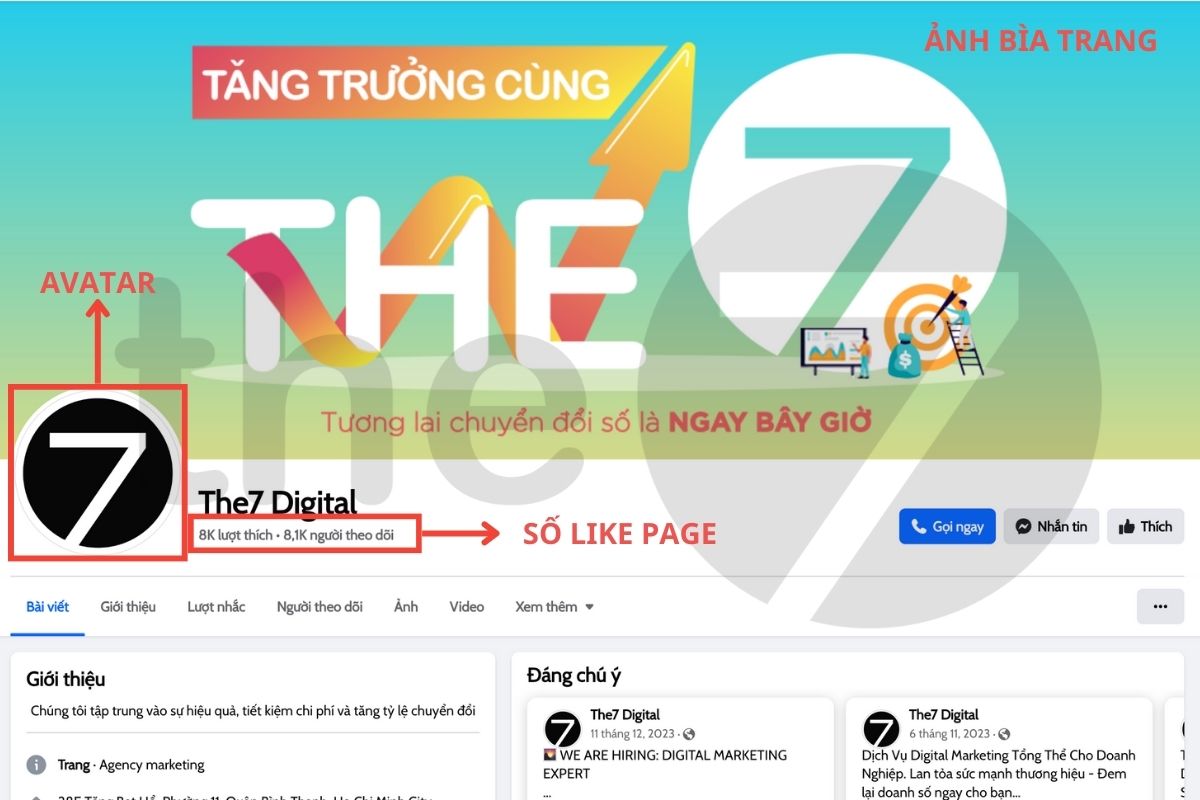
- Avatar (Profile Picture)
This is the profile image of your Facebook Page, usually a logo or product image used for brand recognition. The standard size of a profile picture is 168px x 168px, and it is cropped into a circle.
- Cover Photo
The cover photo is the first large image users see when they visit your Facebook Page. It can be used to make your brand stand out or to display information about ongoing campaigns. The standard size of a cover photo is 820px x 312px.
- Page Likes
This metric shows the number of people who have clicked the “Like” button on your Page. The number of Page Likes can boost your brand’s credibility in the eyes of new customers.
- Facebook Insights
Once your Facebook Page has been active for a while and has attracted a significant number of followers, Facebook provides Insights with key information such as your followers’ age, gender, location and activity habits. This information helps you optimize your advertising budget effectively.
>>>> You can explore The7’s Facebook advertising services
1.2 Facebook Page Roles and Permissions
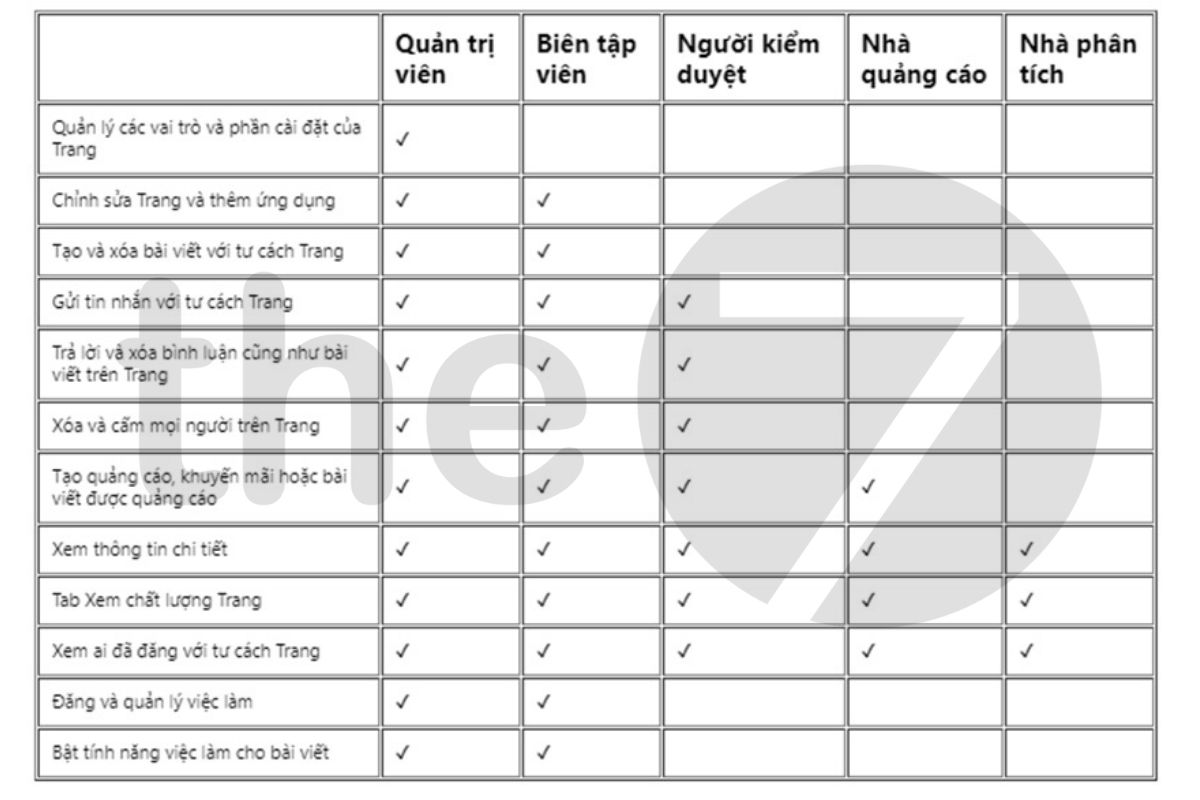
A Facebook Page has 5 different roles:
- Admin: Has full control over the Page’s settings.
- Editor: Cannot add or remove members, but can still edit other settings, such as running ads, publishing posts and replying to customer messages.
- Moderator: Cannot add or remove members, publish posts or change Page settings. Can only reply to messages and comments, and view ad campaign metrics.
- Advertiser: Cannot add or remove members, publish posts or reply to customers. Can only monitor metrics and run ads for the Page.
- Analyst: Can only monitor the Page’s metrics and has no permission to interfere with any other activity.
2. Terms for Running Facebook Ads
Mastering the basic advertising terms is an important step toward setting up and managing your ad campaigns effectively. Here are some key terms you need to know to analyze and evaluate campaign performance and to optimize your campaigns.
2.1 Ad Objective Terms
Following the customer’s buying journey, there are 3 main objectives for ad campaigns:
- Awareness: Increase brand awareness and reach.
- Consideration: Increase traffic, engagement, app installs and video views, find leads, and drive messages.
- Conversion: Drive conversions, catalog sales and store visits.
2.2 Ad Campaign Terms
Ads Manager: This is where you start to create and fine-tune your ads.
Campaign: A collection of multiple ads and ad sets, where each campaign has a specific objective.
Ad set: Within each campaign, you can create multiple ad sets, and each one contains a series of ads tied to a specific goal.
Ad: The most basic unit of a campaign, made up of elements such as images, video and the content you want to deliver to your target audience.
Buying Type: The way you choose to pay for your ad campaign, which affects how your ads are delivered.
Fixed price: A fixed budget is set for the campaign, and ads are bought based on the number of impressions Facebook provides.
Ad Auction: A more flexible method in which you place a bid for your ads to be shown to your target audience, based on an auction mechanism.
2.3 Ad Setup Terms
Targeting: The specific group of customers you want your ads to reach.
Custom Audience: A target customer group built from data such as UIDs, emails or people who have interacted with your website or app.
Saved Audience: Information about a customer group based on criteria such as location, gender, age and interests, saved so you can reuse it in later campaigns.
Lookalike Audience: A group of Facebook users who share similar characteristics with your custom audience, expanding your potential to reach new customers.
2.4 Terms for Running and Evaluating Ads
Cost: The amount you pay each time an ad achieves a desired goal, such as an engagement, a click or a visit.
Conversion Value: The total value generated by customers’ interactions with your ads, configured in the tracking pixel.
Reach: This metric shows the number of people who have seen your ad.
Impressions: The total number of times your ad was shown to users.
Clicks: The total number of times users clicked on your ad.
Frequency: Measures the average number of times a person has seen your ad.
Click-through rate (CTR): The percentage of clicks relative to the total number of times your ad was shown.
Total spent: The total amount spent on one or more ad campaigns over a specific period.
Relevance Score: A score that rates ad performance based on user reactions, with a maximum of 10, calculated from the first 500 people reached.
Result: The number of specific actions your ad generates, based on the objective you set for the campaign.
Budget: The amount of money allocated to your ad campaign.
Daily budget (Per day): Allocates a fixed amount of money to your ads each day.
Lifetime budget (Lifetime): Sets the total budget for the entire duration of the ad campaign.
Estimated daily reach: The number of people expected to see your ad each day.
Potential reach (Potential): How many people in your target audience your ad can potentially reach.
CPA: The cost for each action a customer takes on your ad.
CPC: The cost each time a user clicks on your ad.
CPM: The cost for every 1,000 times your ad is shown.
Placement: The area on the platform where your ad is displayed to viewers.
3. Facebook Advertising Slang Only Industry Insiders Know
Personal account: An ad account linked directly to a personal Facebook account. Any issue affecting the personal Facebook account, such as being hacked or locked, will also affect this ad account.
BM (Business Manager) account: An ad account for businesses on Facebook. Each Facebook account can create up to two BM accounts, and each BM account can contain multiple personal accounts.
“Chạy bùng” (running and skipping payment): A term for using Facebook’s postpaid payment option without paying once the threshold is reached, which leaves the ad account owing money and results in Facebook stopping all of its campaigns.
Nick via: A real user’s Facebook account that has been hacked and then sold to people who want to run ads.
Nick clone: A fake account created by a user, not a real account.
Nick via Việt, via Ngoại: Facebook accounts belonging to Vietnamese users and foreign users, respectively.
Identity-verified via (XMDT): An ad account whose owner has submitted identity verification documents that Facebook has accepted.
That’s the list of common Facebook advertising terms you need to know. If you have any questions about Facebook services, don’t hesitate to contact The7 for detailed support.
>>> You can also check out these related articles:
- How to post sales content on Facebook and attract hundreds of orders

Nguyễn Đình
Bảo




As CEO of The7, I am committed to sharing practical, useful knowledge with every reader. Every article on The7 is based on my 7 years of hands-on experience in marketing — Facebook advertising, LinkedIn advertising, Google advertising, and marketing strategy. I hope you take away plenty of insight from these posts and apply it successfully in practice.
Related Articles

What Is Facebook Ads? Popular Types of Facebook Advertising
What is Facebook Ads? This is surely a question many people wonder about, especially those just starting to learn about Facebook advertising. Let’s explore Facebook Ads from A to Z...

26 Predictions for Social Media Marketing Trends in 2025
It’s that familiar time of year again, when experts and analysts start revealing their predictions for the social media marketing trends worth watching, along with the shifts that promise to...

How to Run Facebook Ads: 2024 Step-by-Step Guide
How can you run Facebook ads effectively, reach the right target customers, and generate valuable conversions? This is probably a question many Digital Marketers and business owners ask when promoting...

Requirements for Running Facebook Ads Successfully and Effectively
When you start your Facebook advertising journey, mastering the basics is the key to success. So what are the requirements for running Facebook ads exactly? Let’s begin exploring and optimizing...

The Most Detailed Guide to Creating a Facebook Ad Account in 2024
To run a campaign on Facebook, the first thing you can’t do without is an ad account. Below, The7 will walk you through how to create a Facebook ad account....
Facebook Video Ad Size: The Most Accurate Guide for 2024
Running video ads is becoming the go-to choice for many businesses. In this context, the Facebook video ad size plays a key role in determining how well your post performs....


