


How to Stop Facebook Ads: A Simple Step-by-Step Guide
While tracking, measuring, and optimizing your Facebook ads, you will filter out some underperforming Adsets to save budget. So how do you stop Facebook ads when an ad creative doesn’t perform the way you want? Let’s find out with The7 in today’s article!
>>> You can explore The7’s services:
- Facebook ad management in Ho Chi Minh City
- Facebook Advertising Services in Hanoi
- Facebook Advertising Services in Da Nang
What to Know Before You Stop Facebook Ads
Before you turn off Facebook ads, keep the following in mind:
- Turning off a campaign, ad set, or ad does not delete that campaign, ad set, or ad.
- When you turn off or pause a campaign, you also turn off or pause all the ads and ad sets inside that campaign.
- If you can’t turn a paused or turned-off ad back on, reset your spending limit or update the payment information for your account.
How to Stop Running Ads on Facebook Successfully
Plenty of users wonder how to stop ads on Facebook. If that’s something you’re looking into, here is how to stop running Facebook ads, as shared by our team:
How to Stop Facebook Ads at the Campaign Level
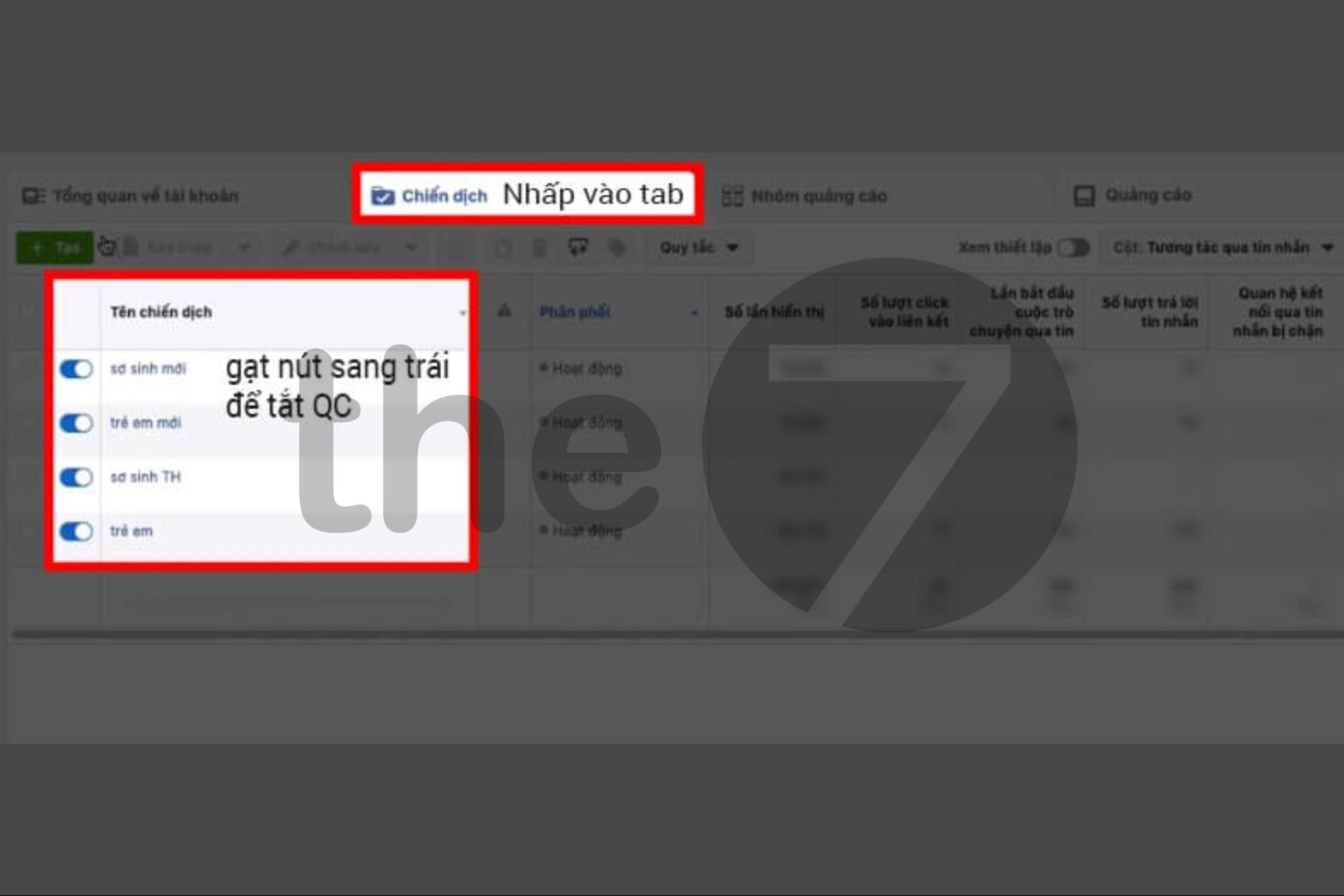
Here is how to stop Facebook ads at the campaign level:
- Step 1: Go to the ad management settings.
- Step 2: Select the ad campaign you want to turn off or pause.
- Step 3: Click the “On/Off” toggle next to the ad campaign. A blue toggle means the campaign is on, and a gray one means the ads are off.
How to Stop Facebook Ads at the Ad Set Level
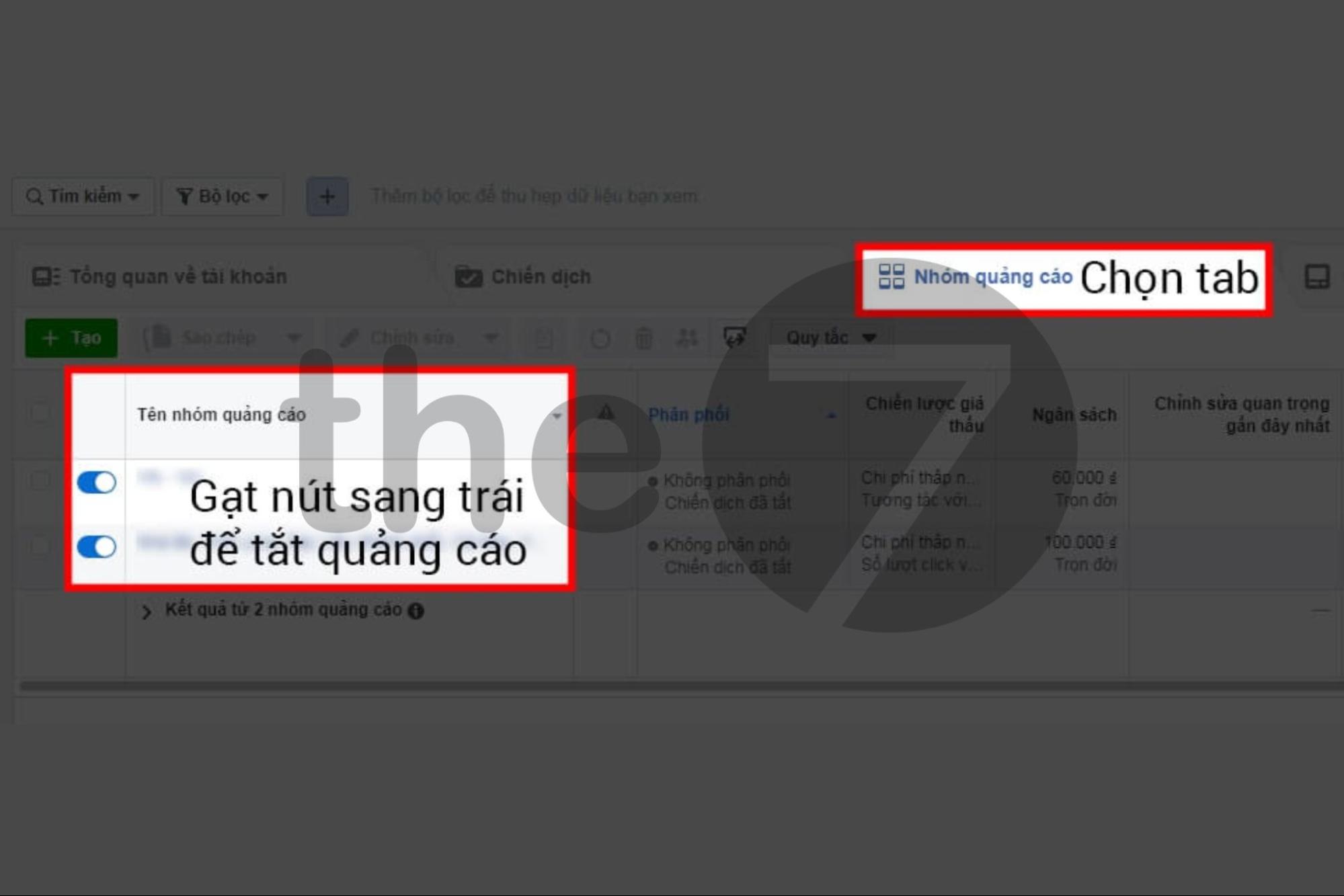
Say you target your Facebook ads at two audiences, A and B. Audience A gets plenty of engagement, while audience B doesn’t perform. If you want to stop showing ad set B, follow the steps below:
- Step 1: Go to the Facebook ad management page
- Step 2: Click the “Ad Sets” button -> Scroll down, find the ad set you want to turn off, and flip the toggle to the left. That’s it.
- Step 3: To restart the ad set, simply flip the toggle to the right.
How to Stop Facebook Ads at the Post Level
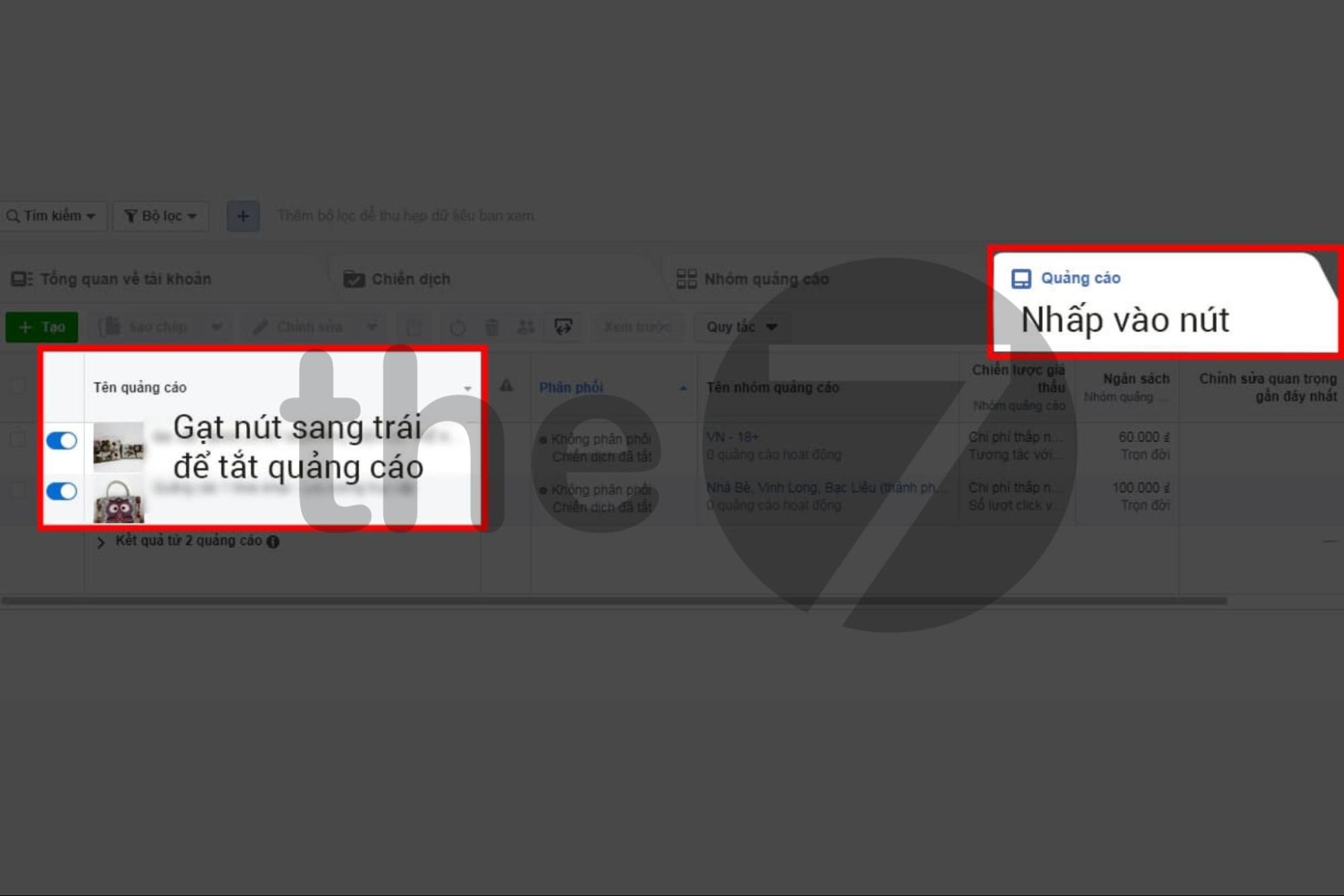
The post level (Adset) is the smallest level of Facebook advertising. If you want to turn off or adjust an underperforming post, turn off the Adset. Here is how:
- Step 1: Go to the Facebook ad management page through Facebook Business.
- Step 2: On the management page, click “Ads” -> Find the underperforming Adset and flip the toggle to the left.
- Step 3: To run the Adset again, flip the corresponding toggle to the right.
How to View Data for Deleted Facebook Ads
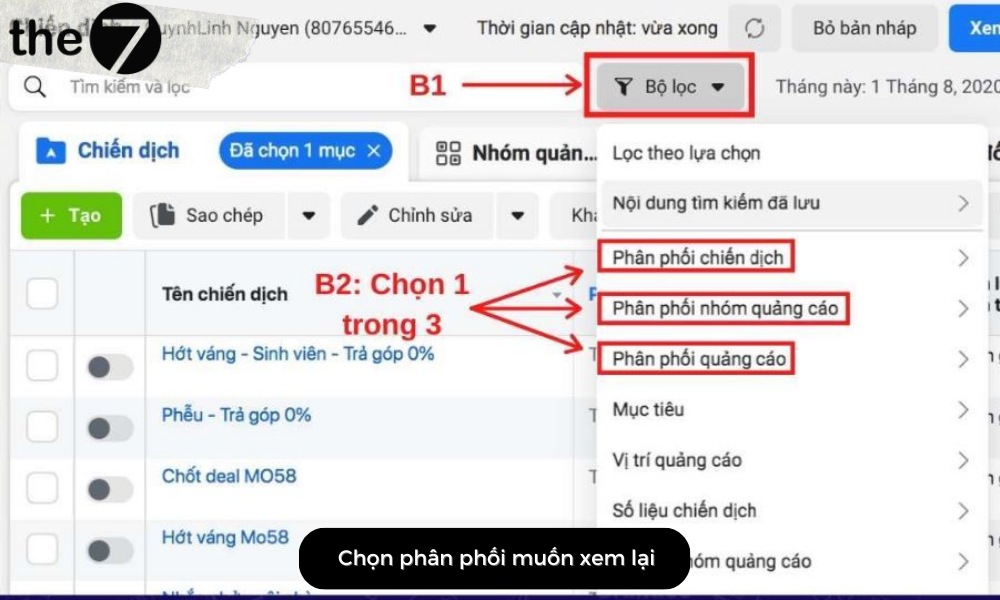
If you have already deleted an ad, you can still view its data after stopping Facebook ads. Here are the steps:
- Step 1: On the Ads Manager home page, click “Campaigns, Ad Sets, Ads”.
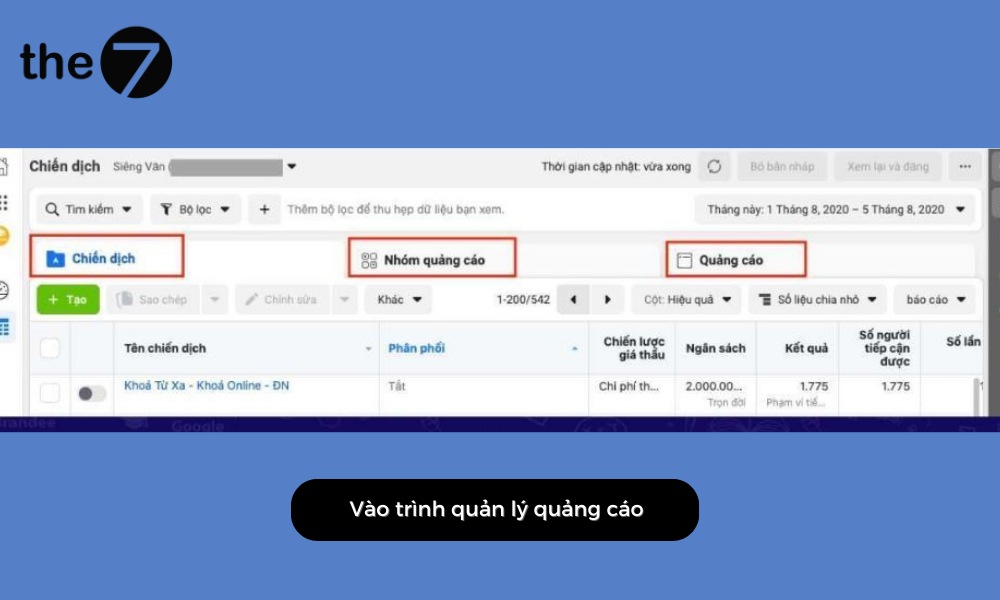
- Step 2: Click “Filters”.
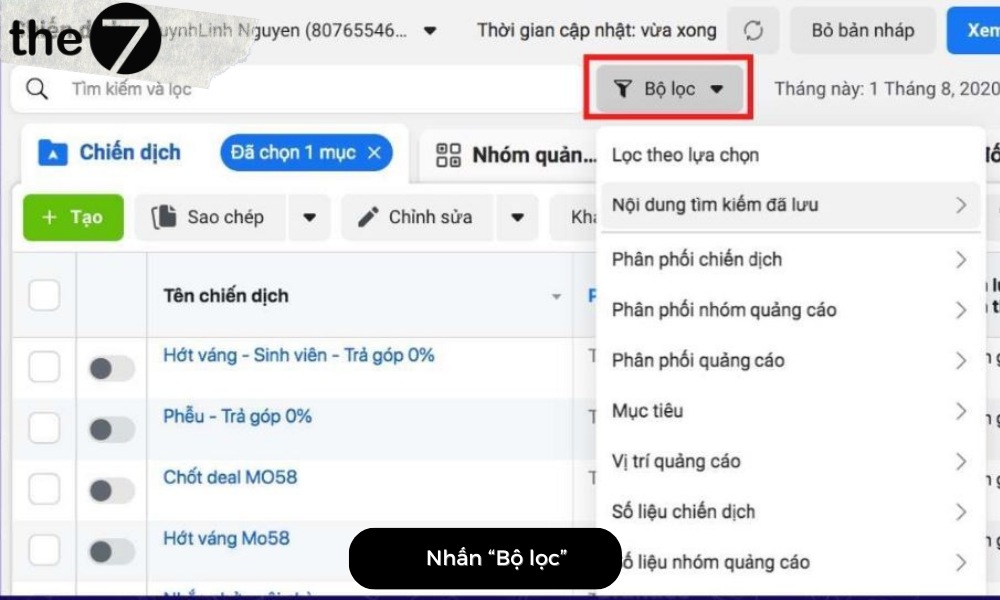
- Step 3: Next, in the “Delivery” section of the dropdown menu, select Deleted.
Answers to Common Questions About Stopping Facebook Ads
When they need to stop Facebook ads, individuals and businesses often ask the following questions:
When Should and Shouldn’t You Pause Facebook Ads?
Many people today wonder whether they should pause their Facebook ads. In reality, the answer depends on the situation. Specifically:
| Criteria | Details |
| Should | In the cases below, pausing your ads helps you save budget and money:
When you edit ad content (you must turn the ad off before you can make changes). Ad reach is limited. Engagement rate is low (the ad doesn’t resonate with users). Cost per engagement is much higher than other Adsets or groups. |
| Shouldn’t | In the first 3 – 5 days after your ads start delivering, you shouldn’t turn them off. During this period, Facebook is still identifying the right audience. So leave everything as it is until delivery stabilizes. |
What Is the Right Time to Pause Facebook Ads?
In fact, Facebook updates your billing automatically at all times. So you can pause your Facebook ads whenever you like, day or night.
Also, when you stop advertising, you can still use Facebook as usual. However, you won’t see ads from the organizations and businesses you have chosen.
What Happens When Facebook Ads Are Paused?
In practice, turning off or stopping Facebook Ads has a certain impact, depending on how well your campaign is performing. Specifically:
- Facebook Ads that are performing well: When an ad gets high engagement in shares, likes, and comments, more customers message you and the order rate climbs. However, when you stop the ad, the results you have built up gradually fade. So at this point, you need to keep posting new, useful content on Facebook. This increases engagement and responses, and shows customers a professional attitude.
- Facebook Ads that aren’t performing well: If your ads aren’t effective, consider pausing or turning off the campaign to avoid wasting money. Then reinvest in fresh images, content, and video, and turn the ads back on under the right conditions.

Do You Get Charged or Lose Money When You Stop Facebook Ads?
Stopping Facebook ads does not cost you any money. Facebook only charges based on engagement and reach, and no additional costs arise.
So if you stop your ads at any point, you only pay for the reach or engagement you have already received.
In short, you can’t always turn off or stop a campaign, ad, or ad set. When pausing isn’t possible, deleting is the only way to cancel. Still, before you pause, think it through carefully to make sure the move benefits you or your business.
We hope the tips above help you understand how to stop Facebook ads. If you have any questions along the way, contact The7 for a consultation.
>>> You can also read these related articles:
- How to run Facebook ads yourself effectively as a beginner
- What are Facebook ads? A guide to Facebook advertising in 2024
- A – Z of Facebook advertising policies 2024
-
9 reasons why Facebook ads get no conversions

Nguyễn Đình
Bảo




As CEO of The7, I am committed to sharing practical, useful knowledge with every reader. Every article on The7 is based on my 7 years of hands-on experience in marketing — Facebook advertising, LinkedIn advertising, Google advertising, and marketing strategy. I hope you take away plenty of insight from these posts and apply it successfully in practice.
Related Articles

What Is Facebook Ads? Popular Types of Facebook Advertising
What is Facebook Ads? This is surely a question many people wonder about, especially those just starting to learn about Facebook advertising. Let’s explore Facebook Ads from A to Z...

26 Predictions for Social Media Marketing Trends in 2025
It’s that familiar time of year again, when experts and analysts start revealing their predictions for the social media marketing trends worth watching, along with the shifts that promise to...
How to Run Facebook Ads: 2024 Step-by-Step Guide
How can you run Facebook ads effectively, reach the right target customers, and generate valuable conversions? This is probably a question many Digital Marketers and business owners ask when promoting...
Requirements for Running Facebook Ads Successfully and Effectively
When you start your Facebook advertising journey, mastering the basics is the key to success. So what are the requirements for running Facebook ads exactly? Let’s begin exploring and optimizing...

The Most Detailed Guide to Creating a Facebook Ad Account in 2024
To run a campaign on Facebook, the first thing you can’t do without is an ad account. Below, The7 will walk you through how to create a Facebook ad account....
Facebook Video Ad Size: The Most Accurate Guide for 2024
Running video ads is becoming the go-to choice for many businesses. In this context, the Facebook video ad size plays a key role in determining how well your post performs....


