


Meta Business Suite: The Ultimate Solution for Managing Social Media

Meta Business Suite is a multifunctional platform that helps businesses manage their social media presence effectively. Tracking performance metrics, optimizing ads, creating engaging content, and expanding your presence on Facebook, Instagram, and other Meta platforms is easier than ever. With Meta Business Suite, you get a wide range of tools and features to support your business at any scale in the digital age. Tap into the potential of online marketing strategy and achieve outstanding success.
What Is Meta Business Suite?
Meta Business Suite is a comprehensive marketing and advertising platform that lets businesses manage all of their social media marketing activities in one place. From creating ads and campaigns to analyzing performance and optimizing results, Meta Business Suite provides a variety of tools that help businesses of every size reach their marketing goals.
With more than 3 billion users across its platforms, Meta (formerly Facebook) has established a strong position in social media marketing. And Meta Business Suite is the best platform for companies that want to take advantage of the reach and targeting capabilities of Facebook and Instagram. It has become an essential tool for businesses to connect with customers and promote their products or services.
Meta Business Suite vs. Facebook Creator’s Studio
In late 2021, Meta announced that it was upgrading its suite of business tools, including Facebook Creator’s Studio, into Meta Business Suite. The change reflects Facebook’s broader strategic shift toward building a “metaverse” (a virtual universe), described as a virtual environment where people can interact with one another and with digital objects in a more vivid and effortless way.
Here are the differences between the two platforms:
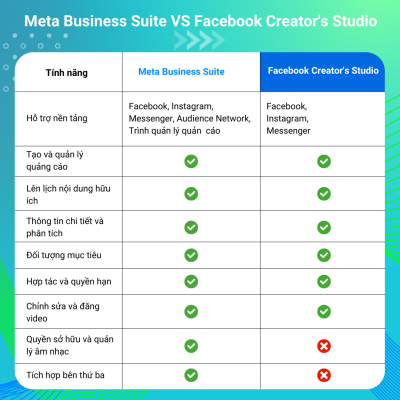
Facebook Creator’s Studio was renamed Meta Business Suite to give content creators and brand owners access to a broader range of tools and features for managing marketing and advertising on Facebook and Instagram. These features include advanced analytics and insights, options for ads and content, and improved tools for task and workflow management.
As you can see, both Meta Business Suite and Facebook Creator’s Studio offer similar features, such as creating and managing ads, scheduling content, analytics, and insights. However, Meta Business Suite supports more platforms, including Messenger, Audience Network, and access to Ads Manager, while Facebook Creator’s Studio is limited to Facebook, Instagram, and Messenger.
In addition, Meta Business Suite offers more advanced features such as collaboration and permissions, as well as music rights management and usage. It also supports third-party integrations, which is useful for businesses that want to optimize their marketing activities, making Meta Business Suite a comprehensive tool for using all of these features.
Navigating the Meta Business Suite Dashboard
Once you have set up your account and business profile, you will be taken to the Meta Business Suite dashboard. This is where you will manage your marketing activities on Facebook and Instagram.
With Meta Business Suite, you can perform tasks such as creating and managing ads, scheduling content, analyzing performance metrics, and managing customer messages and engagement. Meta Business Suite helps you streamline the management of your social marketing activities and achieve the results you want from your marketing on Meta platforms.
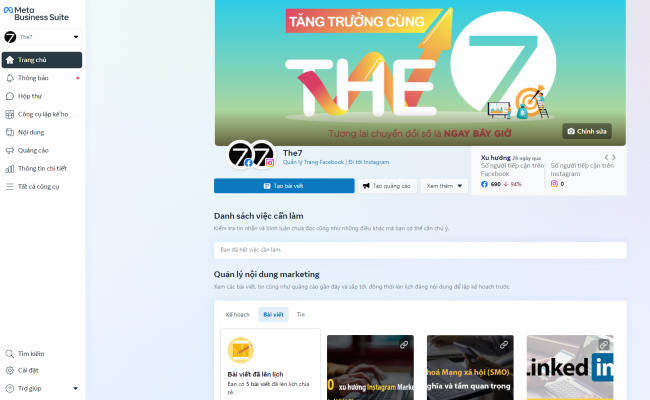
The Meta Business Suite dashboard is divided into different sections to make it easy for you to manage your marketing activities on the Meta platform.
Sections of Meta Business Suite and How to Use Them
Planner
On the Meta Business Suite dashboard, you can create, schedule, and manage content in the Planner section. It gives you an overview of the posts you will share on a specific day, week, or month.
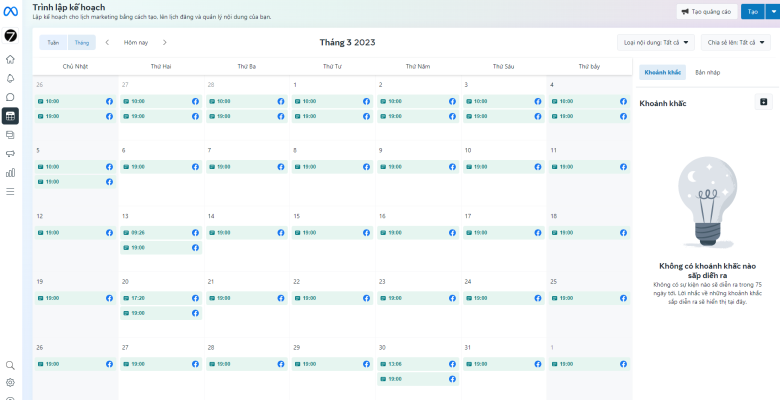
By scheduling posts in advance, you free up more time to focus on running your business. Having a social media calendar lets you plan the content you will share and keep your audience engaged.
In the Planner section, you can:
- Schedule posts: You can choose a specific date and time to schedule posts on your social media platforms. This saves you time and effort by letting you prepare posts ahead of time and schedule them in advance.
- Manage content: In the Planner section, you can see all of your scheduled, published, and pending-approval content. You can conveniently manage and edit posts, making sure content goes out according to your plan.
- Create new content: You can create new content directly in the Planner section. This lets you write and edit posts and attach images, videos, or links with ease. You can preview a post before publishing and keep editing until the content is just right.
- Track progress: In the Planner section, you can track how your posting plan is going. You can see which posts have been published, which are awaiting approval, and which have expired. This helps you keep tabs on your marketing activities and makes sure content is released on schedule.
Content
In this section, you will see all of the published, scheduled, draft, expiring, and expired posts you have shared on Facebook and Instagram. It gives you an overview of what you have done over the past weeks, months, or years.
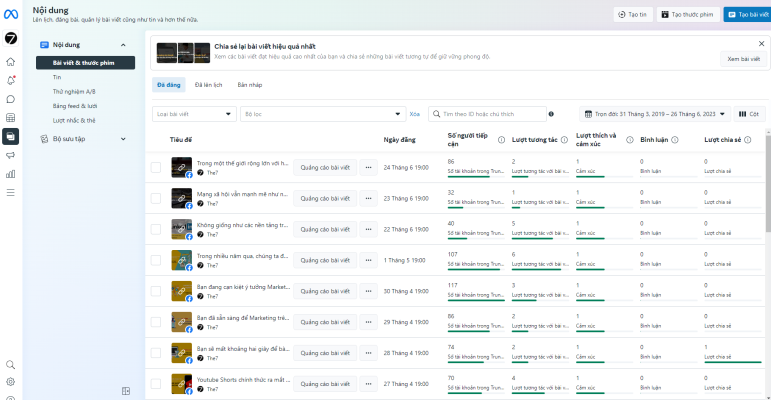
In the Content section, you can:
- Create ads: You can use the built-in tools to create engaging, effective ads. You can customize the content, images, and video, and choose your target audience to make sure your ads perform as well as possible.
- Plan your posts: The Content section lets you plan and set the timing of your posts. You can prepare your content ahead of time and schedule posts for the right moments. This helps you stay consistent and efficient when sharing content across social media platforms.
- Engage with customers: The Content section lets you engage with your customers through comments, messages, and replies. You can read and respond to comments from your audience directly in the dashboard, stay in touch with customers, and build a community around your brand.
- Manage content: In the Content section, you can manage and organize your marketing content. You can review published posts, saved drafts, and posts awaiting approval. This helps you stay organized and manage your content effectively across social media platforms.
One of its sections also lets you see all of the posts in which others mention or tag your company’s Meta Business Page or Instagram account.
Insights
The Insights section of the Meta Business Suite dashboard gives you an overview of your online performance by analyzing key metrics for your posts, videos, and other shared content.
Through this detailed analysis, you can gather information about your customers, including their behavior and engagement with your content, and spot notable trends as they emerge. With these reports and statistics, you can analyze and compare data over time and recognize what is working and what needs improvement.
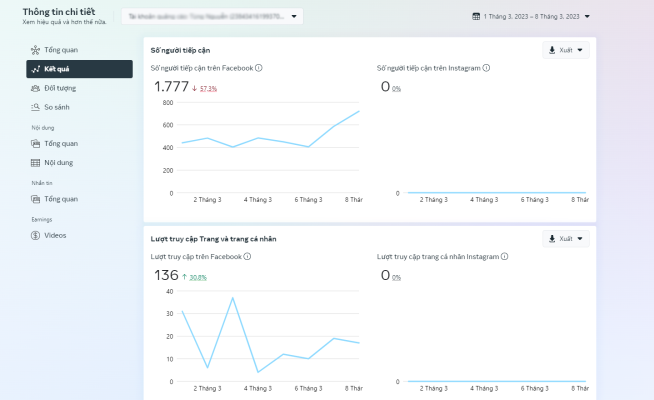
The Insights section provides detailed metrics and reports for your marketing campaigns. You can track metrics such as reach, engagement, link clicks, Page likes, and more. By monitoring your performance, you can make data-driven decisions and improve the results of your ads.
Notifications
The Notifications section of the Meta Business Suite dashboard makes it easy to keep track of important notifications and updates from the activities and events related to your business across Meta platforms.
Through this section, you will be notified of important events such as customer responses, new comments on posts, connection requests from users, activity on your Page, and much more. This way you never miss an interaction and can respond promptly to your users and customers.

In addition, the Notifications section also delivers the latest updates on products, technology, and new features in Meta Business Suite. This keeps you up to date with changes and improvements to your business management tools and features.
With the Notifications section of the Meta Business Suite dashboard, you can easily manage and track important notifications, making sure you stay consistent and effective in managing your business on Meta platforms.
Inbox
The Inbox section of the Meta Business Suite dashboard lets you read new messages and comments from your Facebook Page, Messenger, and Instagram account. The process is streamlined so you can quickly respond to inquiries, replies, and comments, keeping your followers engaged and satisfied.
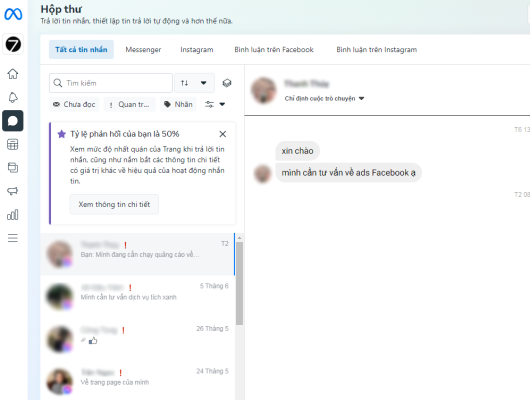
With this section, you can easily receive, read, and reply to customer messages in a convenient, organized way. You can view conversations, search messages by keyword or sender, and sort messages by priority or unread status.
The Inbox section also offers handy management features such as flagging messages, marking them as read, moving them into folders, and applying labels to categorize messages by purpose and content.
The Inbox section of the Meta Business Suite dashboard helps you centralize and organize all customer messages, so you can maintain and strengthen your relationships with customers and users. By managing and responding to messages effectively, you can quickly meet customer needs and requests, build trust, and boost engagement with your customers across Meta platforms.
To work even more efficiently, you can take advantage of the option to create automated replies to frequently asked questions, which saves you time and lets you respond to inquiries even when you are away. This helps you manage your social media accounts effectively and deliver fast, professional customer service to your followers.
Ads
The Ads section of the Meta Business Suite dashboard is where you can create and manage ads on Meta platforms, including Meta News Feed, Instagram, and other ad placements across the Meta network.
With this section, you can easily create ad campaigns, set budgets, define your target audience, and track ad performance. You can choose the right ad format, including text, graphics, or video, and craft a compelling call to action (CTA) that prompts users to take a specific action.
The Ads Manager section of the Meta Business Suite dashboard provides tools to help you create ad campaigns, set budgets, define your target audience, and track performance. You can monitor metrics such as reach, engagement, link clicks, Page likes, and more. This helps you track and evaluate how well your ads perform, so you can make data-driven decisions and improve the results of your ad campaigns.
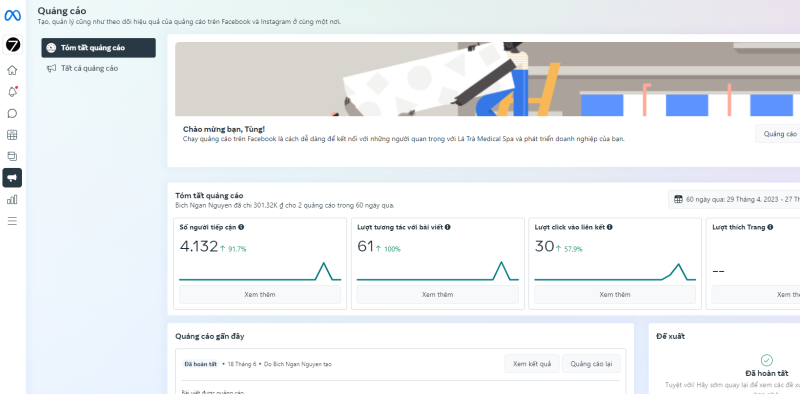
With the Ads section of the Meta Business Suite dashboard, you can use powerful advertising tools to boost your marketing performance across Meta platforms. By using these features, you can increase brand awareness, drive more engagement, and generate positive business results for your company.
See more: [EXPERIENCE] The Most Effective Way to Run Facebook Ads in 2023
Monetization
The Monetization section gives you an overview of the monetization tools available to you, such as Stars and In-Stream Ads, and lets you manage your earnings effectively. You can easily track your income, adjust your payment settings, and monitor your progress toward your financial goals.
- Stars – This feature lets viewers buy a virtual currency called “Stars” and send them to creators during live streams to show their appreciation. Creators can then exchange Stars for real money. Currently, this feature is available only to eligible gaming creators and some media and entertainment Pages on Facebook. Creators must meet certain criteria, such as having an active Facebook Page, reaching a certain number of followers, and achieving a certain level of engagement on their content, to qualify for Stars.
- In-Stream Ads – This feature lets creators earn money from their video content by inserting ads into their videos. These can be short, skippable ads that play before, during, or after the creator’s video content. To qualify for In-Stream Ads, creators must meet certain criteria, such as having a certain number of followers and complying with certain content guidelines.
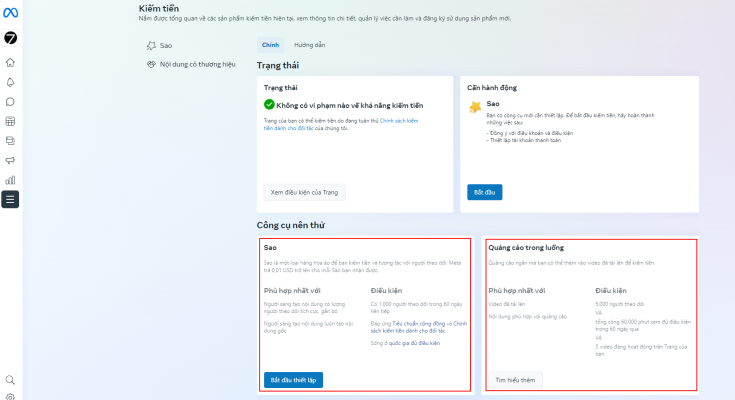
Through Monetization, you can use these tools to generate income from your content on Meta Business Suite and move toward your financial goals.
In addition, the Monetization section lets you keep track of any policy issues that may arise and gives you a place to connect new monetization tools. This ensures you stay up to date with the latest monetization options and keep maximizing your earning potential. With the tools and insights available, you can manage your income streams effectively and make smart decisions about your content strategy.
Conclusion
Meta Business Suite represents the evolution of Facebook’s business tools, reflecting the company’s ongoing efforts to hold its position in a rapidly changing digital landscape. Meta Business Suite aims to equip businesses of every size to succeed in the digital age by providing a more comprehensive set of tools and features that strengthen their social media management.
Source: A Guide To Meta Business Suite

Nguyễn Đình
Bảo




As CEO of The7, I am committed to sharing practical, useful knowledge with every reader. Every article on The7 is based on my 7 years of hands-on experience in marketing — Facebook advertising, LinkedIn advertising, Google advertising, and marketing strategy. I hope you take away plenty of insight from these posts and apply it successfully in practice.
Related Articles
Building a Full-Funnel Content Marketing Strategy on LinkedIn
Table of Contents Toggle Why Build Content Marketing for the Full Marketing Funnel? (Why Full-Funnel Content Marketing?)Creating Your Strategy (Creating Your Strategy)Implementing Your Content Strategy (Rolling out your content strategy)Summary...
Designing Creative Content for LinkedIn
Table of Contents Toggle Why Is Good Creative Content So Important? (Why is Good Creative Important?)Key Components of Creative Design (the core elements of creative design)Summary (summary) Why Is Good...
Building an Organic Business Presence on LinkedIn With a LinkedIn Page
Table of Contents Toggle Why Have a LinkedIn Page?Establishing Your LinkedIn PageKeeping Your LinkedIn Page ActiveThe Measure of SuccessSummary About LinkedIn Page (Summary) Why Have a LinkedIn Page? For a...

6 Best LinkedIn Marketing Strategies for B2B in 2026
Table of Contents Toggle LinkedIn 2026: Where B2B Decisions Get MadeStrategy #1 – Why Is LinkedIn the Best B2B Marketing Channel Today?1. Decision-makers are concentrated here2. Users are in work...

What Is Facebook Ads? Popular Types of Facebook Advertising
What is Facebook Ads? This is surely a question many people wonder about, especially those just starting to learn about Facebook advertising. Let’s explore Facebook Ads from A to Z...

26 Predictions for Social Media Marketing Trends in 2025
It’s that familiar time of year again, when experts and analysts start revealing their predictions for the social media marketing trends worth watching, along with the shifts that promise to...


