


Designing Creative Content for LinkedIn
Why Is Good Creative Content So Important? (Why is Good Creative Important?)
Visual Preference in the Digital Landscape (the trend of visually consuming information on digital platforms)
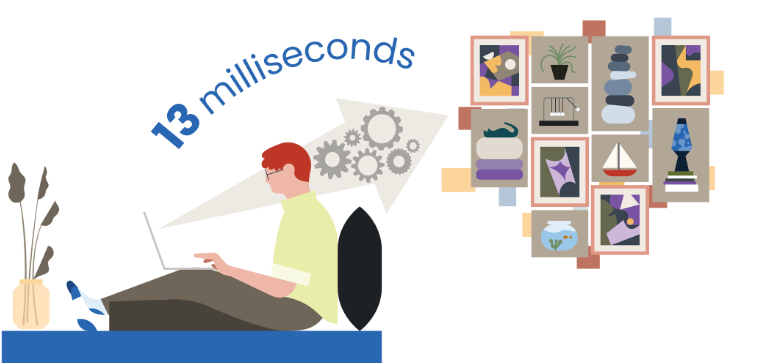
People naturally tend to absorb information through images. The brain processes visuals roughly 60,000 times faster than text, and nearly half of the brain is devoted to processing visual information. That’s why images naturally grab attention. You may have already looked at and understood the illustration below before reading this introduction.
When you combine the brain’s superior visual-processing ability with the fact that people spend an average of about 2.5 hours a day scrolling social media, it’s clear that compelling visual design plays an enormously important role in capturing users’ attention. On social platforms, imagery is the single biggest driver of engagement. That’s why your visual content needs to stand out and look different from every other brand’s.
Today, brands face three major challenges:
- Users are exposed to more content than ever before.
- Competition for users’ attention keeps getting fiercer.
- Users are more selective with their time and only pay attention to content that is genuinely compelling.
The first goal of Social Marketing is to make users stop scrolling through their feed (a Scroll-stopping Moment). Once they’ve stopped, you have less than 8 seconds to communicate your brand’s value and convince them to take the next action, such as learning more, following your page, or visiting your website.
In the next section, we’ll look at the principles and methods for designing creative content that make effective use of every moment, so that each second of the viewer’s attention delivers real value.
The Role of Design in Your Creative Strategy (the role of design in your creative strategy)
In marketing, time and resources are always limited. As a result, many marketers reach for quick fixes, such as using ready-made templates, overusing stock photos, or writing content that looks like everyone else’s. However, this easily creates a “Sea of Sameness,” leaving a brand’s visuals and messaging with no real distinction.
Creative Strategy is what shapes a brand’s story, themes, visual style, and tone of voice. To stand out among competitors, a business needs to build its own visual identity and communicate an authentic, distinctive point of view. Research shows that high-quality creative content not only holds up over time, but can also drive 10–20x higher sales.
If you do use stock photos, try to personalize them with brand identity elements such as color or logo, or add a message or keyword onto the image to make it more distinctive.
Content Strategy, Creative Strategy, and Creative Design need to work closely together to build a consistent brand image on social media. When these elements reinforce one another, a brand creates a clear, memorable impression. Now, let’s look at the basic design principles.
Key Components of Creative Design (the core elements of creative design)
Anatomy of Compelling Creative (the elements that make creative content compelling)
When building creative content on LinkedIn, you need to focus on four main elements:
- Imagery: Use consistent visuals that carry your brand’s own signature. This is the single most important element for driving engagement in the News Feed.
- Copy: Choose the right words and keep them short and to the point so your message lands effectively.
- Format: Mix content formats such as images, video, articles, or documents to keep viewers engaged.
- Testing: Test regularly, evaluate the results, and optimize to find the content combinations that perform best.
When these four elements are applied consistently, a brand creates content that’s easy to recognize and can be deployed effectively across multiple formats. Imagery and copy need to work in harmony to capture attention and tell the brand’s story clearly.
- Imagery: Be Distinctive (imagery: creating distinctiveness)
The first thing to remember is that imagery is the most important element for grabbing users’ attention and getting them to stop and engage with a brand in the News Feed. Images that use bold colors, illustrations, unusual angles, or real people don’t show up that often in LinkedIn ads. That very difference is what makes the content stand out and stops users mid-scroll.
When designing your visuals, apply the principles of graphic design or photography to boost their appeal. In LinkedIn Marketing Solutions’ example, the image uses plenty of negative space, contrasting colors to create a focal point, and a smiling face to draw the eye and convey emotion.
Staying Consistent
Consistency is what makes it easy for users to recognize your brand in the News Feed. Competing against so much other content, especially ads with similar formats, a consistent visual style helps a brand stand out and stay memorable.
For example, if a target customer has previously seen a useful piece of content from your brand, then when they come across other posts with the same colors, icons, or design style, they’ll easily recognize it as yours. That increases the odds they’ll stop to view and engage with the post.
That said, consistency doesn’t mean every post has to look identical. What matters is maintaining a cohesive, recognizable visual style that boosts brand recall and builds familiarity with viewers. Think of it as your brand’s own “fashion style” – each outfit can be different, yet still unmistakably carry the same signature.
- A logo boosts brand recognition. Use it consistently across your visuals and designs to leave an impression and reinforce your brand image.
To create standout creative content, you need to balance the elements that make up your brand identity. When these elements come together harmoniously, content becomes more engaging and delivers better results. Here are the key elements to keep in mind:
- Shapes: Use consistent shapes to build your own style and make your brand easier to recognize.
- Colors: Bold colors can grab attention and stop users mid-scroll in the News Feed. Stick to your brand’s color palette, avoid mixing in too many colors, and make sure text color has enough contrast against the background to stay legible.
- Fonts/Typography: Use clear, legible fonts at a minimum size of 16 px. If your brand doesn’t have its own typeface yet, popular sans-serif fonts like Helvetica or Open Sans are good defaults. Avoid distracting fonts or ones that don’t suit your message, such as Comic Sans, which the internet tends to associate with humor.
- Faces: Use images of real people, especially ones representative of your target customers, to create a sense of relatability and strengthen the connection with your brand. Research shows that ads featuring human faces are 11 times more likely to grab attention than ads without them.
- Copy: Be Concise, Compelling, and Clear (copy: short, engaging, and clear)
Once you have striking, attention-grabbing visuals, the next step is building your copy. Copy conveys the information imagery alone can’t, things like your brand’s value, your product’s benefits, or a call to action.
One important thing to keep in mind is copy length. LinkedIn recommends staying within about 150 characters, for two reasons:
- It forces you to lead with your most important message right away.
- On mobile, copy longer than 150 characters gets truncated and users have to tap “See more” to keep reading. Writing tighter copy makes for a smoother experience and increases the odds that people read the whole thing.
Invest real effort in your copy instead of dashing it off. Use a clear message, emphasize the benefit the viewer will get, and tell them what problem your brand can solve.
When writing copy, ask yourself: “Why should someone watch this video, download this report, or read this article?” Highlight the valuable information or compelling perspective, while showing readers the specific benefit they’ll get. Copy becomes more persuasive when it is:
Effective copy tends to share these traits:
Focused:
Each post should carry a single main message. Trying to cram too much information into one piece of content makes the message muddled and hard to remember.
Relevant:
66% of business decision-makers say content that speaks directly to the issue they care about is a key factor in their willingness to engage.
Snackable:
57% of decision-makers prefer content they can take in and understand in just a few minutes, rather than something overly long.
Actionable:
60% of the Thought Leadership content decision-makers come across doesn’t deliver information that’s useful or applicable in practice. So provide specific, useful information they can act on right away to make your content stand out.
Example: Instead of simply promoting an event, spell out the benefit attendees will get. For instance: “Join the event to learn how to improve your ROI.” This is a clear, specific message that motivates viewers to act.

Numbers always stand out more against a long block of text. Use figures or statistics to quickly highlight the value your content delivers.
The example below uses the figure “a 30% reduction in Cost per Lead” to show the concrete benefit of effective alignment between the Marketing and Sales teams.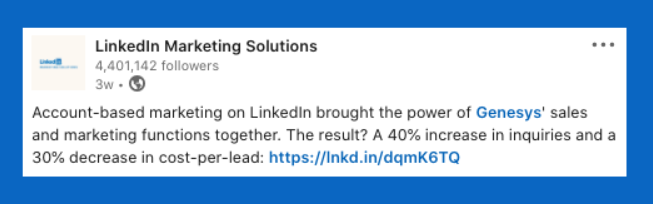
Make sure your copy stays true to your brand’s tone of voice. Even though LinkedIn is a professional platform, it’s still a social network. So balance professionalism with approachability so your content is both easy to read and feels relatable to viewers.
Beyond that, even a single well-chosen word or phrase can make a difference and lift your click-through rate. Phrases like “The future of…”, “Why you should…”, “How to…” or words like “leading,” “trending,” “secrets” tend to spark curiosity and encourage viewers to learn more.
- For paid ads, limit your use of hashtags. Hashtags can lead users away to other content, splitting their attention and lowering the odds they take the action your campaign is targeting.
- Format: Mix up Your Content (format: diversifying your content)
LinkedIn offers a range of content formats, both organic and paid, that help businesses communicate their brand message effectively. Popular News Feed formats include Articles, Single Image Ads, Document Ads, Video, and Carousel Ads. To reach a variety of audience segments, mix multiple content formats flexibly into your creative strategy.
Video
Video is one of the most important formats on social media because it lets a business “show” rather than just “tell.” On LinkedIn, video is 5 times more likely to spark conversation than other content formats.
You can use video for a range of purposes, such as:
- Sharing industry knowledge: updates on trends, perspectives, or useful analysis.
- Telling your brand story: introducing your brand, your team, or interviewing experts to build credibility.
- Event coverage: sharing content before, during, and after an event, including behind-the-scenes moments and highlights.
- Tips and real-world experience: how-tos, skills, or experience shared by experts within your business.
- Introducing a product or service: demonstrating how the product works and the benefits customers get.
Video makes a brand feel more authentic, relatable, and emotionally engaging. Not every video needs a big budget; DIY-style videos can build just as much connection and engagement. Whatever the format, video remains an effective tool for telling a brand’s story in a vivid, persuasive way.
Carousel Ads are an ad format that let a business convey multiple pieces of content within a single campaign. You can showcase several product features, share tips and trends, or spotlight your team and in-house experts.
To make Carousel Ads work well, keep these in mind:
- Keep the visuals consistent across cards to create a seamless, professional feel.
- Use each card’s headline to add information and build out the story you want to tell.
- Give a clear call to action (CTA), so viewers know exactly what to do next, such as Learn More, Sign Up, or Visit Website.
- Test Your Creative and Your Campaigns (testing the effectiveness of your creative content and campaigns)
Before putting creative content into a live campaign, get someone else to look it over and give feedback. You’ve surely come across ads that made you wonder: “Who on earth approved this?” Mistakes like that can happen to anyone, especially when working under a tight deadline or too zoomed into the details. Sometimes you’ll miss an obvious error in the imagery, or use a message that someone else could read a completely different way.
- Build a review process that involves colleagues, partners, or your agency to bring in an objective perspective and catch mistakes before you publish.
Once the content is ready, test your campaign by changing only one variable at a time. For example, keep the copy the same and change the creative, then keep the creative the same and adjust the copy. Changing just one variable at a time helps you pinpoint exactly what’s driving the difference and optimize your campaign more effectively.
Summary (summary)
In this lesson, you’ve learned the core foundations of Creative Design along with best practices for building compelling visual content that gets LinkedIn members to engage with your brand.
Did you know LinkedIn partners with a number of technology providers to help businesses manage all their social accounts from one platform? Check out the LinkedIn Marketing Partner Directory to find partners that can help you manage your LinkedIn Page, from scheduling posts and managing content to tracking and measuring engagement across multiple social channels.
It’s time to put your creativity to work and start building standout content for your brand!
See also: Building an Organic Presence for Your Business on LinkedIn with a LinkedIn Page

Nguyễn Đình
Bảo




As CEO of The7, I am committed to sharing practical, useful knowledge with every reader. Every article on The7 is based on my 7 years of hands-on experience in marketing — Facebook advertising, LinkedIn advertising, Google advertising, and marketing strategy. I hope you take away plenty of insight from these posts and apply it successfully in practice.
Related Articles
Building a Full-Funnel Content Marketing Strategy on LinkedIn
Table of Contents Toggle Why Build Content Marketing for the Full Marketing Funnel? (Why Full-Funnel Content Marketing?)Creating Your Strategy (Creating Your Strategy)Implementing Your Content Strategy (Rolling out your content strategy)Summary...
Building an Organic Business Presence on LinkedIn With a LinkedIn Page
Table of Contents Toggle Why Have a LinkedIn Page?Establishing Your LinkedIn PageKeeping Your LinkedIn Page ActiveThe Measure of SuccessSummary About LinkedIn Page (Summary) Why Have a LinkedIn Page? For a...
6 Best LinkedIn Marketing Strategies for B2B in 2026
Table of Contents Toggle LinkedIn 2026: Where B2B Decisions Get MadeStrategy #1 – Why Is LinkedIn the Best B2B Marketing Channel Today?1. Decision-makers are concentrated here2. Users are in work...

26 Predictions for Social Media Marketing Trends in 2025
It’s that familiar time of year again, when experts and analysts start revealing their predictions for the social media marketing trends worth watching, along with the shifts that promise to...
LinkedIn Advertising Guide for Beginners
LinkedIn offers businesses a huge opportunity to reach potential customers, build their brand, and even find talent to grow with. In this article, let’s join The7 in exploring how to...

7+ Ways to Optimize Your LinkedIn Account to Boost Career Opportunities
LinkedIn is a great platform for connecting with recruiters and finding jobs. If you know how to optimize your LinkedIn account, it becomes much easier to present yourself and make...


