


How to Add Funds to Your Facebook Ad Account Easily
Want to add funds to your Facebook ad account but don’t know how? In this guide from The7, we walk you through how to add money to your Facebook ads account the dead-simple way.
Requirements for Adding Funds to Your Facebook Ad Account
Here are the conditions you need to meet before adding funds to your Facebook ad account:
- You must be an admin of the ad account.
- You have to set up your first payment manually. For later Facebook ad campaigns, if you have paid Facebook before, payment will default to automatic.
- The balance required in each account varies depending on the payment method.
- Facebook does not charge a fee if you add funds yourself. If you don’t know how, you will have to pay a specialized provider to do it for you.
- You will pay in the currency that matches your country, for example VND in Vietnam and US dollars in the United States.
>>> Check out The7’s services:
- Facebook Advertising Services in Ho Chi Minh City
How to Add Funds to Your Facebook Ad Account
Paying for Facebook ads is not difficult. Just follow the steps below one by one.
Step 1: Log in to the personal account you use to run Facebook ads.
Step 2: Go to Ads Manager.
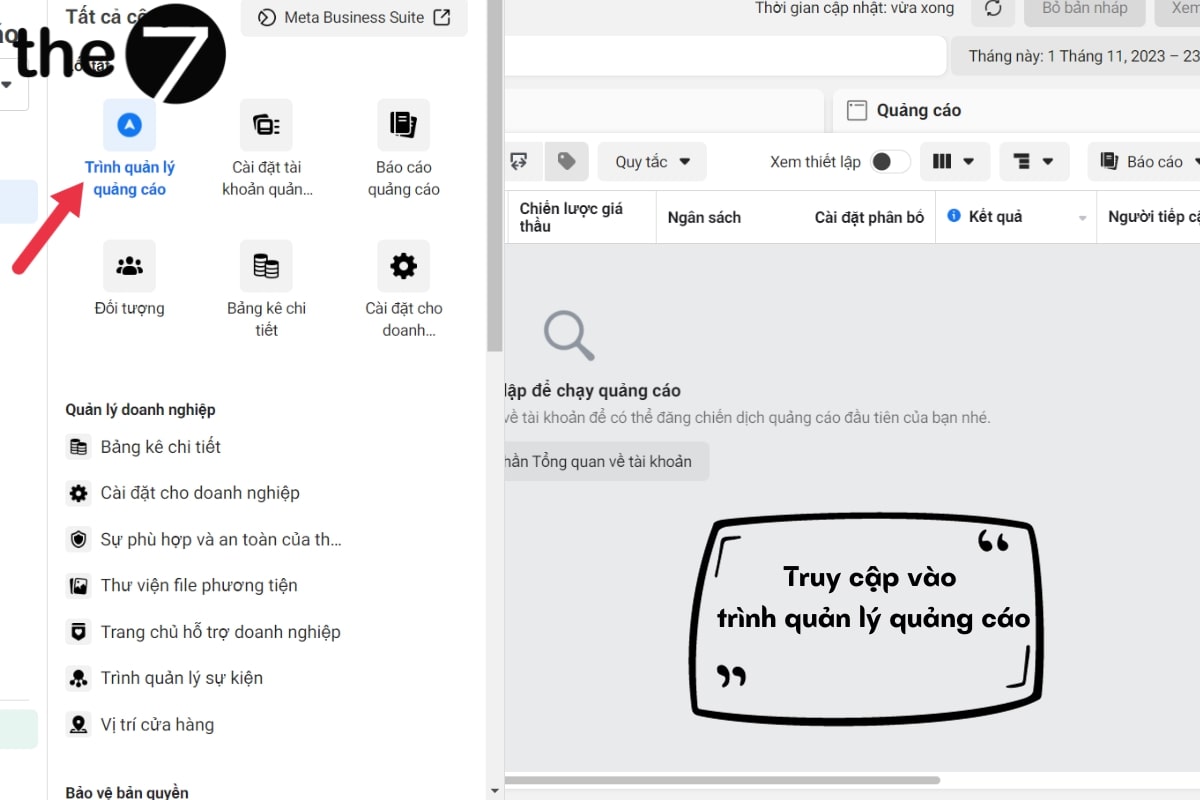
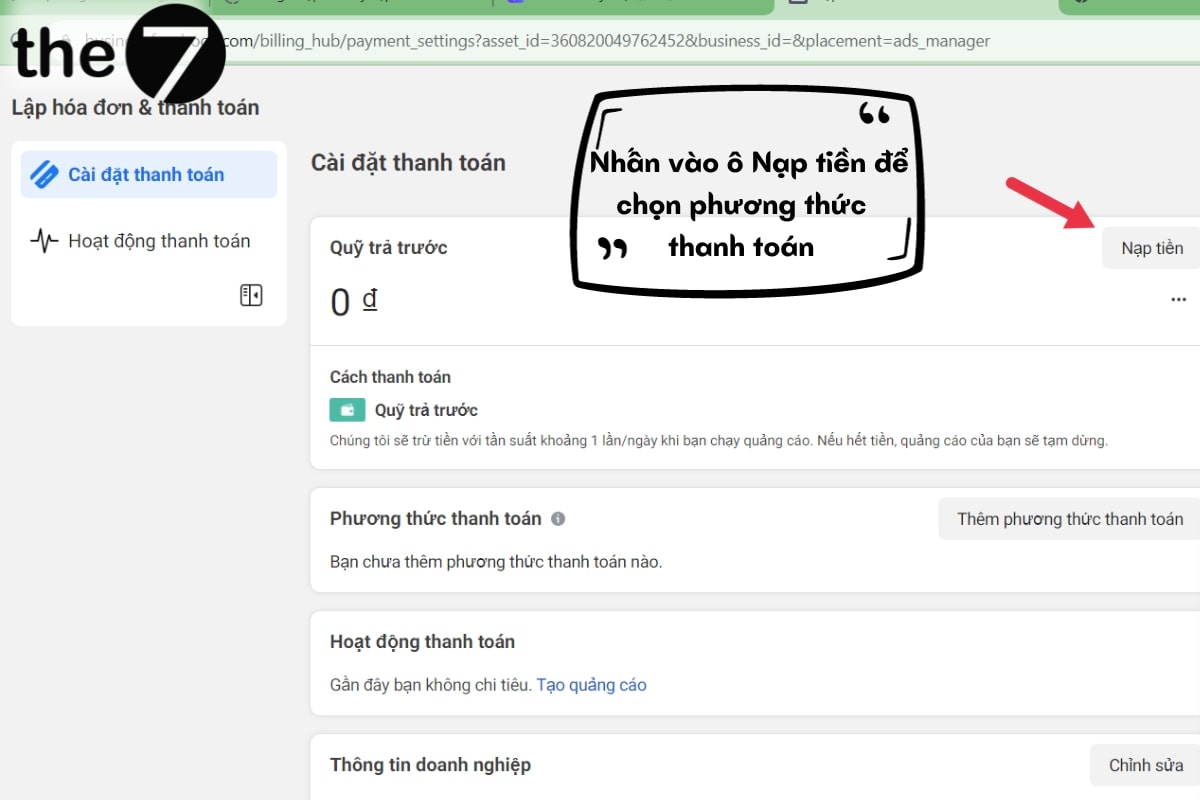
Step 3: Click Billing, then go to Payment Settings.
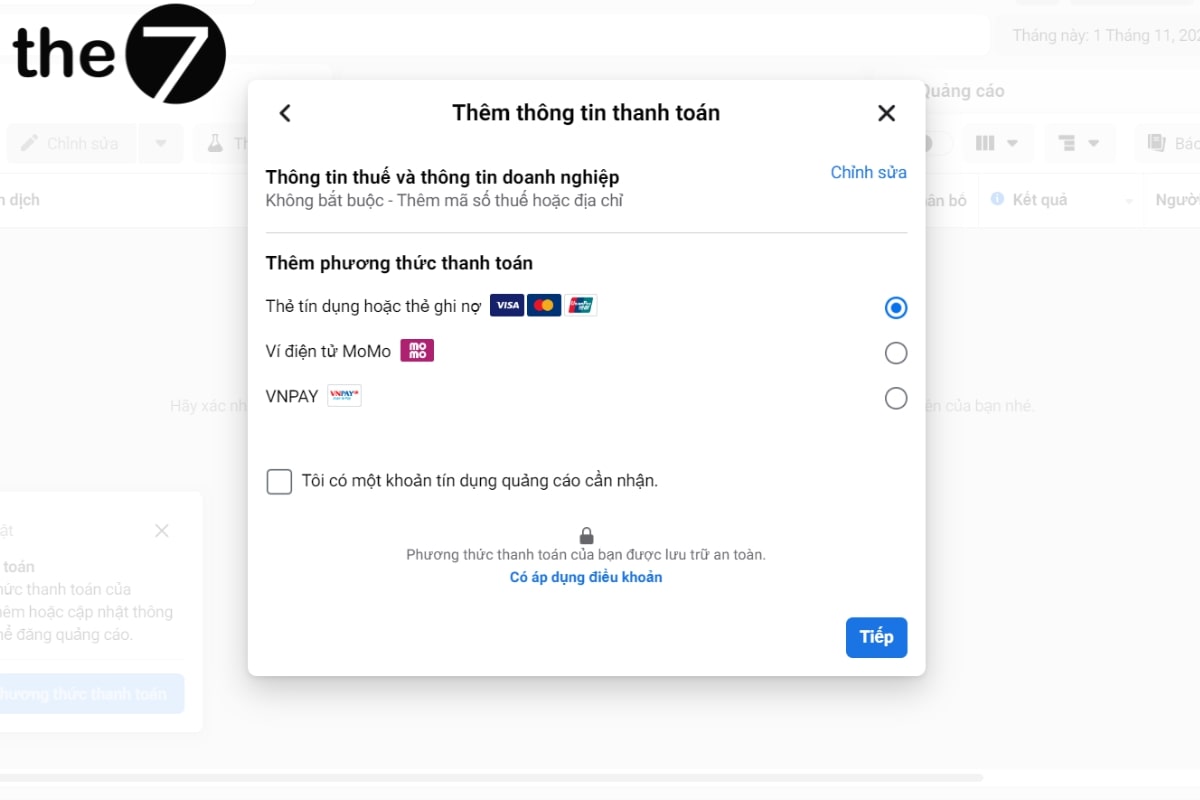
Step 4: Select Add Payment Method if this is the first time you are paying Facebook, since you have to set this up entirely by hand.
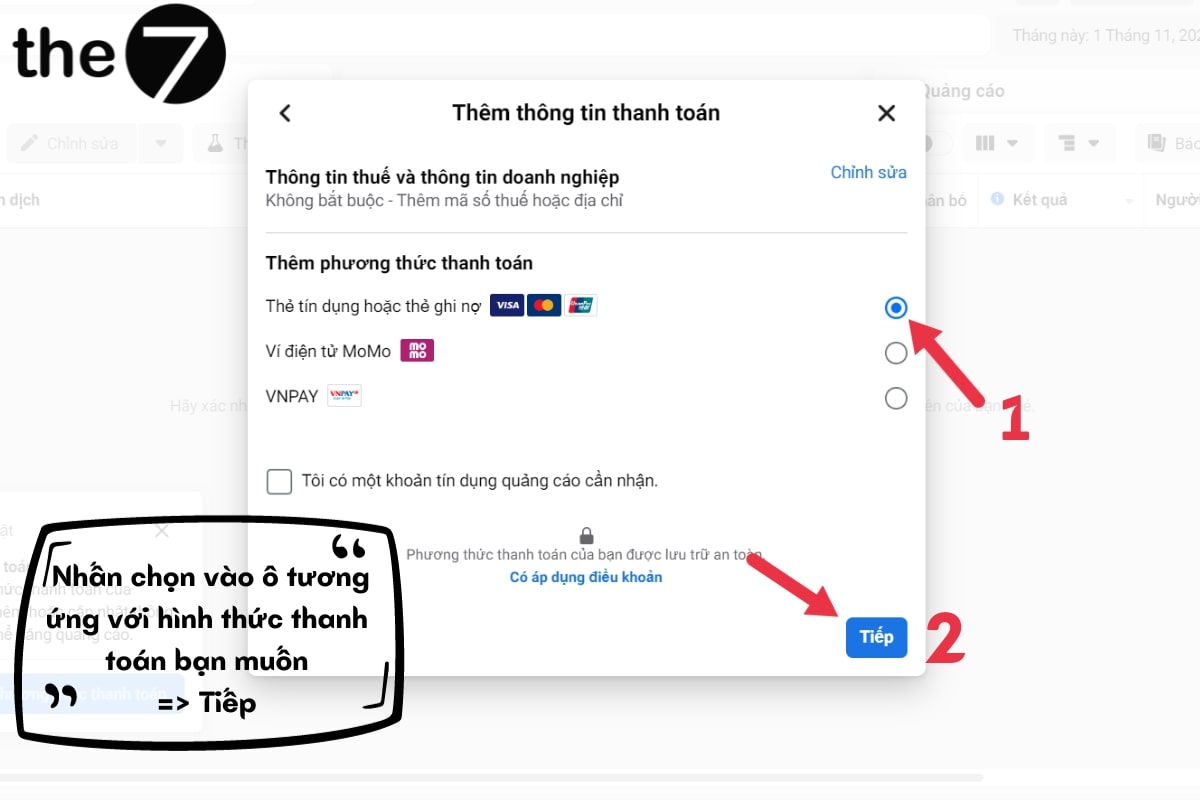
Next, choose a suitable way to add funds to your Facebook ad account, such as:
- Visa card.
- Coupon.
- PayPal.
Step 5: If Facebook asks you to verify your information (usually when paying by Visa card), enter it accurately. Finish this step by clicking “Continue”.
Step 6: Click Add Money and enter the amount you want to add to your account.
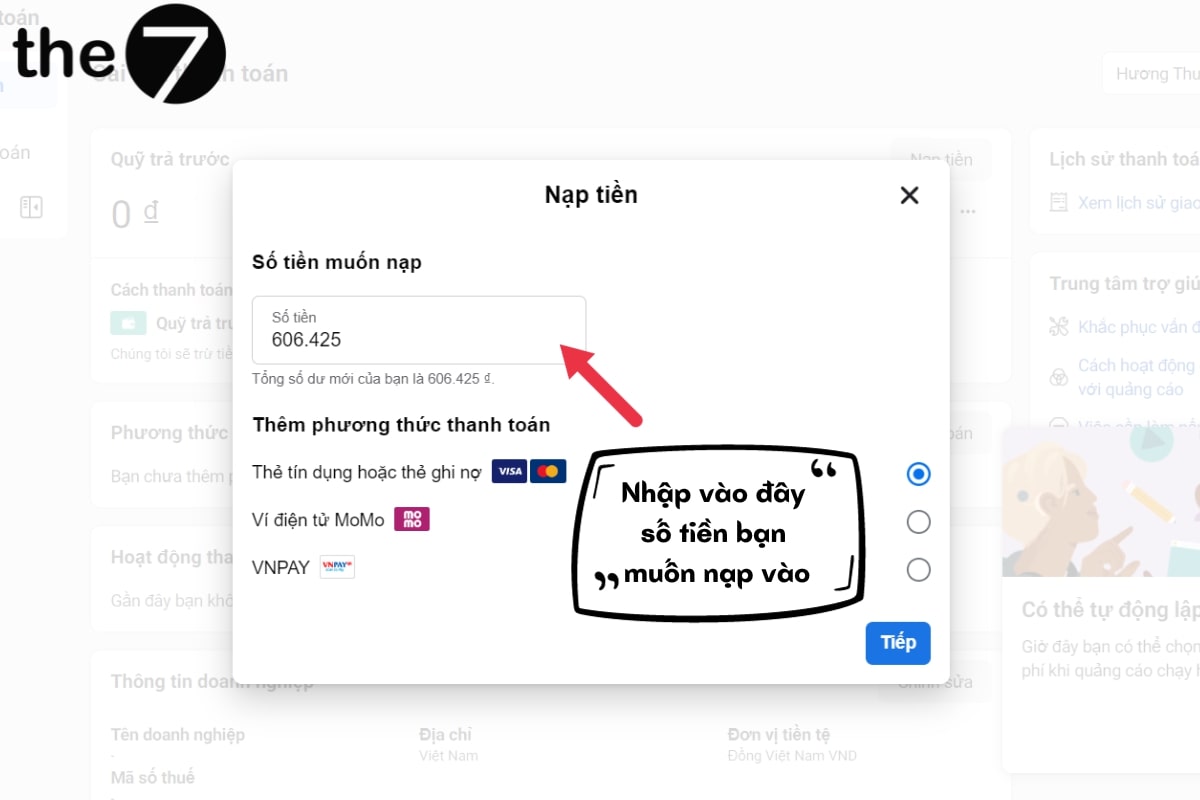
Step 7: Confirm to finish. After a few minutes, you can check the balance in your Facebook Ads account.
Note:
- Facebook’s policy allows the money you add to your account to be kept indefinitely. As long as your Facebook ad account is not locked, your balance won’t disappear. Keep in mind, however, that service fees are still deducted as usual when you pay.
- If your Facebook Ads account doesn’t have enough funds when the service fee is due, Facebook may treat it as fraud and flag the account. You should plan your budget and ad run time accordingly.
- In addition, money transferred into a Facebook ad account cannot be withdrawn back to your bank card. So if you don’t use up the budget you added for Facebook ads, you cannot get that money back.
- While a campaign is running, you should not change your payment card. This may look unusual to Facebook and get your account flagged or even disabled.
Popular Ways to Add Funds for Facebook Ads
To give users as much support as possible, there is a wide range of ways to add money for Facebook ads. Each payment method has its own advantages and limitations.
Adding Funds to Your Facebook Ad Account With a Visa Card
Paying for Facebook ads with a Visa card is one of the most popular and widely preferred payment methods in the world. With a Visa or Mastercard, users can make international payments to Facebook. Thanks to its simplicity and convenience, this type of card lets you complete transactions quickly and get approval from Facebook.
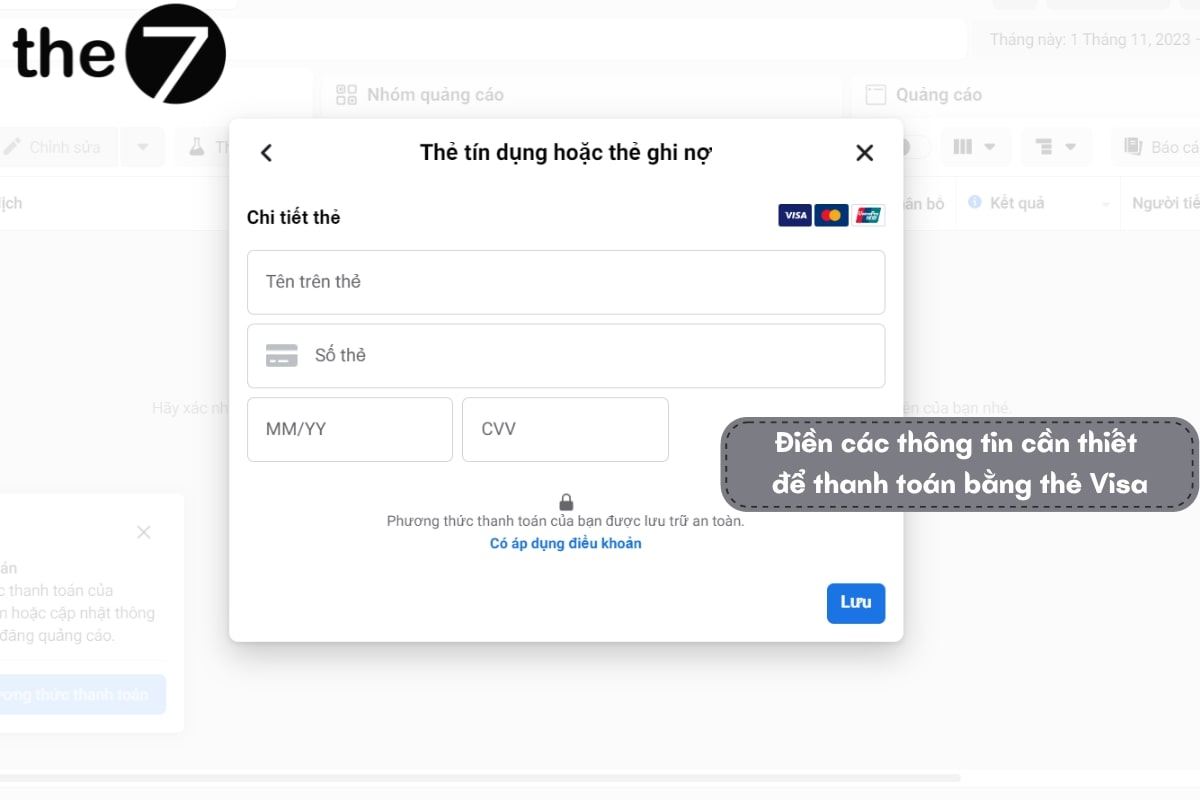
Paying for ads on Facebook with this method is not hard. Users simply link their card details to their personal ad account and can then cover the cost of running Facebook Ads. The basic requirement is that the account has enough balance to cover the ad spending limit set by Facebook.
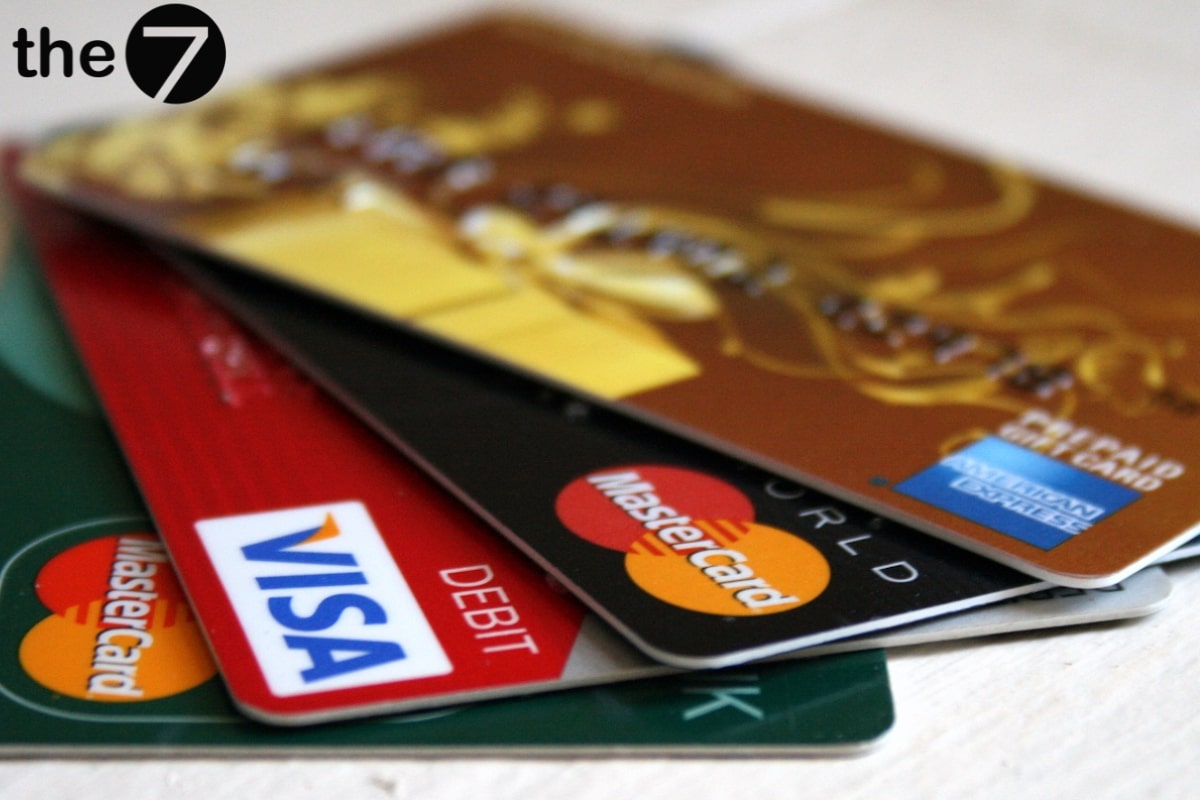
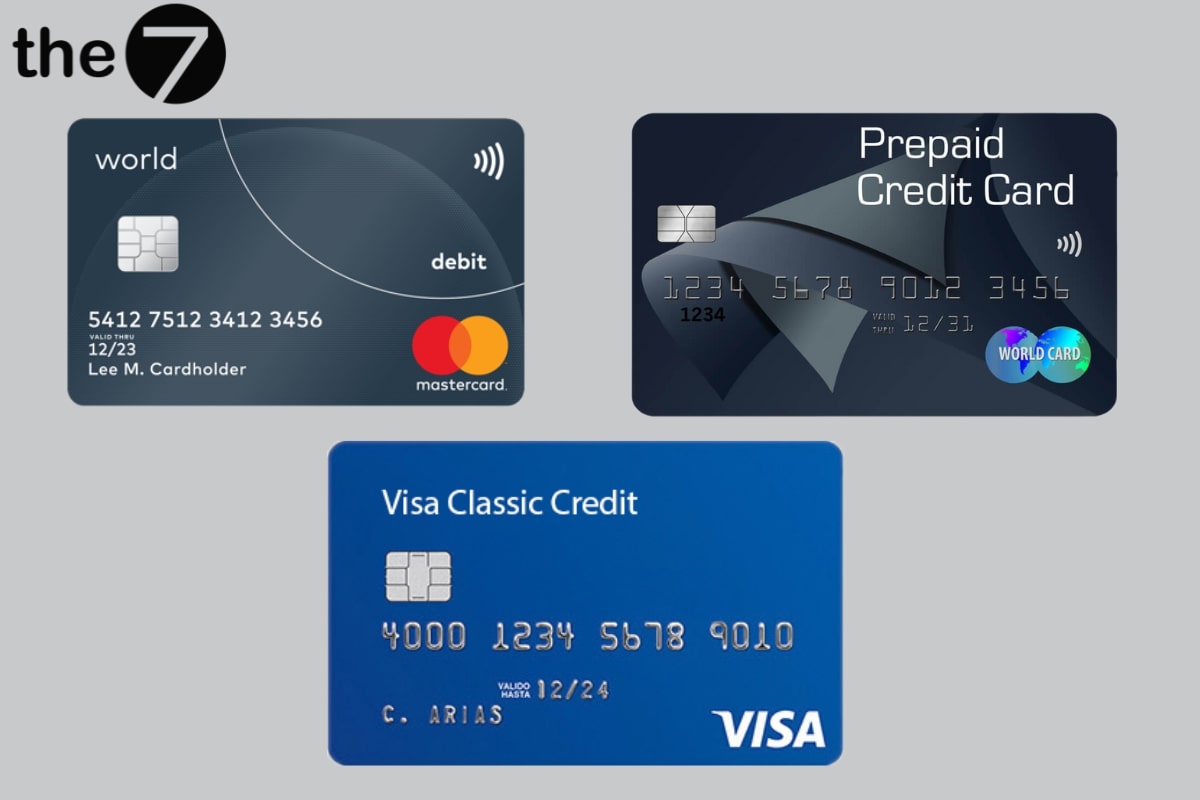
There are 3 types of Visa cards you can pay with:
- Debit card (Visa/Mastercard Debit): You need to load money onto this card before running ads. When payment is due, Facebook deducts the exact amount directly from the card.
- Credit card (Visa/Mastercard Credit): With this card, the bank pays the ad service fees up front. At the end of the month, you simply pay that amount back to the bank.
- Visa/Mastercard Prepaid: This type of card works similarly to a debit card.
Note:
- When paying with a Visa card, it is best to register with reputable banks such as Vietin, Vietcombank, Techcombank, BIDV, etc.
- Avoid Visa cards from Agribank, MB and Sacombank. There have been many cases where people used cards from these banks and then left ad bills unpaid for a long time, so Facebook has put these cards on its bad list and they are easily blocked.
- When you get a card, you need to activate it for international payments so you can pay Facebook.
Paying for Facebook With a Coupon
Adding funds to your Facebook ad account with a coupon is also a method many people choose. Depending on the type of coupon, users can pay for part or all of the cost of running Facebook Ads.
However, not everyone can pay for Facebook ads this way. Typically, to hold a coupon, the advertiser must be a large agency that has built a reputation in the marketing industry.
Prepaying Your Facebook Ad Account
When you pay with a Visa card, you can only pay up to a daily limit. This figure is not fixed. It depends on your account’s reputation, how long the account has existed, your history of adding funds to Facebook, and more.
However, for large Facebook ad campaigns, this method has many drawbacks because spending can exceed Facebook’s limit.
That is why, in many cases, users tend to add money to their Facebook ad account before running ads. The advantages of this approach are as follows:
- Expand the reach and running time of your ads.
- Use ads with expensive packages.
- Speed up delivery and impressions to users.
When you add money directly to your account, your ads are guaranteed to appear continuously. This suits short campaigns that need to attract many customers. You also get some priority payment services when you use this paid method.
That said, think carefully before using this payment method. If your account is locked, the money inside it is frozen too, and in this case you will most likely lose all of it. In addition, before choosing this method, plan the budget you need to pay, so you don’t run out of funds and interrupt your ad campaign.
Which Way of Adding Funds for Facebook Ads Is Best?
No single method is the best. Look at your business situation and your goals when setting up your Facebook ad campaign, then choose the payment method that fits.
Example: If you are an individual with a small budget, choose a Visa card for its convenience and speed. If you own a large business, have a verified (blue-tick) Facebook account and can invest billions of VND in ads, you should choose to add funds directly to your ad account.
Why Can’t Businesses Add Funds for Facebook Ads?
Adding more money to a Facebook ad account can sometimes be difficult for businesses and individuals alike. It usually comes down to one of the following common errors:
The Payment Card Is Not Supported by Facebook
Currently, Facebook only supports payments with the 3 most common types of Visa cards: Prepaid, Credit and Debit. So if you want to run Facebook Ads, make sure you choose one of these card types.
If you are already using one of these three cards and still can’t pay, check whether you have activated international payments. Sometimes the error also comes from entering the card details incorrectly.
The solution is fairly simple:
- To add funds to your Facebook ad account, check whether your Visa card has international payments enabled. If not, go to the nearest ATM or bank and ask for help enabling it.
- Double-check the card details you entered in your Facebook Ads account settings.
- Finally, if you have completed all of the above and still can’t pay, ask Facebook’s customer support team for detailed assistance.
The Payment Card Is on Facebook’s Restricted List
In its history of working with advertisers, Facebook has run into many cases where cardholders from Sacombank, Agribank and MB left ad bills unpaid or suddenly canceled Facebook Ads campaigns. As a result, Facebook does not look favorably on payment accounts from these banks.
In this case, here are some solutions to consider:
- Switch your payment to another bank account and continue paying. However, we don’t recommend doing this too many times.
- Add a new payment method so Facebook doesn’t suddenly stop your campaign because it sees something unusual.
- Contact Facebook’s customer support team directly and ask them to resolve it.
The Payment Method Has Been Suspended
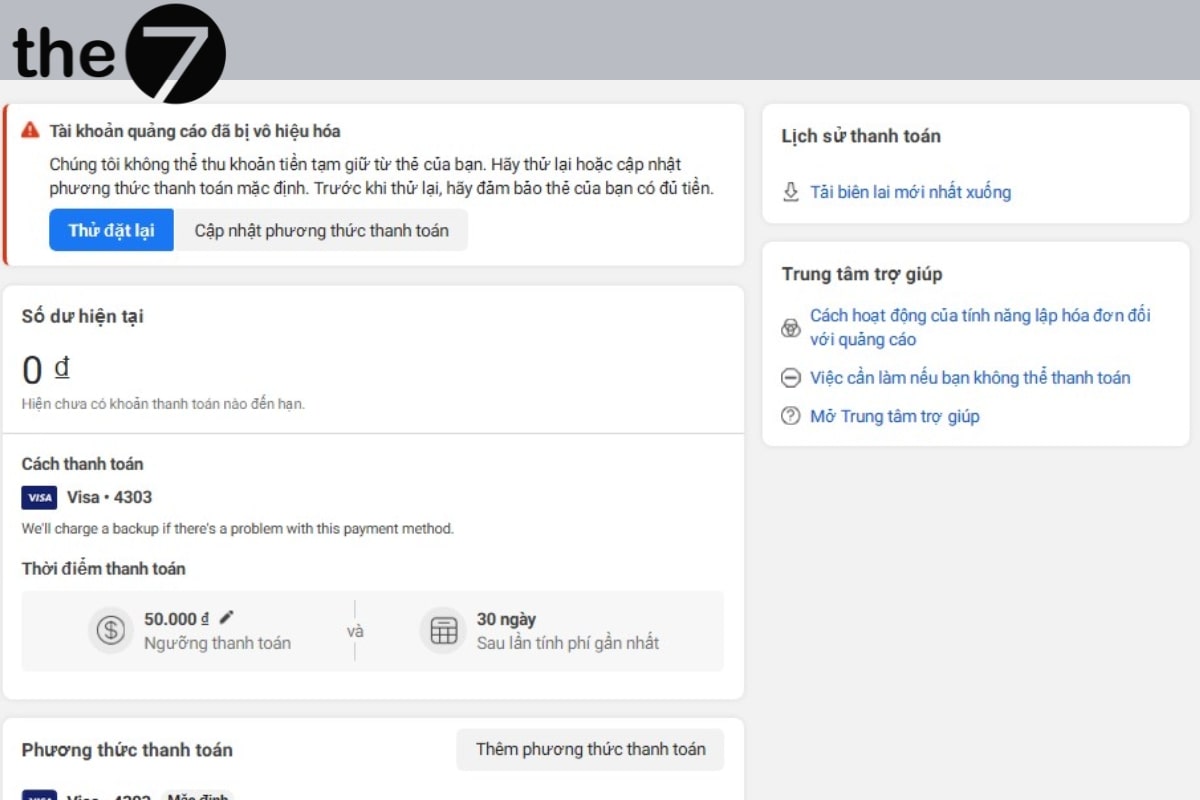
Even long-standing Facebook ad accounts can suddenly have their payments frozen or stopped. Facebook says this happens when it believes security rules are being violated because it notices unusual activity in a customer’s card transactions. Or it may simply be that the account has a history of unpaid ad bills.
For example, if Facebook discovers that a user has borrowed someone else’s card to make payments, the ads will also be stopped.
The solution is as follows: Contact Facebook’s customer support center quickly to explain the reason in detail and provide evidence that your account has not violated Facebook’s rules. You can also ask Facebook’s team to reissue your payment method for Facebook ads.
The Card Is Out of Funds or Has Unpaid Ad Charges
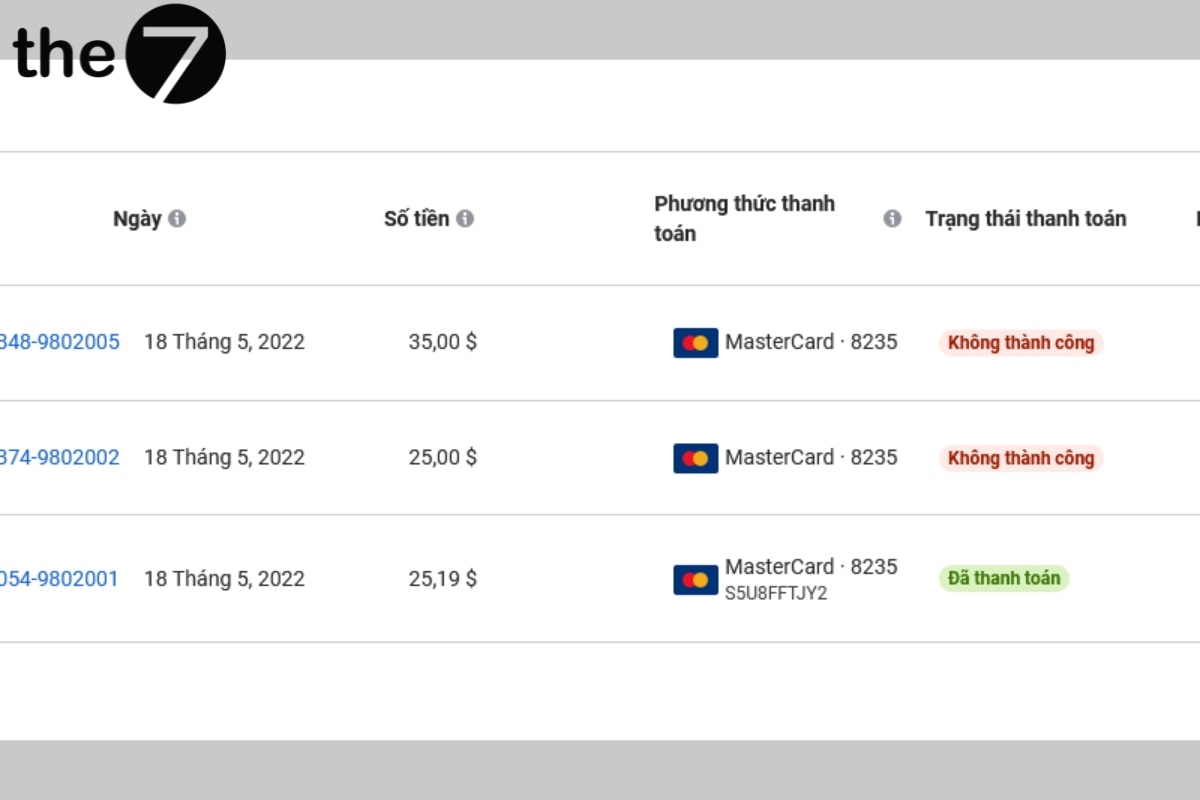
When the balance in your account is not enough to pay Facebook, your Facebook campaign will also be stopped. With this error, the cardholder usually receives a detailed notification. In addition, if you haven’t paid off earlier transactions with Facebook, they may also be flagged on your account. These errors are very common for businesses or individuals who use a Visa credit card to pay for Facebook Ads.
The solution is as follows: Check your account balance regularly. If you notice it is running low, add enough funds to your Facebook ad account early. It is best to review all of your past ad activity to see whether you have ever left a Facebook bill unpaid. If you have any outstanding debt, pay it immediately. Clearing it is a prerequisite for running Facebook ads, and it is what lets Facebook allow you to keep advertising on the platform.
The Card Declines the Payment
This happens when the card you use to pay for Facebook Ads has a problem. The clearest sign is that Facebook sends a payment confirmation request to your account but the card declines it. In this case, you will receive a notification about the error.
The solution is as follows:
- Check the balance on your card. In some cases, banks such as BIDV and Techcombank require the card to hold a minimum balance to stay active each month.
- Check whether the amount on the card exceeds its payment limit.
- If you have checked everything and still can’t add funds to your Facebook ad account, contact the support center to fix the error.
Should You Add Funds for Facebook Ads Through PayPal?
Paying with PayPal leads to ad creatives not being approved and puts your account at risk of being locked. This is because it is a payment method that has been used many times to skip ad bills in Vietnam, so Facebook has put it on its bad list.
You can connect a PayPal account to your Facebook ad account and use it to pay if you run ads and set your IP in an overseas market such as the US.
With the detailed answers above on how to add funds to your Facebook ad account, The7 hopes Facebook advertisers now have the basic knowledge they need. You can then apply it to your own ad campaigns effectively, economically and smoothly. For common problems when running ads on Facebook, contact Facebook’s customer support team right away for the best answer.

Nguyễn Đình
Bảo




As CEO of The7, I am committed to sharing practical, useful knowledge with every reader. Every article on The7 is based on my 7 years of hands-on experience in marketing — Facebook advertising, LinkedIn advertising, Google advertising, and marketing strategy. I hope you take away plenty of insight from these posts and apply it successfully in practice.
Related Articles

What Is Facebook Ads? Popular Types of Facebook Advertising
What is Facebook Ads? This is surely a question many people wonder about, especially those just starting to learn about Facebook advertising. Let’s explore Facebook Ads from A to Z...

26 Predictions for Social Media Marketing Trends in 2025
It’s that familiar time of year again, when experts and analysts start revealing their predictions for the social media marketing trends worth watching, along with the shifts that promise to...

How to Run Facebook Ads: 2024 Step-by-Step Guide
How can you run Facebook ads effectively, reach the right target customers, and generate valuable conversions? This is probably a question many Digital Marketers and business owners ask when promoting...

Requirements for Running Facebook Ads Successfully and Effectively
When you start your Facebook advertising journey, mastering the basics is the key to success. So what are the requirements for running Facebook ads exactly? Let’s begin exploring and optimizing...

The Most Detailed Guide to Creating a Facebook Ad Account in 2024
To run a campaign on Facebook, the first thing you can’t do without is an ad account. Below, The7 will walk you through how to create a Facebook ad account....

Facebook Video Ad Size: The Most Accurate Guide for 2024
Running video ads is becoming the go-to choice for many businesses. In this context, the Facebook video ad size plays a key role in determining how well your post performs....


