


What Is Google Remarketing? Top Optimization Tips

Google Remarketing is an approach to reaching customers that’s becoming more and more popular. That’s because customers tend to research product/service information on the internet before buying. The question is: how do you stand out among countless competitors? If you’re not sure, let’s walk through the guide below on how to create a Google Remarketing ad. The7 is confident you’ll come away with plenty of fresh ideas after reading this article.
ONLINE MARKETING SERVICES AT THE7:
What Is Google Remarketing?
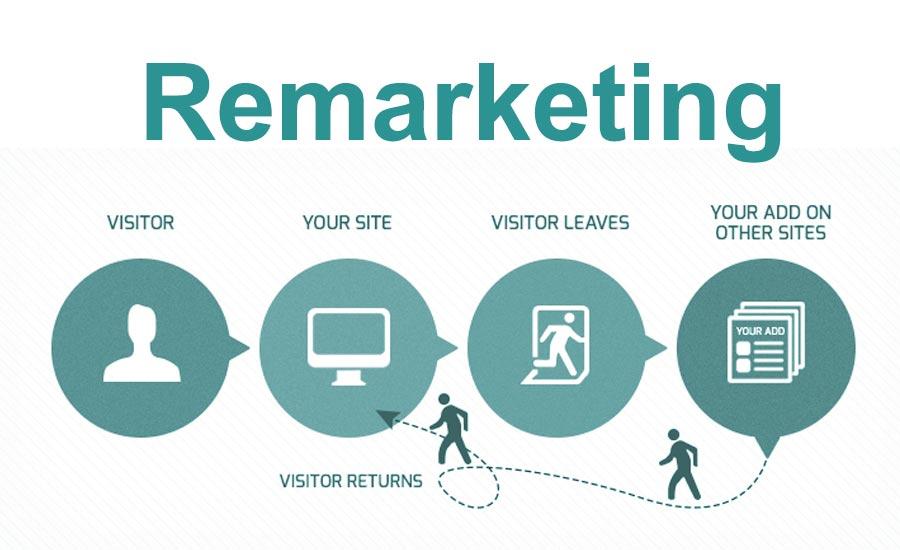
To understand the term most accurately, you should start with the meaning of Remarketing itself. This is a form of digital advertising and communication, or email, that follows internet users around after they’ve visited a site. These are people who have visited your business’s website before but haven’t bought anything yet. Not everyone who comes and goes is uninterested in the product/service you offer. Perhaps they’re simply taking time to decide whether to buy or not.
Remarketing at this golden moment is absolutely essential. It gives you another chance to reach customers and make an impression with compelling ad copy and offers. As a result, your conversion rate increases significantly.
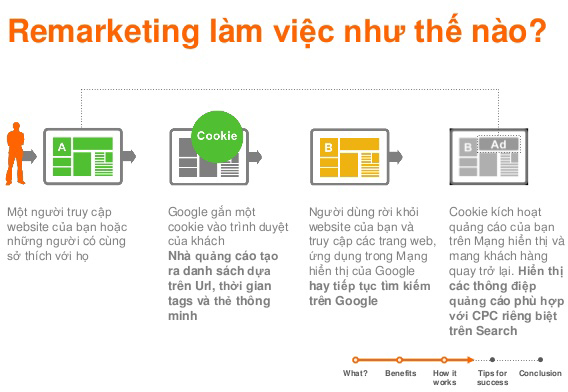
So what is Google Remarketing? It’s Google’s mass-communication technology, working on the same principle explained above. Through it, businesses can track potential customers as they move around the internet. More specifically, the tool does its job the moment a user visits your site. A small snippet of code on your website adds them to your Remarketing list.
Statistics show that 97% of users visit a website for the first time and don’t buy anything, because they don’t yet have enough trust in an unfamiliar brand. Google Remarketing advertising will help etch your brand into customers’ minds repeatedly, prompting them to take action.
>>> See also:
- How to Run Google Ads Most Effectively in 2024
- What Is Google Ads? Google Ads Basics for Beginners
Who Should You Run Google Remarketing For?
To succeed, you need to know exactly who you’re targeting when running Remarketing Google Ads. Below are the visitors you should add to your business’s tracking and analysis list. If you reach them successfully, they can become loyal customers of your brand.
- As mentioned, Google Remarketing should target people who have visited but haven’t converted yet. The action you want them to take might be signing up, placing an order, calling you, etc.
- Visitors who have spent money, but are still below a threshold of X VND, where X is the value you want to reach or exceed. This applies to websites with an online payment system.
- People who have visited your website a certain number of times.
- Visitors who first landed on your website via Google Adwords Remarketing. The next time, they visit through some other channel that isn’t a paid ad, such as a search query or clicking through on an organic SERP listing, etc.
- Customers who have completed specific goals such as purchasing, placing an order, or calling, etc.
- Visitors who have viewed a specific page on your website more than once within N days.
Understanding the behavior of these segments helps you find the right ideas for your Google Adwords Remarketing strategy. Businesses don’t need to optimize for every single audience listed above. Depending on your resources, you can identify the core audience you want to pursue.

How Does Google Remarketing Work?
To objectively assess the effectiveness of this digital marketing method, it helps to dig into how it actually works. When someone visits a website, they’ve already shown a certain interest in a product/service. Remarketing does the job of reminding them of what they need and want using the following method. Every time a user visits the website, the system automatically saves cookies. In particular, the audiences from the marketing lists above are used to build campaigns.
First, you use a short snippet of code provided by AdWords when creating a new Google Remarketing list. This code gets inserted into the header or footer of the pages you want to market. If someone visits a page that has this tag installed, the system instantly saves their information. Ads are then shown to these people when they visit other pages within Google’s network. Meanwhile, even on the exact same destinations, people who aren’t your customers won’t see this at all.
You can also choose how long remarketing ads run for each customer segment. Say, for example, a business sets this to 30 days. After that period, if that person hasn’t returned to your website, they’ll stop seeing that Google Ads ad. Similarly, you can apply the same logic to customers who’ve already purchased or successfully placed an order.
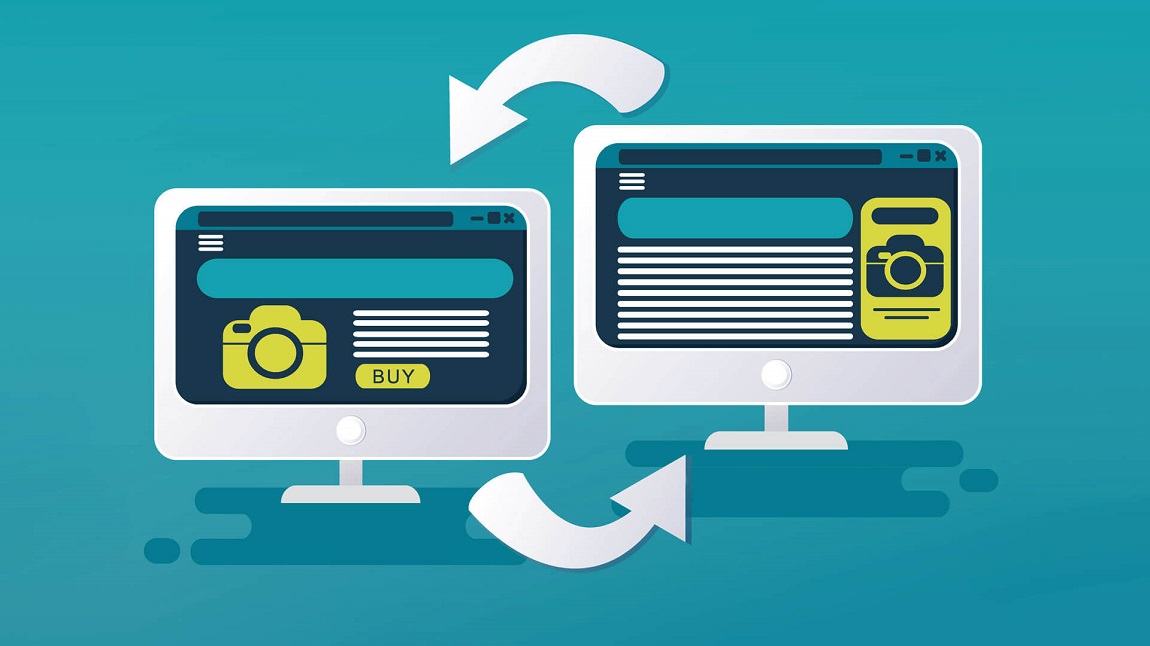
Popular Ways to Run Remarketing on Google Ads
Google Display Network – Display Ads on the Partner Network
This type of Google ad lets you display ads to past visitors when they revisit your website. It also uses display ads that run across the Google Display Network.
Google Search Ads – Display on the Search Network
This feature is called RLSA (Remarketing Lists for Search Ads). It lets you identify and customize search ads for past visitors while they search on Google’s partner sites or across the search network.
Display on Mobile Apps
When a user uses an app on their mobile phone or visits your website, Google Ads lets you display remarketing ads to them while they’re using other apps or browsing other websites.
Video Remarketing Display
Google Ads helps you reach people who’ve engaged with your YouTube channel or watched other videos. You can show ads to them on YouTube or on other websites and videos across the Display Network.
Remarketing via Email Lists
If you already have an email list from customers, you can upload that list to Google Ads. This feature lets you show ads to those users when they’re signed in to Google Search, YouTube, or Gmail.

Advantages of Running Google Remarketing
Google isn’t the only Remarketing service provider out there. This search engine’s strongest competitor is Facebook. So what advantage makes businesses want to dig deeper into this guide to running Google Remarketing? You’ll find the full answer in the analysis below.
Personalization
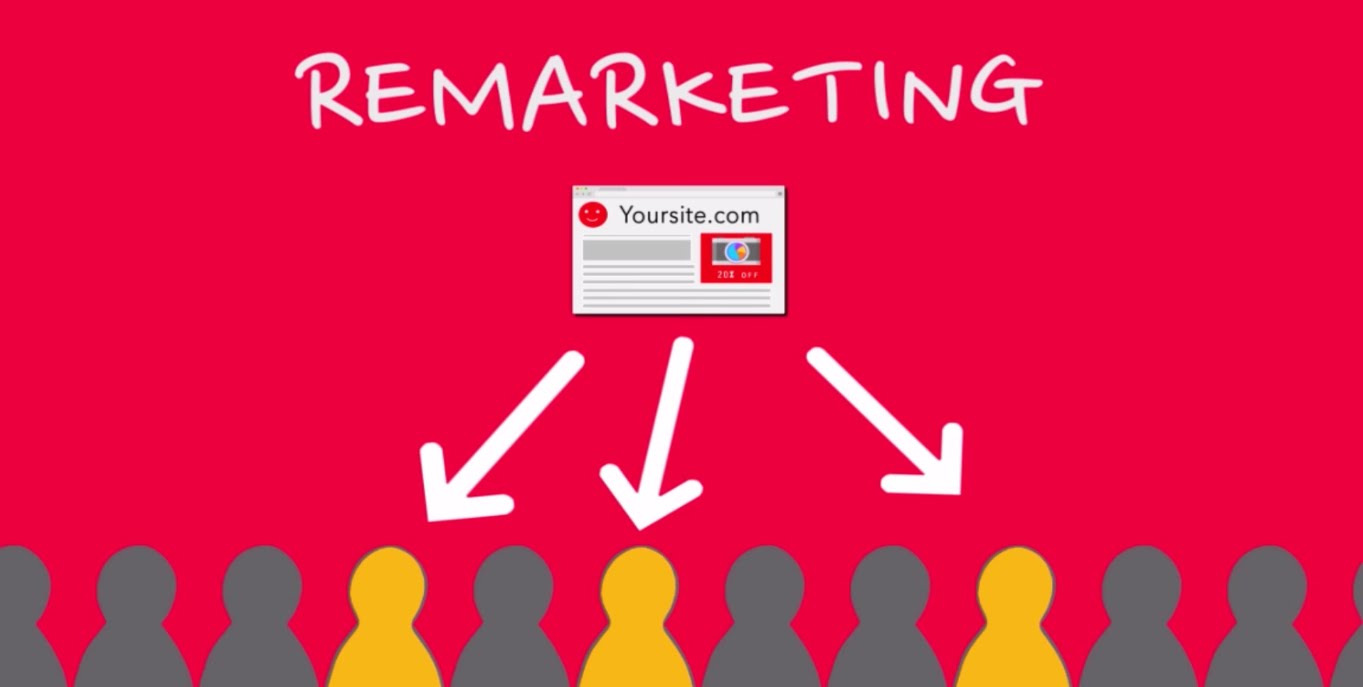
Say a potential customer left without actually clicking on or reading anything. What you need to do is reignite their curiosity through Google Remarketing, putting your service/product front and center. The information you provide needs to be personalized, touching on the things they truly want, such as offering a solution to the exact problem they’re facing.
In addition, the most practical thing you can do is offer a personalized discount code. This should especially be done when a customer has already added an item to their online cart but hasn’t checked out. It gives them the sense that this is the perfect moment to save money while still getting the product they wanted.
Massive Reach
Facebook can be effective for businesses that rely heavily on social media. However, using it as a marketing tool still comes with plenty of limitations. If users aren’t active on this social network, they simply won’t see your ads.
By contrast, the Google Display Network reaches globally across more than 2 million websites. According to estimates, it can reach up to 90% of internet users. Meanwhile, only about 27% of internet users are on Facebook. That comparison alone is enough to show just how powerful Google Remarketing’s reach really is.

Google Display Network Remarketing Allows Extensive Customization
You can customize your Remarketing campaign much more extensively with the Google Display Network. Say, for example, a visitor first came to your site interested in children’s clothing but quickly left. You could consider placing ads on kids’ fashion and apparel websites. At the same time, creating a segment targeting parents is also a very practical move. All of this is possible because the search engine owns a massive trove of demographic data.
In addition, the Google Display Network lets businesses customize ads based on other factors. Specifically:
- The devices your customer segments typically use to browse.
- Mobile apps.
- Applying ads to an entire country or a specific geographic region.
- Customizing the location names used in Google Search.
- Displaying content in the customer’s language.
This lets brands target their online advertising at a higher, more comprehensive level. Say someone looking to shop for baby clothes happens to walk past your store. In this case, ask Google to show your ad however it can. For example, letting the customer see you the moment they open a weather-checking app.
Track Ad Performance with Google Analytics Remarketing
This is yet another advantage of using Google Remarketing. You can add tracking codes to your own campaigns. From there, use the analytics tool to see how your advertising efforts are performing. If a particular channel is performing well, you should consider investing more resources into it. Underperforming channels need to be scaled back to save on costs.
In addition, Analytics helps users fine-tune their own Google Remarketing campaigns. You log into your personal account and check the demographics report. Through that, you’ll notice what your engaged audience and your ads have in common.
Say you turn on your analytics tool and see that the people leaving your site are usually under 30. That could be because their budget isn’t quite enough. What you need to do is offer some additional incentives. Google Analytics also helps by pointing out which pages get the best response rates. That way, your customer base grows, saving you a lot of effort on unnecessary activities.
In addition, you can also add a UTM, or Urchin Tracking Module, to your URLs. This is a code that lets you track a specific Google Remarketing campaign. This way, the monitoring process delivers the most accurate results.

Customizable Design
When using Google Remarketing, you get to choose the content and visual design of your ads. This lets your business maintain consistent sound, imagery, and brand identity.
This flexibility also lets you preview simulations of what different strategies will look like. You can assess performance both within individual AdWords campaigns and across the whole picture.
The Google Display Ads Builder Tool: Built for User-Friendliness
With Google’s Display Ad Builder, you get to choose the layout, color palette, and ad content. Creators can use their own images or download them from a free library. Creating and updating ads takes just a few minutes.
All of this is possible even if you’re not a professional designer. Businesses can absolutely create their own ads for all of their Google Remarketing digital marketing campaigns.

Reasonable Cost
Compared to other Remarketing channels, Google delivers far better economic value. The average cost per click on the Google Display Network is $0.56. Compared to the traffic and high conversion rate you get in return, this is genuinely a great deal for you. On top of that, you also get the analytics data benefits mentioned above.
What’s more, businesses gain free opportunities for brand recognition. Every time a customer sees your ad, it’s one more chance for your product/service to stick in their mind. There’s a strong chance they’ll think of and associate your brand first when the need arises. That’s an incredibly appealing bonus benefit of Google Remarketing packages.

What Benefits Does Google Remarketing Bring to Businesses?
Reach Every Customer Who’s Ever Visited Your Website
Survey research shows that 96% of users visit your website without buying anything, and 49% of users visit a website 2 – 4 times before placing an order. Today, as many as 43% of businesses are working to boost online brand awareness among customers through Remarketing. These figures show just how influential Google Remarketing is for reaching customers who’ve already visited your business’s website.

Generate Revenue from Your Existing Customer Data
Remarketing is an extremely powerful support tool for SEO and SEM. If your business’s website is seeing rapid traffic growth thanks to SEO and SEM, add the users who have visited and are visiting your website into your Google Ads Remarketing list.
Build Trust Through the Appearance of Scale
When your business’s ads keep showing up everywhere, customers will assume you’ve spent a significant amount on advertising. This indirectly signals your business’s strong financial standing, helping boost your brand’s reach and build trust in customers’ eyes.

Outstanding Campaign Performance
A Google Remarketing ad campaign focuses solely on one specific customer segment and shows relevant ads designed specifically for those customers. This is an incredibly smart strategy that helps minimize costs and boost ad performance, avoiding wasted impressions on the wrong audience or a target audience that’s simply too broad.
Easy Upselling & Cross-Selling
Businesses can insert the Google Remarketing code on their Thank You page (shown after a user has purchased or signed up) or on any conversion action on your website. This gives you a list of customers who’ve already purchased a product, or in other words, completed a conversion. Similarly, if your business combines this with cross-selling, customers will be more inclined to buy from you rather than checking out a different provider.

A-to-Z Guide: How to Run Google Remarketing
Below, The7 will walk you through the most detailed guide to running Google Remarketing, from creating an account, to getting the code, inserting the code, building your audience list, and finally, creating your Google Remarketing ad.
Create a Google Adwords Account
First, you need a Google Adwords account before you can run any ads. This can be an MCC Google Adwords account or an individual account, depending on your business’s advertising needs.
Get Your Google Remarketing Code
Step 1: Log in to your Google Adwords advertising account.
Step 2: Click on Tools and Settings.
Step 3: Under the Shared Library tab, click Audience Manager.
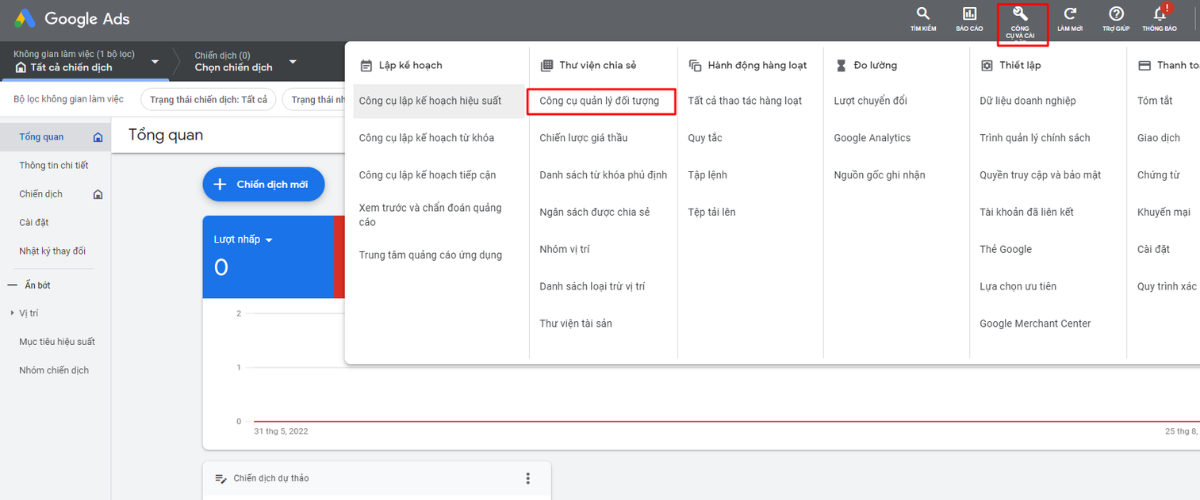
Step 4: On the Audience Lists screen, under the Remarketing tab, click the Set Up Audience Source button. If you don’t yet have an audience source, click Audience Source in the menu on the left of the screen. Then, under the Google Ads Tag section, click Set Up Tag.

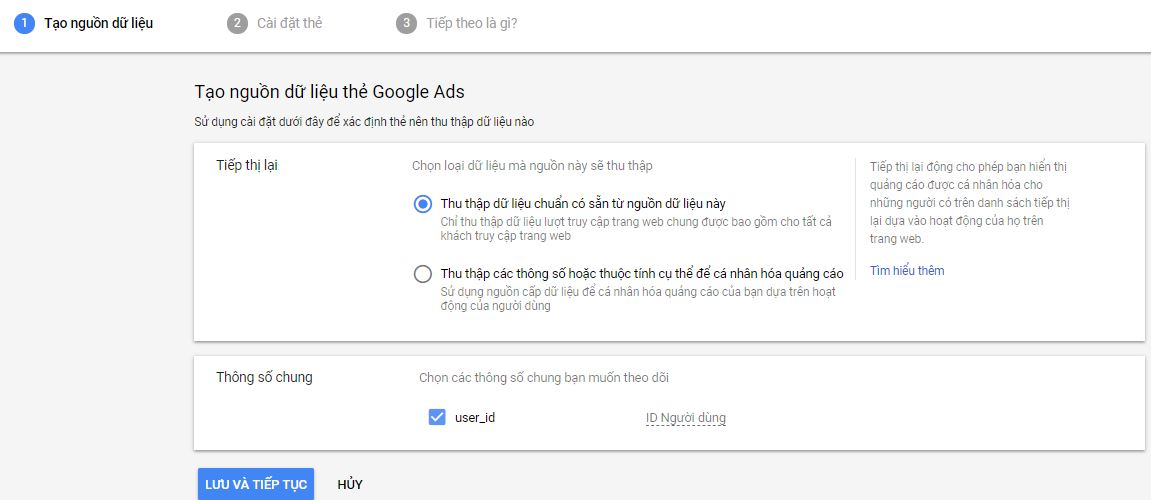
Step 5: Create a data source
To create a data source, you can follow one of these 2 methods:
- Collect only general data about website visits to show ads to visitors of your website.
- Collect data about specific actions people have taken on your website to show personalized ads.
Here, The7 will check the first option, “Collect only general data about website visits…”. Then click the Save and Continue button.
Step 6: Next, choose a method for adding the tag to your website. There are 3 ways to install the tag:
- Install the tag yourself
- Email the tag
- Use Google Tag Manager
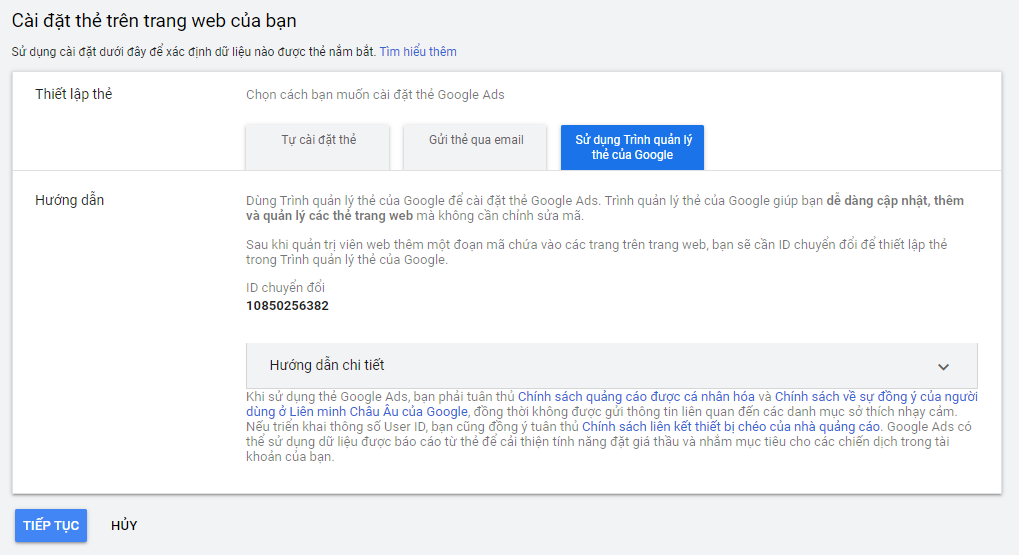
Here, we’ll go with the Install the tag yourself option. Alternatively, if you need to add the tag to many different pages, you can Email the tag or use Google Tag Manager. Once you’ve made your selection, click Continue.
Step 7: Finally, click Done to finish getting your Remarketing code.

Add the Remarketing Code to Your Website
Once you’ve gotten your Remarketing code, you need to add this code to your website. There are two scenarios here:
- If you built the website yourself, you can easily insert the code on your own
- If you hired another company to design your website, you can send them the code and ask them to insert it into your website
Adding the Remarketing Code in WordPress
Step 1: First, install and activate the Insert Headers and Footers plugin.
Step 2: Click on Settings, then select Insert Headers and Footers.
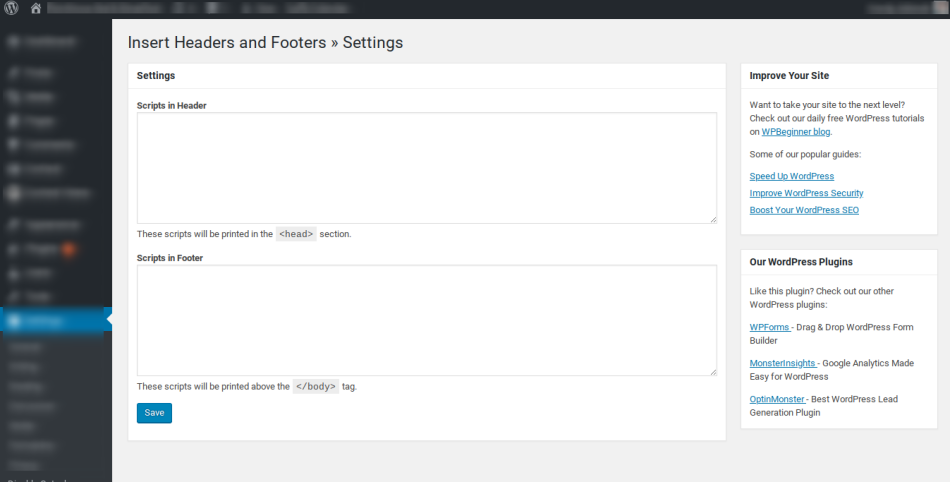
Step 3: Next, paste the Remarketing code you got earlier into the Scripts in Header field. Finally, click Save to save your changes.
And that’s it, you’ve finished adding the Remarketing code. This snippet is used to track user behavior, an incredibly important factor in your marketing campaign.
Have Another Company Do It
In this case, you simply need to send your web design company the Remarketing code above and ask them to insert it into your website. The code can be added to individual pages one at a time, or across the entire site.
Attaching the Google Ads Remarketing Tag via Google Tag Manager
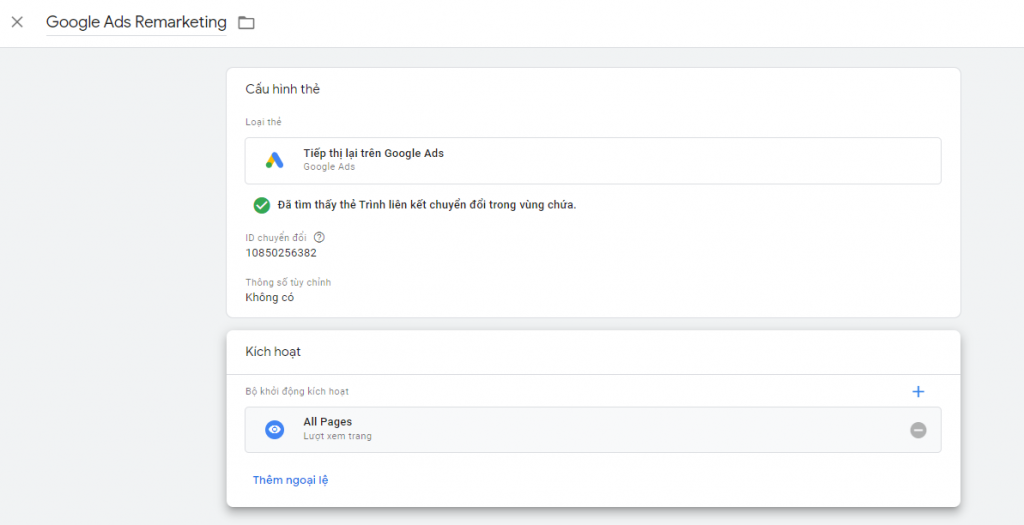
Next, log in to your Google Tag Manager account > select Tags > Create New Tag and follow the steps below
- Name: Google Ads Remarketing
- Tag type: Google Ads Remarketing
- Conversion ID: Copy the Conversion ID from your Google Ads account
- Trigger: Select All Pages
- Then Save and Publish
After publishing the tag, you can double-check it with the Tag Assistant tool to see if the code is working
Create a Google Remarketing Audience List
Once the code is added to your website, you’ll start receiving valuable data about customer behavior. This is the key foundation you’ll use to build audience lists and deploy your Google Adwords Remarketing ad campaigns.
To create an audience list, follow these steps:
Step 1: Log in to your Google Ads account.
Step 2: Click on Tools and Settings. Then select Audience Manager (found under the Shared Library section).
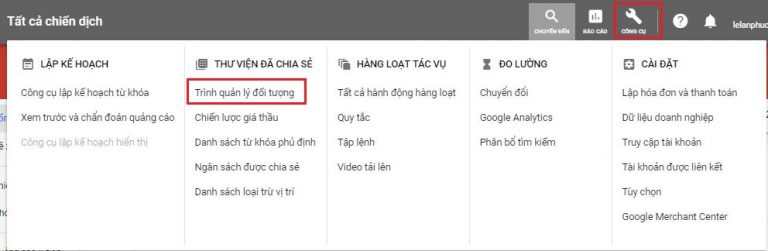
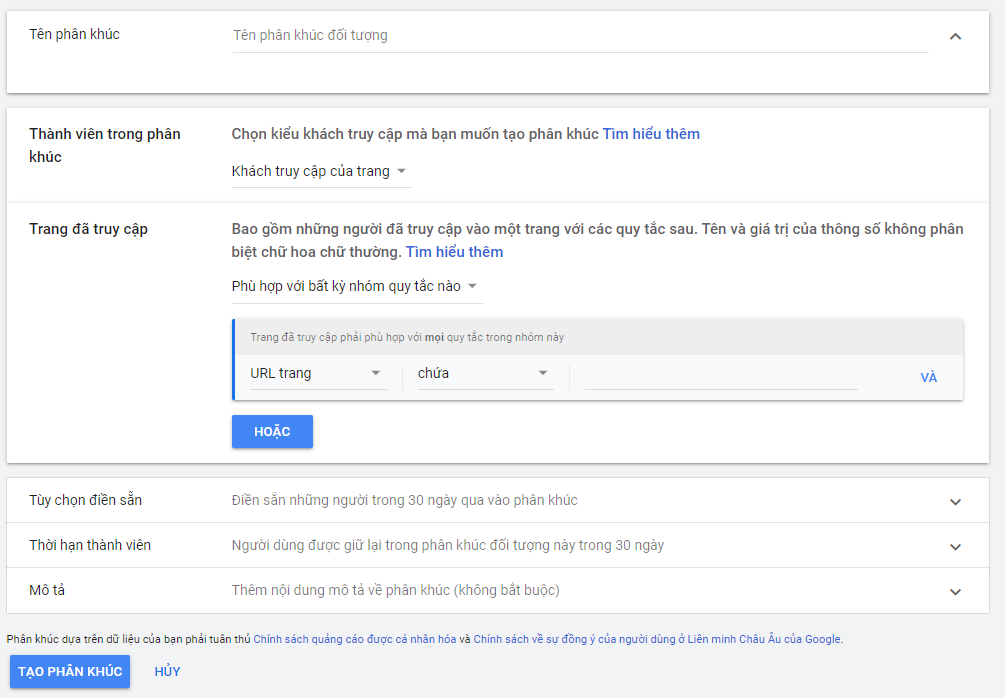
Step 3: On the next screen, click the “+” icon in the top-left corner. Then click the Website Visitors option in the menu below.
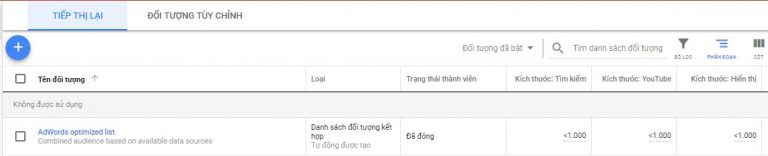
Step 4: Create your audience segment.
While creating your audience segment, keep the following in mind:
– Audience name: Your choice
– Membership: You can select all Website Visitors or customize based on your needs
– Pages visited: There are 2 options, “Match all of the rule groups” or “Match any of the rule groups”.
For the traffic source, you can choose from URL or Referrer URL.
- Under the Contains field, you can set additional conditions such as contains, equals, starts with, and so on.
- Once you’ve filled in all the information above, scroll down and click Create Audience => press OK.
Note:
- The “Contains” condition helps you filter out visitors who’ve visited a specific page you designate.
- If your website has too little traffic, or if the Remarketing code was only recently added to the site, you may not meet the requirements for creating an audience list to run Google Adwords Remarketing ads.
How to Run a Google Remarketing Ad
In this Google Remarketing guide, The7 will walk you through the steps to set up and run your ad campaign. Specifically:
Step 1: Log in to your advertising account.
Step 2: Click the Campaigns tab in the menu on the left. Then, on the Campaigns screen on the right, click the “+” icon to start a new campaign.
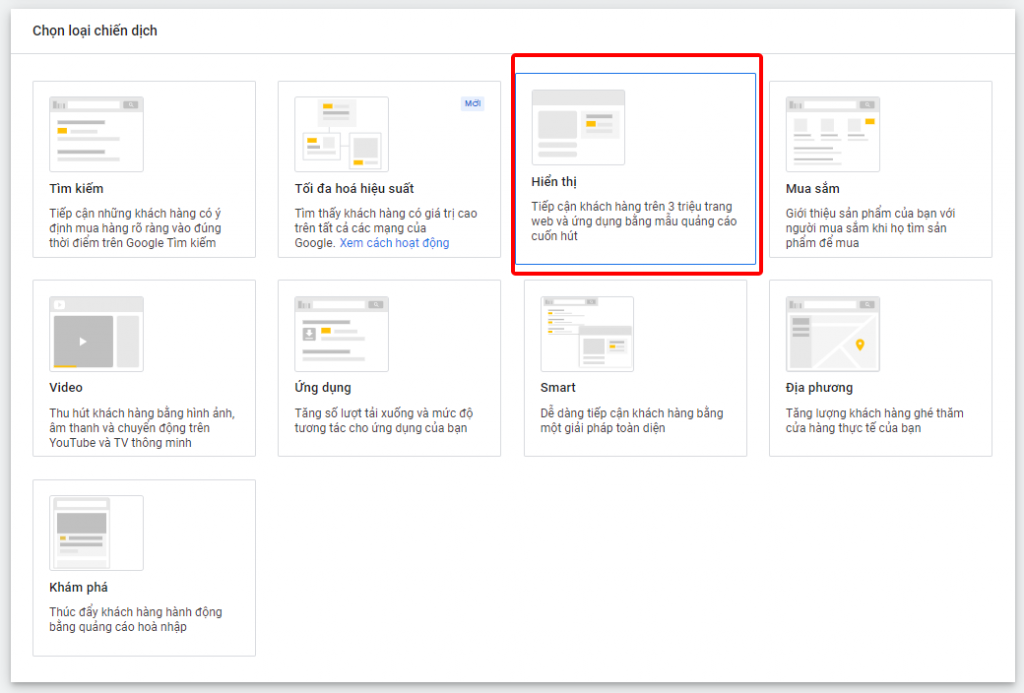
Step 3: Create New Campaign > select Create a campaign without a goal’s guidance > select Display
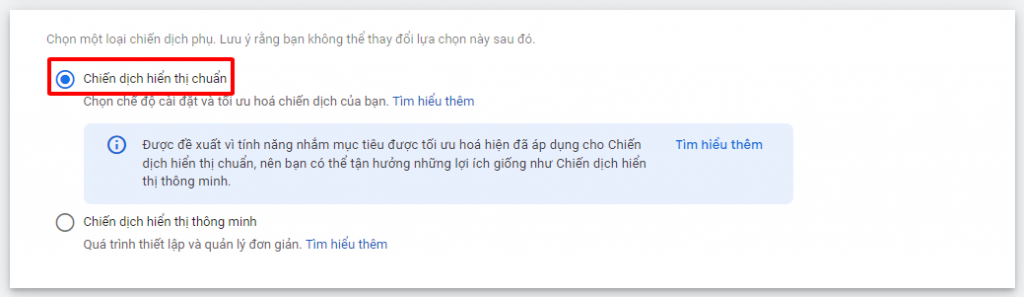
Step 4: On the Select a Campaign Type screen, click the Standard Display Campaign option.
Step 5: Next, fill in how you’ll achieve your chosen goal. You can attach your business’s website link here. Then click Continue to move to the next screen.
Step 6: Build your ad campaign.
To create a new ad campaign, you need to provide the following information:
– Campaign name: Your choice
– Locations: Vietnam or a specific location of your choosing
– Language: Your choice
– Bidding: based on the campaign goal shown. You can also set your own bid by clicking Or select a bid strategy directly below and configuring a few more options.

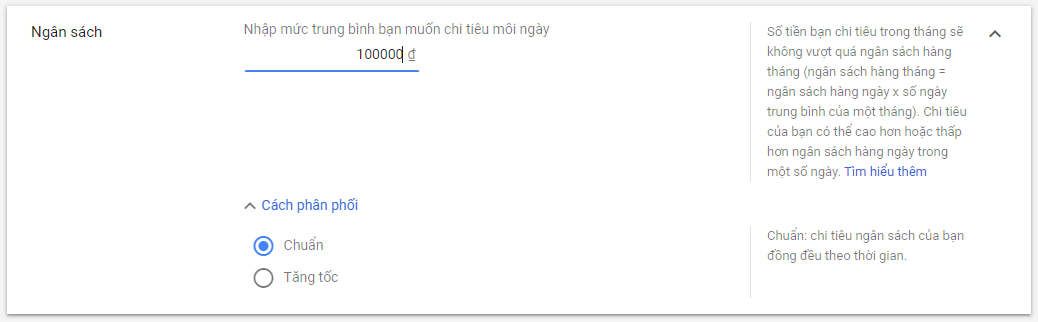
– Budget: Here, you can set your average daily spending budget. Select Accelerated if you want to spend faster.
– Ad rotation: Here you have 4 options: Optimize, Do not optimize, Optimize for conversions, or Rotate evenly.
– Ad schedule: When setting your ad schedule, you can run ads every day or only during a specific time window.
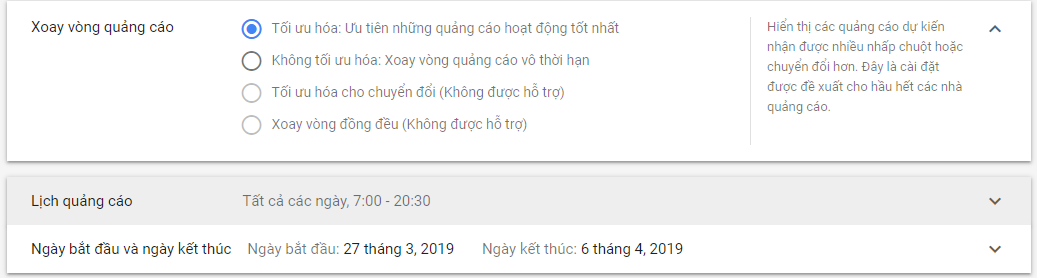
– Start and end date: Your choice, based on your campaign.
– Devices: Choose the type of device you want your ad to appear on. This can be All devices or a specific Device group.
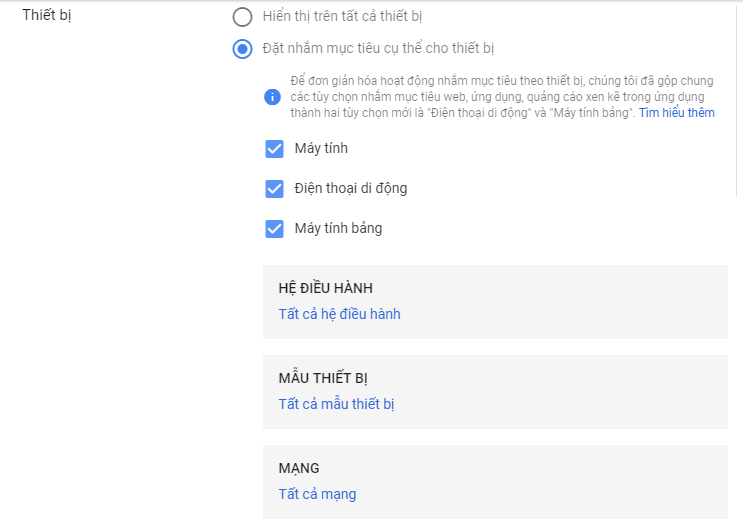
– Frequency capping: This feature lets you limit how many times an ad is shown to the same user. You can select Optimized automatically by Google Ads, or set your own Limit.
– Campaign URL options: Can be skipped.
– Dynamic ads, Conversions: Can be skipped.
– Content exclusions: Here, you can select inappropriate content types so Google Ads won’t show your ad alongside them.
Step 7: Create your ad group.
– Ad group name: Your choice
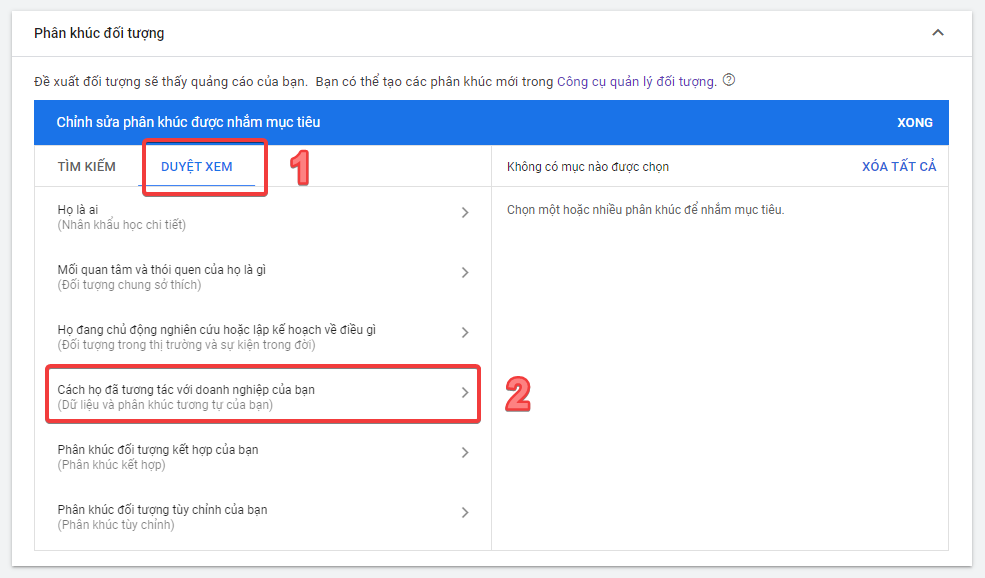
– Audiences: Switch to the Browse tab, then click How they have interacted with your business.
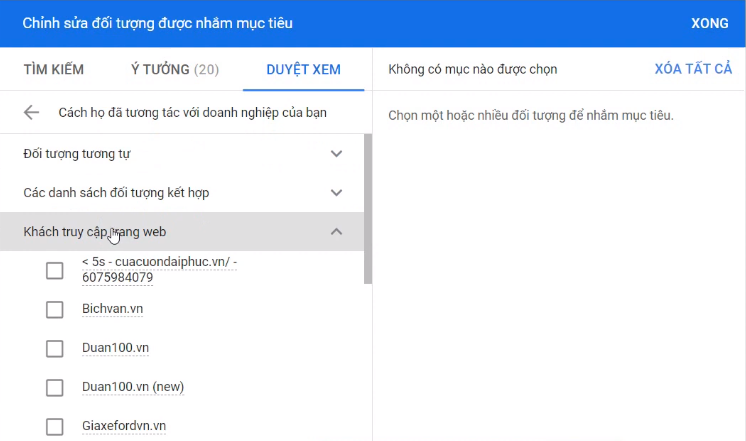
Next, click Website visitors then check the List option to select the audience list you created earlier.
– Demographics: Can be skipped for a small audience list.
– Optimized targeting: Lets you expand your target audience if you feel it’s necessary.
– Ad group bid: Set the appropriate bid amount.
– Dynamic ads: You can leave this section at its default setting.
Step 8: Create your ad.
- To create an ad, click the plus icon next to “Ads”.
- Next, click Upload Display Ad to select the banner set you’ve already prepared. Note that it needs to meet the standard size requirements.
- Enter your landing page URL, then click Choose File to upload.
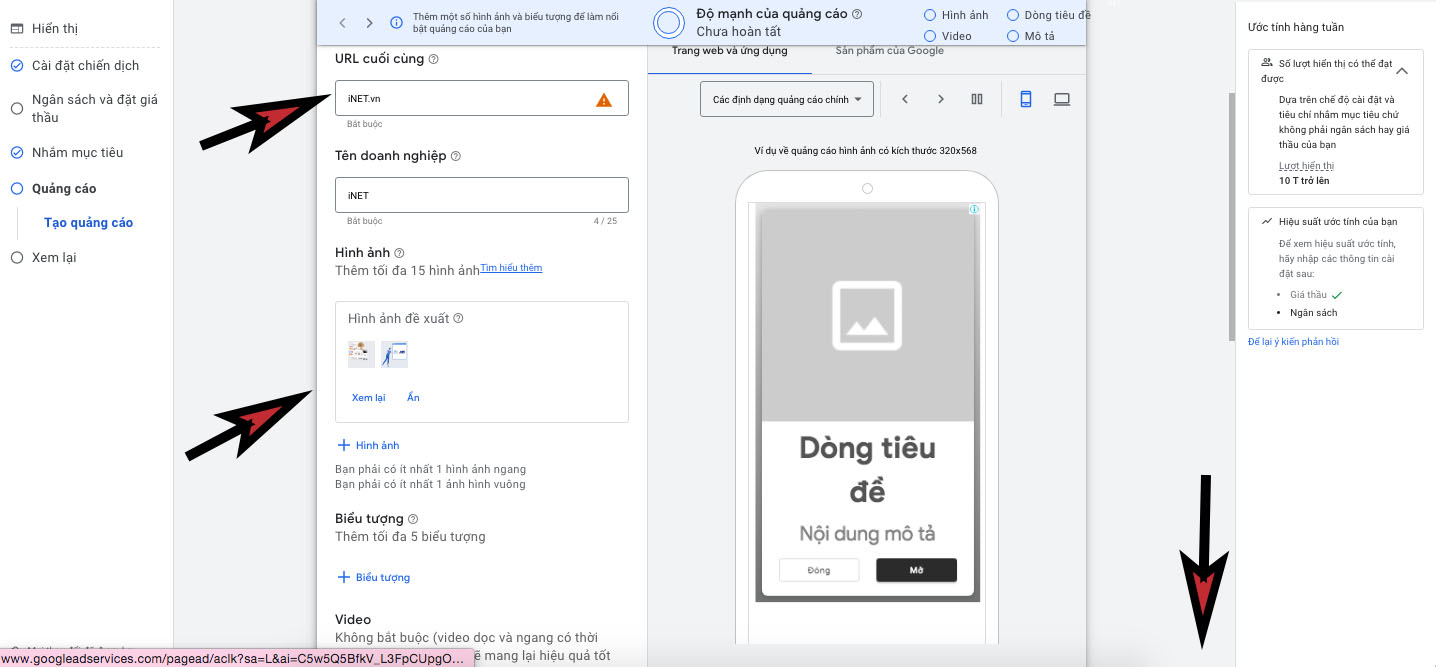
- You can click the Supported sizes and formats link to check whether your file type is compatible.
- Finally, click the Create Campaign button below to complete every step of running your Google Remarketing ad. At this point, if you’ve already set up a payment method for your account, the ad will run based on the settings you configured above.
3 Tips for Optimizing Your GDN Remarketing Campaign
Below are three bonus tips from this Google Remarketing guide. Use them to run your campaign in the most optimized way possible. Your ability to reach potential customers and drive them to take action will also increase.
| ✅Technique | Explanation |
✅Use AMP HTML Instead of Banner Ads |
– AMP HTML is a dynamic image format, a feature that supports the ad display process. This method helps build, distribute, and measure ads faster, lighter, and more securely.
– Ads are only distributed after being confirmed free of malicious software. – On top of that, these marketing messages get distributed anywhere on the web. Their reach isn’t confined to just AMP pages. |
✅Choose the Right Timing |
– The right timing for ads varies depending on the product being offered and the customer you need to reach.
– Say, for example, office workers’ lunch hour starts at 12pm. A food delivery business’s Google Remarketing should push ads at this time. You could also run ads a bit earlier so they choose your service for that day’s lunch right away. |
✅Always Include a CTA |
– Ad posts can’t be without a CTA button to prompt action. Every ad needs a clear direction for the visitor.
– Ask yourself what you want them to do after reading, and design the right Call-to-Action accordingly. |
For Google Remarketing to give you a real edge, you need to apply these winning techniques
How to Effectively Optimize Your Google Ads Remarketing Campaign
Test Your Ads
To optimize the effectiveness of your remarketing ads, you need to clearly define your target audience. Test different content, purchase triggers, and images within your ads. Based on the results, you can adjust and change the content to achieve the best performance.
Test Combined Customizations
Keep testing and fine-tuning your target audience combinations. Try different audience lists to optimize your campaign. Study campaigns targeting visitors who accessed your website at different times to achieve the best effectiveness.
Check Your Bids
You need to continuously check your bids and total spend to assess the situation. When running remarketing ads on Google Ads, you should pay close attention to pricing, since it has a direct impact on your ad budget.

Check Frequency
You need to regularly check how often your ads are shown to each audience segment. If ads appear too frequently, users may feel harassed, which negatively affects their impression of your website.
Check Your Landing Page
Check the content of your website when a customer visits. What information did they read? How is the content on this page communicated? Your landing page needs to contain detailed information about the product or service your business offers, along with a call to action such as calling, filling out a form, or making a purchase.
Common Mistakes to Avoid When Running Google Remarketing
When you’re new to Google Remarketing digital marketing, it’s hard to avoid some confusion. Below are things you should avoid to minimize mistakes. This way, you save time and effort on revisions, keeping your campaign on the right track from the very start.
Not Segmenting Your Customer Audience
Customer needs vary depending on their age, education level, and distinct demographics. You need to base your approach on real market research, combined with your product type and their behavior on your website. Otherwise, it’s very easy to end up optimizing for the wrong audience.
For example, the Thế Giới Di Động website carries many different models and product segments. Each customer group only cares about one or two items among them. You need to precisely match supply and demand to work toward the ultimate goal of increasing profit.
Using the Same Ad Message for Every Audience
Using the same ad message for every audience is another mistake to avoid. When running Google Remarketing, each segment needs to be tailored in its own distinct direction.
For example, you can’t market your cosmetics as anti-aging and youth-preserving to high school students. Instead, this audience needs a product that gives them smooth, radiant, rosy skin. So even with the same functional product, figuring out the right way to market it takes considerable time and thought.

Above is everything you need to know when your goal is to spread your brand and drive customers to take action. If you’d like more specific guidance on full-service marketing, contact The7 right away via hotline: 084.397.77.77 or website: https://the7digital.com/. We’ll help you build the perfect Google Remarketing campaign.
>>>> See more related articles:
- What Is Google Keyword Advertising? Top Tips for Choosing the Perfect Keywords
- Guide to Running Google Maps Ads for Beginners
- What Are Google Smart Campaigns? Secrets to Driving High Traffic

Nguyễn Đình
Bảo




As CEO of The7, I am committed to sharing practical, useful knowledge with every reader. Every article on The7 is based on my 7 years of hands-on experience in marketing — Facebook advertising, LinkedIn advertising, Google advertising, and marketing strategy. I hope you take away plenty of insight from these posts and apply it successfully in practice.
Related Articles

6 Simple Yet Effective Steps to Run Google Ads in 2024
Google Ads (Google AdWords) is Google’s online advertising service that helps businesses reach the right target customers, boost brand awareness, attract customers, and drive sales as customers search for information...
How to Run Effective Gmail Ads for Your Business
One of the advertising formats attracting the attention of many business owners is Gmail advertising. So how do you run effective Gmail ads? Let The7 walk you through this fresh...
What Are Google Smart Campaigns? Tips to Drive High Traffic
Google Smart Campaigns are one of the ways advertisers can access advertising information and digital marketing techniques faster. If you have just started a small business, keeping track of your...
What Card Should You Use to Pay for Google Ads in 2024?
Which card to use to pay for Google Ads is a common question among people who are new to Google Ads campaigns. So which card is best for paying for...

How to Link Google Analytics With Google Ads in 2024
To run Google Ads effectively, you need to do more than just launch campaigns. You also have to analyze and evaluate the performance of each campaign through its metrics. So...
How to Add Sitelink Extensions in Google Ads (2024 Guide)
Sitelink extensions let your ads give customers more information. They also make each ad stand out more than your competitors’ ads. This gives your Google Ads extensions a Quality Score...


