


Building an Organic Business Presence on LinkedIn With a LinkedIn Page
Why Have a LinkedIn Page?
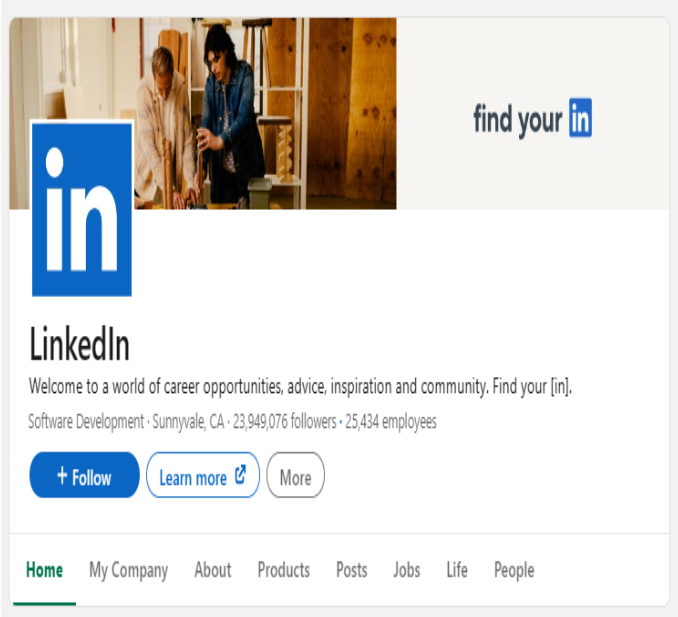
For a brand, building a strong relationship with the professional community is extremely important. The best place to start is by creating – and maintaining – an actively managed LinkedIn Page. LinkedIn is a brand-safe, trustworthy environment where you can connect with a community of professionals authentically and scale that connection with ease.
When you set up a LinkedIn Page for your brand, you gain credibility. It shows that you’re genuinely serious about your brand’s presence within your professional field. You can use your brand’s LinkedIn Page to promote products and services, share valuable content, and interact directly with target customers.
Thanks to a LinkedIn Page, your brand can also establish itself as a leading expert in its field. By sharing valuable insights, market trends and specialized knowledge, you can turn your brand into a trusted source of information that people always turn to.
A business’s LinkedIn Page is the official representation of the brand on LinkedIn. It connects members with your brand and connects members with one another. This Page also helps you better understand the goals of your followers. Are they following you to stay updated on industry trends or company news? Or are they current employees, or people who aspire to work for you?
The more followers who engage with your content through likes, comments and shares, the more chances that content has to be shown to their own network. As a result, your brand’s reach expands. Even if your initial reach is limited, posting consistently and actively engaging with other people’s posts will help you grow your reach quickly.
Creating this organic channel is very important, but that’s only the first step. Keeping it consistently active is just as important, if not more so! Once you’ve planted the seeds in your garden, you need to keep watering them regularly for the plants to grow.
What Can You Do on Your LinkedIn Page?
Your LinkedIn Page is the starting point for joining real-time conversations with the professional community. And remember, building an organic presence on this dynamic platform requires you to stay constantly active! Here are a few things you can do with your LinkedIn Page:
Join the conversations that matter to your brand
- Share content in a variety of formats (posts, regular newsletters, polls, company videos, etc.) to connect and engage with your community.
- React to and comment on other people’s posts, contributing to discussions to build your presence in the community as well as your credibility on related topics.
Know and grow your professional community
- Build a community of followers that includes potential customers, current customers, investors, employees and prospective candidates.
- Discover the content that’s trending with the public, track performance using visual analytics tools – including the ability to view detailed data on each Page follower – and tap into your community of product users to generate high-quality leads.
- Grow your community by using your LinkedIn Page identity to follow other Pages.
Engage your people
- Re-share standout employee posts that @mention your business, or high-quality content they publish on LinkedIn. At the same time, notify employees about important posts on your LinkedIn Page to encourage them to engage and share, thereby expanding your Organic Reach.
- In addition, businesses can mark memorable team milestones or honor outstanding individuals with personalized posts on the LinkedIn Page. Building a trusted internal community dedicated to employees will also help strengthen engagement and drive interaction within the business.
Express your executive thought leadership
- One of a brand’s most valuable assets is its people and leadership team. LinkedIn is the platform where brands and business leaders share perspectives, exchange expertise, and spark valuable discussions.
- Take advantage of LinkedIn to showcase your leadership team’s expertise, real-world experience and perspective through quality posts capable of sparking exchanges and discussions within the community.
Goals of a LinkedIn Page
Before creating a LinkedIn Page, be sure to clearly define your goals so you can make the right decisions about: what content to post, how often to post, visual identity, content tone, and how to measure success. A LinkedIn Page can support a range of different goals:
- Building brand awareness and credibility
- Building community and partnerships
- Attracting potential customers and driving business growth
- Strengthening public advocacy
- Engaging employees
- Attracting new talent
Let your goals be the compass for building and rolling out a social media strategy suited to your brand. After defining your goals, ask yourself: Is your organization ready to start a two-way conversation?
To help your LinkedIn Page succeed from the start:
- Understand the demographics and interests of the professional community your business wants to reach.
- Choose the right content, capable of resonating with the community.
- Encourage employees to actively participate, or build an Employee Advocacy Program to spread your business’s content and expand your Organic Reach.
- Align internal resources. Keeping a LinkedIn Page actively running takes time. Identify a Page admin, train them, and communicate with them regularly.
Establishing Your LinkedIn Page
Create Your LinkedIn Page
Setting up a LinkedIn Page takes only a few minutes:
- Log in to your LinkedIn account.
- Select For Business or Work at the top of the website.
- Among the options that appear, choose Create a Company Page.
- Choose the Page type that fits your business.
- Make sure to fill in all the fields and add suitable images to the Page. The Home tab will display a summary of the information you used to fill in the Page.
About Tab
After creating your Page, you’ll need to add some detailed information about your business. The About tab on your LinkedIn Page helps introduce your brand and contributes to building credibility. This is the first stop for anyone who wants to learn more about your brand, so it’s worth investing time in this content.
Here are a few elements you should include:
- Your company’s mission, vision and core values
- The customer segment you serve and the public you want to reach
- Your products or services
LinkedIn members will find your brand or search for your services using keywords, so describe your brand using the words you want associated with your company’s image.
Fully completing your Page information helps increase weekly views by +30%.
Posts Tab
The Posts tab is where everyone finds all your organic posts. Posts can be filtered by content type or sorted by post date/level of engagement.
Keep the Posts tab updated with fresh content for visitors. You can also schedule a post to be published at your desired date and time, up to three months in advance. Keep in mind that if you set a post to target a specific audience, only people in that group will be able to see the content.
Companies that post 4 times a week see a 2x increase in engagement on their content.
Admin Roles
Managing a LinkedIn Page is a team effort. There are four different admin roles you can assign to organize roles within your team. You don’t have to use all four – apply whichever ones fit your internal workflow.
- Super admin As the name suggests, the Super admin has the highest level of access. Some permissions are exclusive to this role:
- Manage other admins
- Edit the Page
- Approve API integrations
- Deactivate the Page
- Create Showcase Pages
- Content admin The Content admin role is largely limited to Page content-related areas, such as creating, managing and sponsoring/boosting organic posts. Although only a Super admin can create a Showcase Page, a Content admin can create and edit Product Pages as well as Live Events.
- Curator The Curator plays a specialized role in curating content for the Page. A Curator can edit the suggested content in the My Company tab.
- Analyst The Analyst’s sole purpose is to track the Page’s performance. This role is granted permission to view and export analytics data on Visitors, Followers, Updates and Employee Advocacy.
Showcase Pages
When you want to highlight a specific brand, a business unit or a separate initiative, or want to speak to a particular audience, take advantage of Showcase Pages. A Showcase Page is an extension of a LinkedIn Page and operates in a similar way.
For example, at LinkedIn, we have several business lines with different customer audiences, so we have a Showcase Page called LinkedIn Ads. These pages appear in the right-hand navigation panel as Affiliated Pages rather than in the main Page navigation bar.
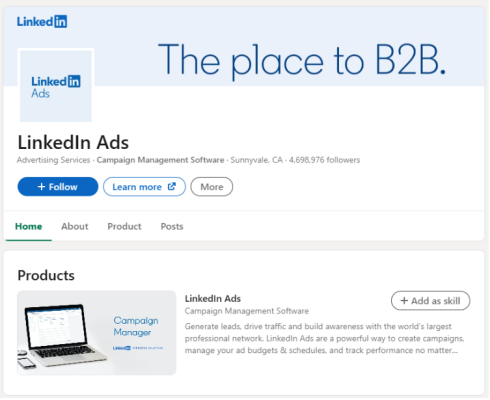
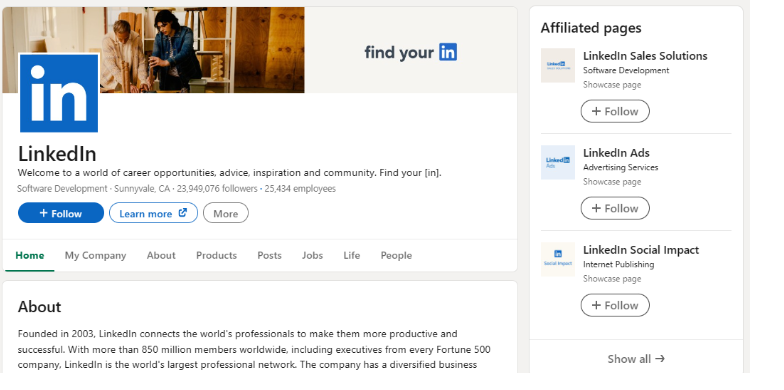
Before creating a Showcase Page, be sure to clearly define your goal and make sure this page aligns with your business’s overall strategy. Only create a Showcase Page when there’s a specific audience or a product/service line that needs focused development. Avoid creating too many Showcase Pages, as this can scatter your followers and make content management difficult. For example, a business unit or a distinct product line might need a Showcase Page, but a regional office or branch typically doesn’t.
Creating a Showcase Page is just as easy as creating a LinkedIn Page. Just follow the same steps, and when choosing the Page type, simply select Showcase Page.
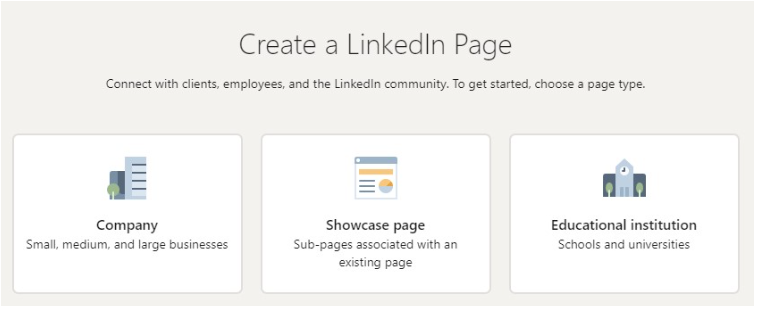
Keep in mind that a Showcase Page will always be linked to a parent LinkedIn Page, so you can also create a Showcase Page from the Create button right on your own Page.
Keeping Your LinkedIn Page Active
Share Valuable Content Regularly
Posting content regularly helps keep your brand top of mind with the public. This might seem daunting at first, but it can be far easier than you think. You can maintain an active presence and deliver value to your community with the following tips:
Take stock of your content inventory Not all content needs to be brand-new or newsworthy. Evergreen content – content that retains its value over time – can carry just as much weight, especially when building credibility on certain topics.
Consider the content resources you already have on hand:
- Existing content from other platforms Content that already exists on other platforms (for example, a blog post) can be repurposed for LinkedIn.
- Top-performing thought leadership content Your best-performing thought leadership content can be re-shared as Articles or as posts with a dedicated call-to-action (CTA) for your followers.
- Playbooks, case studies, or research reports Playbooks, case studies or research reports can be repurposed by breaking them down into smaller pieces or converting them into a different format. For example, you could pull out a single statistic from a report and create a post to share that particular insight.
A small shift in angle can breathe new life into old content.
Post and engage regularly
Every brand is unique, and you’ll need to experiment a little to find the right posting frequency, as well as the prime time window for reaching your audience.
- Aim to post on your LinkedIn Page at least 4 times a week to see a noticeable increase in engagement growth. You can easily do this by scheduling your posts in advance.
- Build a habit of checking your Page’s activity and feed every day. It only takes a few minutes of scrolling to catch up on the latest news and see what your community is engaging with.
- Engage with your community by responding to comments.
Draw your community in with content that matters to them:
- Add images and video
- Post polls to drive quick engagement
- Upload documents such as PDF or PPT files
- Ask thought-provoking, open-ended questions to encourage comments and engagement
- Repurpose existing content to give it fresh life
- Re-share the best posts that @mention your brand
Tools Overview
By now, you’ve learned how to create a Page, define your goals and take stock of your content. Now you’re ready to use the full suite of tools LinkedIn offers for organic engagement, such as the My Company tab, Product Pages and Articles for Pages.
My Company Tab
When it comes to building community on LinkedIn, employees are an incredibly powerful asset. Employees are 60% more likely to engage with a colleague’s post and 14 times more likely to share their organization’s Page content.
The My Company tab is a private, trusted space dedicated to employees, where they can stay connected and up to date on the latest developments within the organization. It gives employees a space to socialize and build excitement within the company. Employees can use the My Company tab to find and easily share company content with their own personal professional network, thereby expanding brand reach in a credible and authentic way.
Use the My Company tab to suggest content such as:
- New product launches
- News articles about the company
- Customer success stories
- Important announcements
- Corporate social responsibility (CSR) initiatives and updates
- Open job positions
Encourage employees and followers to like, comment or share on your behalf. Keep them informed using the Employee Notifications feature (the Notify employees button on your post within the admin view), and ask senior leadership to @mention your Page, as this brings an extremely important level of presence to the Page.
Product Pages
Today’s consumers can view reviews, compare, and share about products/services with great ease. Simply repeating how good your product or service is through marketing isn’t enough anymore.
Using Product Pages is a great way to promote your products and gather testimonials/reviews, helping buyers make informed purchase decisions. You can create up to 35 Product Pages for each LinkedIn Page or separate Showcase Page.
Use them to explain your product’s benefits and demonstrate the value it can deliver, while also creating an opportunity for customers to leave reviews. Visitors use the Products tab to access all the Product Pages associated with your brand.
To create your Product Page:
- Select the Products tab.
- Select Add product.
- Enter your product name and select Save. You’ll be redirected to the new Product Page.
- Fill in all required information.
- Select Submit for review. You’ll get a notification in the Activity tab once the page is approved.
- Once approved, you can publish your Product Page.
You can now invite regular followers to write a review/testimonial about your product.
Tips for building Product Pages that drive action:
- Add a call-to-action (CTA) button to encourage a specific action.
- Share a product overview in the About tab.
- Bring the product to life with images and video.
- Share which job roles/positions are most likely to use your product.
- Feature credible comments and reviews about the product from LinkedIn members.
- Build trust by featuring your actual customers.
Articles and Newsletters for Pages
Articles for Pages: The Articles for Pages feature lets you create and host long-form, blog-post-style content directly on your LinkedIn Page. Articles support rich media such as photos, videos and hyperlinks to help you better engage with the professional community.
To create an Article under your Page’s name:
- Go to your organization Page’s admin view.
- Select Write article.
- Add a title and cover image.
- Edit the font size, style and text formatting.
- Embed links, videos, images, slide decks, quotes or code snippets.
- Optional: Select Settings under the Publishing menu to add an SEO title and meta description, making your article easier to find.
- Publish it to your Page’s feed.
- Review analytics data on reach, engagement, and reader firmographics.
Best practices for Articles The best-performing Articles on LinkedIn tend to share a few things in common. Here are some tips worth considering:
- Invest time in crafting a truly compelling title and cover image.
- Create visual interest with rich media. Use images, videos and quotes.
- Keep content concise (roughly 500 to 1,000 words).
- Use bullet lists or short paragraphs to make content easy to digest.
- Always aim to deliver value in your content; how can you help your reader the most?
- End your post with a call-to-action (CTA), such as an open-ended question that invites comments, or an invitation like “Learn more” or “Sign up today,” depending on your goal.
- Share your Article across your other marketing channels to expand your audience.
Newsletters for Pages: A Newsletter is a series of Articles published regularly on a LinkedIn Page. Each article still carries the full features and stats of a regular Article, while also helping the business build a community of subscribers who follow content on a specific topic.
A LinkedIn Newsletter helps a business build an expert image within its field, thereby establishing credibility and trust with followers. It’s also an effective channel for maintaining a connection with target customers, driving traffic to your website or key content, and creating further opportunities to attract potential customers. In addition, Newsletters offer a number of useful features, such as:
- A one-time notification to all Page followers when you start creating a Newsletter on the Page (they can opt out).
- Notifying subscribers via in-app and email notifications every time you publish a new Article in the Newsletter.
- Displaying the total number of subscribers.
You can create up to 5 newsletters per LinkedIn Page. If you create a newsletter for a Showcase Page, it will not be linked to the Parent Page.
Live Events
LinkedIn Live Events help businesses connect with the professional community in real time through livestream broadcasts. Businesses can interact directly with attendees while promoting and sustaining interest in the content before, during and after the event.
LinkedIn Live Events allow organizations to schedule virtual events in advance to gather attendees and broadcast to the public via video or audio-only format. Video events require broadcasting through a third-party broadcasting tool, while audio events let you interact live directly within the LinkedIn interface.
Creating a Live Event on your Page is extremely simple. First, determine which event format best fits your needs. You’ll need to decide on the event’s content and goal: What do you want to share with the public? What discussion do you want to spark? Do you want the livestream to be open to everyone, or require registration beforehand?
If you’re not sure what content to cover, you can look for suggestions from the Page Activity or Page Analytics sections – covered later in this course.
To create a Live Event:
- Go to your organization Page’s admin view.
- Under the Start a post box, select Event.
- Select Event format and choose your preferred option.
- Create a compelling title, set the date and time, and add other details such as the event description and speakers to attract attendees.
- Video events only: Once created, if you’re using a third-party broadcasting tool, connect it to your event.
Best practices for Live Events
- Before the event:
- If using a video format, decide which tool you’ll use to livestream before setting up the event. Choose one of our preferred/certified partners or use a custom streaming tool (RTMP).
- Set up your event at least 2 to 4 weeks in advance.
- Rehearse beforehand so you’re confident in the content and the full program flow.
- Send at least 10 invitations to your network right away.
- Promote your event with Event Ads to kickstart discovery and expand the event’s reach.
- During the event:
- Encourage attendee engagement by having the host and moderator ask the audience direct questions. Respond to audience interactions right during the broadcast.
- Broadcast for at least 15 minutes to give your audience time to build up, and avoid a drop-off in viewers by wrapping up after 1 to 2 hours.
- After the event:
- Edit and share highlight moments from the Live Event as a Page post or a paid video ad.
- Keep the conversation going with attendees by sharing materials, sending follow-up emails and building a paid retargeting ad campaign in Campaign Manager.
The Measure of Success
Key Metrics
When looking for key metrics for your Page, there are two main options: Page activity and Page analytics.
- Page activity gives you a view of what people are saying about your brand.
- Page analytics helps you:
- Understand whether you’re building the right professional community relative to your stated goals.
- Compare post performance so you can better refine your production, frequency and content pillars.
Page Activity
The Activity tab is where you can see how your community is reacting to and engaging with your content, all in one place. Here’s how to gather insight from your Page activity:
The Activity tab lets you engage with member actions on the Page. You can filter and view activity such as:
- Comments on your posts
- @mentions of the company
- Reposts
- Reactions
The Post highlights section within the Activity tab is where you’ll see the posts that received the most comments, shares and reactions. Use these insights to better understand which posts perform best and which type of content resonates most with your readers, helping you improve future posts.
Page Analytics
Learn who’s following you and what your professional community looks like using the Analytics tab.
The Analytics tab gives you an overview of your Page’s performance and lets you examine who’s visiting your LinkedIn Page and engaging with your content through data such as:
- Unique visitor or page view trends over time
- Detailed demographic breakdown of visitors and followers
- Engagement metrics: likes, comments and shares per post and over time
- Competitor analysis
- Employee advocacy metrics
Summary About LinkedIn Page (Summary)
By now, you know that creating and maintaining an actively engaged LinkedIn Page is one of the most effective ways to build a professional community, raise brand awareness, and attract quality leads.
Let’s recap what we’ve covered in this lesson:
LinkedIn offers a full toolkit tied to your Page, acting as an organic ecosystem you can use to reach your goals. When you post, you only reach your followers and their network if they engage with your content, so staying active and sharing valuable content is the key to organic success.
Start building a strong organic strategy today:
- Fully complete your Page information to increase weekly views by +30%.
- Align internal resources with your strategy and communicate regularly.
- Use Showcase Pages to highlight individual initiatives or reach specific audiences.
- Keep your Page active by posting 4 times a week, since this increases engagement and helps you build a trusted voice.
- Draw in your community with content that matters to them.
- Make the most of the My Company tab to create a private, trusted space dedicated to employees, where they can stay connected and be encouraged to like, comment or share on your behalf.
- Promote products and gather reviews on Product Pages to demonstrate the value your product can deliver.
- Create Articles or a Newsletter for your Page to spotlight thought leadership content, playbooks or reports.
We’ve also seen that with Page Activity and Page Analytics, you can get insight into who’s engaging with your Page and your posts, while measuring public sentiment toward your company and your messaging.
You’re now ready to expand your brand awareness and reach even further by using paid media (paid media) to amplify your organic presence. A professional community is the core of a strategy that blends organic and paid.
See also: What Is LinkedIn Marketing for B2B?

Nguyễn Đình
Bảo




As CEO of The7, I am committed to sharing practical, useful knowledge with every reader. Every article on The7 is based on my 7 years of hands-on experience in marketing — Facebook advertising, LinkedIn advertising, Google advertising, and marketing strategy. I hope you take away plenty of insight from these posts and apply it successfully in practice.
Related Articles
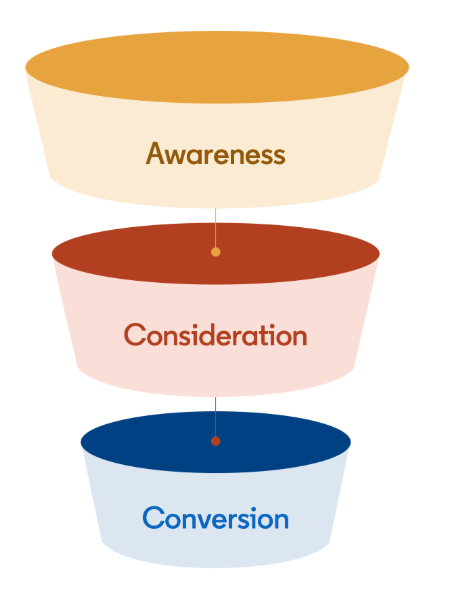
Building a Full-Funnel Content Marketing Strategy on LinkedIn
Table of Contents Toggle Why Build Content Marketing for the Full Marketing Funnel? (Why Full-Funnel Content Marketing?)Creating Your Strategy (Creating Your Strategy)Implementing Your Content Strategy (Rolling out your content strategy)Summary...
Designing Creative Content for LinkedIn
Table of Contents Toggle Why Is Good Creative Content So Important? (Why is Good Creative Important?)Key Components of Creative Design (the core elements of creative design)Summary (summary) Why Is Good...
6 Best LinkedIn Marketing Strategies for B2B in 2026
Table of Contents Toggle LinkedIn 2026: Where B2B Decisions Get MadeStrategy #1 – Why Is LinkedIn the Best B2B Marketing Channel Today?1. Decision-makers are concentrated here2. Users are in work...

26 Predictions for Social Media Marketing Trends in 2025
It’s that familiar time of year again, when experts and analysts start revealing their predictions for the social media marketing trends worth watching, along with the shifts that promise to...
LinkedIn Advertising Guide for Beginners
LinkedIn offers businesses a huge opportunity to reach potential customers, build their brand, and even find talent to grow with. In this article, let’s join The7 in exploring how to...

7+ Ways to Optimize Your LinkedIn Account to Boost Career Opportunities
LinkedIn is a great platform for connecting with recruiters and finding jobs. If you know how to optimize your LinkedIn account, it becomes much easier to present yourself and make...


